

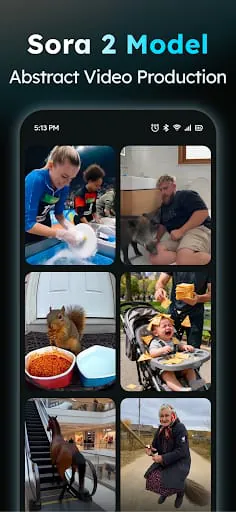

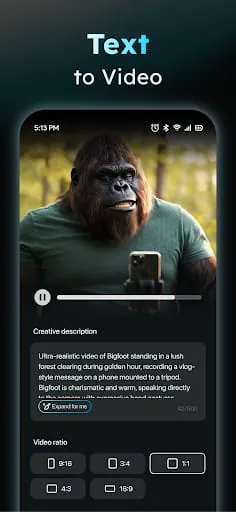
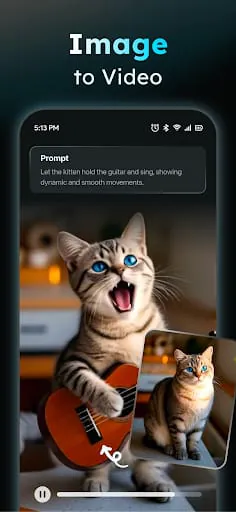
Information Analysis
Common Information Analysis
1. User Reviews and Experience
Overall user satisfaction appears mixed. While some users praise the app's features and speed, a significant portion expresses frustration with technical issues, pricing, and perceived misleading advertising. Common complaints include the app being "broken," videos getting stuck on "Generating," and credits being consumed even when generation fails. Users also find the subscription model and credit costs to be high, with some feeling it's a "predatory" business practice. Despite these issues, many appreciate the AI's capabilities when it functions correctly.
-
Overall User Satisfaction:
Mixed, with notable dissatisfaction regarding functionality and value.
-
Common User Feedback:
Praises for AI capabilities when working, but significant complaints about bugs, cost, and reliability.
-
User Rating Distribution:
Available data suggests a rating around 4.33 to 4.5 stars on average, but individual reviews highlight critical issues.
-
Most Appreciated Features:
Text-to-video and image-to-video generation, AI prompt assistant, and fast rendering speeds.
-
Common Complaints:
App "broken," generation errors, high credit costs, subscription issues (difficulty canceling), perceived false advertising, and poor value for money.
2. Technical Performance
-
App Size and Requirements:
The APK size varies, around 40-70 MB. Requires Android 7.0+ (Nougat) or later.
-
Battery Consumption:
Not explicitly detailed, but intensive AI processing can be battery-draining.
-
Loading Speed:
Praised for fast rendering (up to 50% faster than mainstream tools), but users report long "Generating" times and issues viewing creations.
-
Stability:
Mixed reports, with some users experiencing frequent bugs, crashes, and the app becoming "broken."
-
Offline Capabilities:
Some local AI processing is supported on compatible devices, enhancing privacy and potentially performance.
3. Updates and Maintenance
-
Update Frequency:
The app is updated regularly, with new versions appearing frequently, often addressing "Model Upgraded & Bugs Fixed." Latest versions were noted in early January 2026.
-
Latest Version Changes:
Typically involve model upgrades, bug fixes, and feature enhancements like prompt expansion and aspect ratio adaptation.
-
Bug Fix Response Time:
User reviews suggest a lag in addressing critical bugs, with issues persisting for some users.
-
Developer Support Quality:
Developers respond to reviews, often apologizing for negative experiences and offering support via email, but user experiences suggest that support may not always resolve underlying issues.
4. Security and Privacy
-
Data Collection Practices:
Collects account information (name, email, password), payment details, uploaded content, usage data, device information, and uses cookies. It may use face recognition technology for feature provision. Data may be used to track users across apps/websites.
-
Privacy Policy Clarity:
A privacy policy is available, outlining data collection and usage. It states data is not sold but shared with service providers and for legal requirements.
-
Security Measures:
Mentions local AI processing for enhanced privacy on select devices. Data is encrypted during transfer. Human moderation is employed.
-
Permission Requirements:
Requires standard permissions for an app of its functionality, likely including storage, network access, and potentially camera/microphone access depending on features.
-
Data Storage Methods:
Information is retained while the account is active or as required by law, with personal data removed within 90 days after deletion.
5. Monetization Strategy
-
Pricing Model:
Primarily subscription-based, with options for monthly and annual plans. Also utilizes a credit system for video generation.
-
In-app Purchases:
Credits for video generation, subscription upgrades.
-
Subscription Options:
Monthly and annual subscriptions are available, with varying credit allowances. Some users find the annual cost ($50/year) appealing initially but are deterred by app functionality.
-
Free vs Paid Features:
The app is free to download and offers some free features, but advanced generation and higher limits likely require subscriptions and credits. Some users report watermarks on free exports.
-
Value for Money:
Widely perceived as poor value due to recurring bugs, high credit costs (e.g., 600 credits for 15 seconds with a subscription), and issues with functionality, leading to user frustration.
6. Market Position
-
Competitor Comparison:
Positioned against other AI video generators like Veo 3, Runway, and Hailuo. It aims to offer a balance of creative freedom, cinematic output, and mobile efficiency.
-
Market Share:
Specific data unavailable, but it appears to be a recognized player in the mobile AI video generation space.
-
Unique Selling Points:
Dual Text-to-Video and Image-to-Video engines, prompt assistant, fast rendering, and local processing capabilities for privacy.
-
Target Audience Fit:
Aims at content creators, freelancers, social media users, and brand storytellers seeking quick, professional-looking video content without extensive editing skills.
Category-Specific Analysis (Art & Design)
1. Creative Tools
-
Drawing Tools:
Not a primary focus; the app is geared towards AI generation rather than manual drawing.
-
Brush System:
N/A.
-
Layer Management:
N/A.
-
Color Palette:
Not directly managed by the user for generation, but AI output incorporates color based on prompts.
-
Canvas Options:
Primarily focused on video output ratios (9:16, 16:9, 1:1).
-
Effect Library:
Includes templates and AI models (Veo 3, Runway Gen 4, Hailuo MiniMax) that provide various styles and effects.
2. Design Features
-
Template System:
Offers a "Social Template Hub" with daily updated templates for TikTok, Instagram Reels, and YouTube Shorts.
-
Layout Tools:
Limited, as the AI generates the layout based on prompts and templates.
-
Typography Options:
Not a direct feature for user input beyond text prompts.
-
Grid System:
N/A.
-
Alignment Tools:
N/A.
-
Export Options:
Supports multiple aspect ratios (9:16, 16:9, 1:1) for various platforms. Quality and format details are not extensively specified but aim for social media readiness.
3. Professional Features
-
Project Management:
Basic project saving and viewing within the app.
-
Asset Library:
Users upload their own images; the app provides templates and AI models.
-
Version Control:
Not a prominent feature.
-
Collaboration Tools:
None mentioned.
-
Cloud Integration:
Local processing is supported, suggesting some cloud-based operations are involved for rendering or model access.
-
Professional Export:
Aims for professional-looking output, but users report issues with quality and download restrictions. Ad creatives in JSON format are mentioned.
4. User Interface
-
Tool Organization:
Generally described as user-friendly for its AI-focused purpose. Key modes like Text-to-Video and Image-to-Video are accessible.
-
Workspace Layout:
Intuitive for AI generation tasks.
-
Customization Options:
Limited customization beyond prompt engineering and template selection.
-
Gesture Support:
Standard mobile gestures apply.
-
Quick Access:
Key features are readily available.
-
Tutorial System:
A prompt assistant guides users, and external tutorials demonstrate features.
5. Performance
-
Canvas Performance:
N/A (focus is on video generation, not a traditional canvas).
-
File Handling:
Supports JPG and PNG for image input. Exports video files. Users report issues with downloading these files.
-
Memory Management:
Intensive AI processing could impact device memory.
-
Undo/Redo System:
Not applicable in the context of AI generation.
-
Auto-save:
Not explicitly mentioned, but project history is available.
-
Project Backup:
Implicitly handled by the app's internal storage or cloud sync.
6. Learning Resources
-
Tutorial Content:
While not in-app, YouTube videos and guides demonstrate usage and features.
-
Reference Materials:
Prompt assistant helps users craft better prompts.
-
Community Gallery:
No explicit community gallery mentioned.
-
Inspiration Feed:
Template Hub provides inspiration aligned with trends.
-
Tips & Tricks:
Available through external resources and prompt optimization.
-
User Guides:
Prompt assistant serves as a simplified guide for prompt creation.
Moments of Insight
Common Information Analysis
1. User Reviews and Experience
Overall user satisfaction appears mixed. While some users praise the app's features and speed, a significant portion expresses frustration with technical issues, pricing, and perceived misleading advertising. Common complaints include the app being "broken," videos getting stuck on "Generating," and credits being consumed even when generation fails. Users also find the subscription model and credit costs to be high, with some feeling it's a "predatory" business practice. Despite these issues, many appreciate the AI's capabilities when it functions correctly.
-
Overall User Satisfaction:
Mixed, with notable dissatisfaction regarding functionality and value.
-
Common User Feedback:
Praises for AI capabilities when working, but significant complaints about bugs, cost, and reliability.
-
User Rating Distribution:
Available data suggests a rating around 4.33 to 4.5 stars on average, but individual reviews highlight critical issues.
-
Most Appreciated Features:
Text-to-video and image-to-video generation, AI prompt assistant, and fast rendering speeds.
-
Common Complaints:
App "broken," generation errors, high credit costs, subscription issues (difficulty canceling), perceived false advertising, and poor value for money.
2. Technical Performance
-
App Size and Requirements:
The APK size varies, around 40-70 MB. Requires Android 7.0+ (Nougat) or later.
-
Battery Consumption:
Not explicitly detailed, but intensive AI processing can be battery-draining.
-
Loading Speed:
Praised for fast rendering (up to 50% faster than mainstream tools), but users report long "Generating" times and issues viewing creations.
-
Stability:
Mixed reports, with some users experiencing frequent bugs, crashes, and the app becoming "broken."
-
Offline Capabilities:
Some local AI processing is supported on compatible devices, enhancing privacy and potentially performance.
3. Updates and Maintenance
-
Update Frequency:
The app is updated regularly, with new versions appearing frequently, often addressing "Model Upgraded & Bugs Fixed." Latest versions were noted in early January 2026.
-
Latest Version Changes:
Typically involve model upgrades, bug fixes, and feature enhancements like prompt expansion and aspect ratio adaptation.
-
Bug Fix Response Time:
User reviews suggest a lag in addressing critical bugs, with issues persisting for some users.
-
Developer Support Quality:
Developers respond to reviews, often apologizing for negative experiences and offering support via email, but user experiences suggest that support may not always resolve underlying issues.
4. Security and Privacy
-
Data Collection Practices:
Collects account information (name, email, password), payment details, uploaded content, usage data, device information, and uses cookies. It may use face recognition technology for feature provision. Data may be used to track users across apps/websites.
-
Privacy Policy Clarity:
A privacy policy is available, outlining data collection and usage. It states data is not sold but shared with service providers and for legal requirements.
-
Security Measures:
Mentions local AI processing for enhanced privacy on select devices. Data is encrypted during transfer. Human moderation is employed.
-
Permission Requirements:
Requires standard permissions for an app of its functionality, likely including storage, network access, and potentially camera/microphone access depending on features.
-
Data Storage Methods:
Information is retained while the account is active or as required by law, with personal data removed within 90 days after deletion.
5. Monetization Strategy
-
Pricing Model:
Primarily subscription-based, with options for monthly and annual plans. Also utilizes a credit system for video generation.
-
In-app Purchases:
Credits for video generation, subscription upgrades.
-
Subscription Options:
Monthly and annual subscriptions are available, with varying credit allowances. Some users find the annual cost ($50/year) appealing initially but are deterred by app functionality.
-
Free vs Paid Features:
The app is free to download and offers some free features, but advanced generation and higher limits likely require subscriptions and credits. Some users report watermarks on free exports.
-
Value for Money:
Widely perceived as poor value due to recurring bugs, high credit costs (e.g., 600 credits for 15 seconds with a subscription), and issues with functionality, leading to user frustration.
6. Market Position
-
Competitor Comparison:
Positioned against other AI video generators like Veo 3, Runway, and Hailuo. It aims to offer a balance of creative freedom, cinematic output, and mobile efficiency.
-
Market Share:
Specific data unavailable, but it appears to be a recognized player in the mobile AI video generation space.
-
Unique Selling Points:
Dual Text-to-Video and Image-to-Video engines, prompt assistant, fast rendering, and local processing capabilities for privacy.
-
Target Audience Fit:
Aims at content creators, freelancers, social media users, and brand storytellers seeking quick, professional-looking video content without extensive editing skills.
1. User Reviews and Experience
Overall user satisfaction appears mixed. While some users praise the app's features and speed, a significant portion expresses frustration with technical issues, pricing, and perceived misleading advertising. Common complaints include the app being "broken," videos getting stuck on "Generating," and credits being consumed even when generation fails. Users also find the subscription model and credit costs to be high, with some feeling it's a "predatory" business practice. Despite these issues, many appreciate the AI's capabilities when it functions correctly.
- Overall User Satisfaction: Mixed, with notable dissatisfaction regarding functionality and value.
- Common User Feedback: Praises for AI capabilities when working, but significant complaints about bugs, cost, and reliability.
- User Rating Distribution: Available data suggests a rating around 4.33 to 4.5 stars on average, but individual reviews highlight critical issues.
- Most Appreciated Features: Text-to-video and image-to-video generation, AI prompt assistant, and fast rendering speeds.
- Common Complaints: App "broken," generation errors, high credit costs, subscription issues (difficulty canceling), perceived false advertising, and poor value for money.
2. Technical Performance
- App Size and Requirements: The APK size varies, around 40-70 MB. Requires Android 7.0+ (Nougat) or later.
- Battery Consumption: Not explicitly detailed, but intensive AI processing can be battery-draining.
- Loading Speed: Praised for fast rendering (up to 50% faster than mainstream tools), but users report long "Generating" times and issues viewing creations.
- Stability: Mixed reports, with some users experiencing frequent bugs, crashes, and the app becoming "broken."
- Offline Capabilities: Some local AI processing is supported on compatible devices, enhancing privacy and potentially performance.
3. Updates and Maintenance
- Update Frequency: The app is updated regularly, with new versions appearing frequently, often addressing "Model Upgraded & Bugs Fixed." Latest versions were noted in early January 2026.
- Latest Version Changes: Typically involve model upgrades, bug fixes, and feature enhancements like prompt expansion and aspect ratio adaptation.
- Bug Fix Response Time: User reviews suggest a lag in addressing critical bugs, with issues persisting for some users.
- Developer Support Quality: Developers respond to reviews, often apologizing for negative experiences and offering support via email, but user experiences suggest that support may not always resolve underlying issues.
4. Security and Privacy
- Data Collection Practices: Collects account information (name, email, password), payment details, uploaded content, usage data, device information, and uses cookies. It may use face recognition technology for feature provision. Data may be used to track users across apps/websites.
- Privacy Policy Clarity: A privacy policy is available, outlining data collection and usage. It states data is not sold but shared with service providers and for legal requirements.
- Security Measures: Mentions local AI processing for enhanced privacy on select devices. Data is encrypted during transfer. Human moderation is employed.
- Permission Requirements: Requires standard permissions for an app of its functionality, likely including storage, network access, and potentially camera/microphone access depending on features.
- Data Storage Methods: Information is retained while the account is active or as required by law, with personal data removed within 90 days after deletion.
5. Monetization Strategy
- Pricing Model: Primarily subscription-based, with options for monthly and annual plans. Also utilizes a credit system for video generation.
- In-app Purchases: Credits for video generation, subscription upgrades.
- Subscription Options: Monthly and annual subscriptions are available, with varying credit allowances. Some users find the annual cost ($50/year) appealing initially but are deterred by app functionality.
- Free vs Paid Features: The app is free to download and offers some free features, but advanced generation and higher limits likely require subscriptions and credits. Some users report watermarks on free exports.
- Value for Money: Widely perceived as poor value due to recurring bugs, high credit costs (e.g., 600 credits for 15 seconds with a subscription), and issues with functionality, leading to user frustration.
6. Market Position
- Competitor Comparison: Positioned against other AI video generators like Veo 3, Runway, and Hailuo. It aims to offer a balance of creative freedom, cinematic output, and mobile efficiency.
- Market Share: Specific data unavailable, but it appears to be a recognized player in the mobile AI video generation space.
- Unique Selling Points: Dual Text-to-Video and Image-to-Video engines, prompt assistant, fast rendering, and local processing capabilities for privacy.
- Target Audience Fit: Aims at content creators, freelancers, social media users, and brand storytellers seeking quick, professional-looking video content without extensive editing skills.
Category-Specific Analysis (Art & Design)
1. Creative Tools
-
Drawing Tools:
Not a primary focus; the app is geared towards AI generation rather than manual drawing.
-
Brush System:
N/A.
-
Layer Management:
N/A.
-
Color Palette:
Not directly managed by the user for generation, but AI output incorporates color based on prompts.
-
Canvas Options:
Primarily focused on video output ratios (9:16, 16:9, 1:1).
-
Effect Library:
Includes templates and AI models (Veo 3, Runway Gen 4, Hailuo MiniMax) that provide various styles and effects.
2. Design Features
-
Template System:
Offers a "Social Template Hub" with daily updated templates for TikTok, Instagram Reels, and YouTube Shorts.
-
Layout Tools:
Limited, as the AI generates the layout based on prompts and templates.
-
Typography Options:
Not a direct feature for user input beyond text prompts.
-
Grid System:
N/A.
-
Alignment Tools:
N/A.
-
Export Options:
Supports multiple aspect ratios (9:16, 16:9, 1:1) for various platforms. Quality and format details are not extensively specified but aim for social media readiness.
3. Professional Features
-
Project Management:
Basic project saving and viewing within the app.
-
Asset Library:
Users upload their own images; the app provides templates and AI models.
-
Version Control:
Not a prominent feature.
-
Collaboration Tools:
None mentioned.
-
Cloud Integration:
Local processing is supported, suggesting some cloud-based operations are involved for rendering or model access.
-
Professional Export:
Aims for professional-looking output, but users report issues with quality and download restrictions. Ad creatives in JSON format are mentioned.
4. User Interface
-
Tool Organization:
Generally described as user-friendly for its AI-focused purpose. Key modes like Text-to-Video and Image-to-Video are accessible.
-
Workspace Layout:
Intuitive for AI generation tasks.
-
Customization Options:
Limited customization beyond prompt engineering and template selection.
-
Gesture Support:
Standard mobile gestures apply.
-
Quick Access:
Key features are readily available.
-
Tutorial System:
A prompt assistant guides users, and external tutorials demonstrate features.
5. Performance
-
Canvas Performance:
N/A (focus is on video generation, not a traditional canvas).
-
File Handling:
Supports JPG and PNG for image input. Exports video files. Users report issues with downloading these files.
-
Memory Management:
Intensive AI processing could impact device memory.
-
Undo/Redo System:
Not applicable in the context of AI generation.
-
Auto-save:
Not explicitly mentioned, but project history is available.
-
Project Backup:
Implicitly handled by the app's internal storage or cloud sync.
6. Learning Resources
-
Tutorial Content:
While not in-app, YouTube videos and guides demonstrate usage and features.
-
Reference Materials:
Prompt assistant helps users craft better prompts.
-
Community Gallery:
No explicit community gallery mentioned.
-
Inspiration Feed:
Template Hub provides inspiration aligned with trends.
-
Tips & Tricks:
Available through external resources and prompt optimization.
-
User Guides:
Prompt assistant serves as a simplified guide for prompt creation.
1. Creative Tools
- Drawing Tools: Not a primary focus; the app is geared towards AI generation rather than manual drawing.
- Brush System: N/A.
- Layer Management: N/A.
- Color Palette: Not directly managed by the user for generation, but AI output incorporates color based on prompts.
- Canvas Options: Primarily focused on video output ratios (9:16, 16:9, 1:1).
- Effect Library: Includes templates and AI models (Veo 3, Runway Gen 4, Hailuo MiniMax) that provide various styles and effects.
2. Design Features
- Template System: Offers a "Social Template Hub" with daily updated templates for TikTok, Instagram Reels, and YouTube Shorts.
- Layout Tools: Limited, as the AI generates the layout based on prompts and templates.
- Typography Options: Not a direct feature for user input beyond text prompts.
- Grid System: N/A.
- Alignment Tools: N/A.
- Export Options: Supports multiple aspect ratios (9:16, 16:9, 1:1) for various platforms. Quality and format details are not extensively specified but aim for social media readiness.
3. Professional Features
- Project Management: Basic project saving and viewing within the app.
- Asset Library: Users upload their own images; the app provides templates and AI models.
- Version Control: Not a prominent feature.
- Collaboration Tools: None mentioned.
- Cloud Integration: Local processing is supported, suggesting some cloud-based operations are involved for rendering or model access.
- Professional Export: Aims for professional-looking output, but users report issues with quality and download restrictions. Ad creatives in JSON format are mentioned.
4. User Interface
- Tool Organization: Generally described as user-friendly for its AI-focused purpose. Key modes like Text-to-Video and Image-to-Video are accessible.
- Workspace Layout: Intuitive for AI generation tasks.
- Customization Options: Limited customization beyond prompt engineering and template selection.
- Gesture Support: Standard mobile gestures apply.
- Quick Access: Key features are readily available.
- Tutorial System: A prompt assistant guides users, and external tutorials demonstrate features.
5. Performance
- Canvas Performance: N/A (focus is on video generation, not a traditional canvas).
- File Handling: Supports JPG and PNG for image input. Exports video files. Users report issues with downloading these files.
- Memory Management: Intensive AI processing could impact device memory.
- Undo/Redo System: Not applicable in the context of AI generation.
- Auto-save: Not explicitly mentioned, but project history is available.
- Project Backup: Implicitly handled by the app's internal storage or cloud sync.
6. Learning Resources
- Tutorial Content: While not in-app, YouTube videos and guides demonstrate usage and features.
- Reference Materials: Prompt assistant helps users craft better prompts.
- Community Gallery: No explicit community gallery mentioned.
- Inspiration Feed: Template Hub provides inspiration aligned with trends.
- Tips & Tricks: Available through external resources and prompt optimization.
- User Guides: Prompt assistant serves as a simplified guide for prompt creation.
In the pursuit of digital creation, there are moments when technology transcends mere utility and touches upon the realm of mindful expression. This application, at its core, aims to be such a bridge, allowing users to translate thoughts and images into dynamic video narratives with remarkable ease. The AI's capacity to interpret prompts and weave them into cohesive visual stories offers a profound insight into the democratizing power of modern tools, enabling individuals without extensive technical backgrounds to bring their visions to life. This accessibility fosters a sense of empowerment, suggesting that creativity is not confined to a select few but is a resource available to all who engage with the right instruments.
Balanced Perspectives
While the promise of effortless video creation is compelling, a balanced view reveals areas where this digital alchemy could be refined. The underlying AI models, such as Veo 3 and Runway Gen 4, possess impressive capabilities, often delivering visually engaging results that align with current trends. However, the user experience is not consistently serene. Frustrations arise from technical glitches, prolonged generation times, and a credit system that some find prohibitive, impacting the perceived value. Achieving true harmony requires not only powerful AI but also a seamless, reliable, and transparent user journey, ensuring that the creative flow is rarely interrupted by practical impediments.
Mindful Observations
Observing the interaction with this tool offers a glimpse into mindful digital engagement. The process encourages users to be intentional with their prompts, transforming abstract ideas into precise instructions for the AI. This act of formulation can be a meditative practice, requiring focus and clarity of thought. The "Prompt Assistant" feature, in particular, guides this process, encouraging users to articulate their desires more effectively. When the AI then renders a video that closely matches the user's intent, it provides a moment of quiet satisfaction, a testament to thoughtful input yielding a harmonious output.
Thoughtful Reflections
Reflecting on the application's role, one considers how it might contribute to digital well-being. By simplifying the complex process of video production, it reduces the potential for creative anxiety and technical overwhelm. This allows users to focus on the ideation and storytelling aspects, which can be more fulfilling and less draining. The ability to quickly prototype concepts or generate content for social sharing can also streamline routines, freeing up mental space for other endeavors. The emphasis on AI-driven creation, rather than demanding hours of manual editing, aligns with a more efficient and perhaps less stressful approach to digital content creation.
Harmonious Integrations
The most harmonious integrations occur when the technology serves as an invisible partner, enhancing human creativity without imposing unnecessary friction. This app seeks such a partnership by aiming for intuitive interfaces and responsive AI. When the user's intent is seamlessly translated into a video, and when the output aligns with expectations, a sense of digital harmony is achieved. The developers' efforts to incorporate privacy-focused features like local processing further contribute to this, fostering a sense of trust and control. Ultimately, the app's success in fostering this harmony hinges on its ability to consistently deliver on its promise of accessible, high-quality AI-driven video creation, allowing users to engage with technology in a peaceful and productive manner.









