
Information Analysis
Common Information Analysis
User Reviews and Experience
-
Overall User Satisfaction:
Mixed, with some users finding it very helpful for learning to draw and trace, while others report technical issues.
-
Common User Feedback:
Positive remarks often highlight the app's effectiveness in improving drawing skills and its ease of use for tracing.
-
User Rating Distribution:
Ratings are generally around 3.2 to 4.3 stars across different platforms, indicating room for improvement.
-
Most Appreciated Features:
The core AR tracing functionality, AI image generation, and its utility for beginners are frequently praised.
-
Common Complaints:
Technical glitches, such as the app not loading or displaying black screens, and the presence of excessive advertisements are recurring issues.
Technical Performance
-
App Size and Requirements:
App size is around 89.8 MB, with requirements varying by OS version (e.g., iOS 15 or later).
-
Battery Consumption:
Not explicitly detailed, but AR features can be battery-intensive.
-
Loading Speed:
Some users report long loading times, with one instance of waiting an hour.
-
Stability:
Issues with stability and bugs, such as the app not proceeding past the loading screen, have been reported.
-
Offline Capabilities:
Not specified, but AR features typically require an active internet connection for some functionalities.
Updates and Maintenance
-
Update Frequency:
Regular updates focusing on bug fixes and performance improvements are released. Versions like 1.9.42 and 1.0.6 have been noted.
-
Latest Version Changes:
Recent updates often include AI drawing features, AR drawing enhancements, and general bug fixes.
-
Bug Fix Response Time:
User feedback suggests a continuous effort to address bugs, though some persistent issues remain.
-
Developer Support Quality:
Direct feedback on developer support is limited, but update logs indicate ongoing maintenance.
Security and Privacy
-
Data Collection Practices:
The developer indicates that data may be collected but not linked to the user, and no data is shared with third parties. Data can be encrypted in transit.
-
Privacy Policy Clarity:
Information is provided by the developer, but its verification by platforms like Apple is pending.
-
Security Measures:
Data is encrypted in transit.
-
Permission Requirements:
Requires access to camera and storage for its core functionalities.
-
Data Storage Methods:
Not explicitly detailed, but data is encrypted in transit. Data deletion might not be possible.
Monetization Strategy
-
Pricing Model:
Offers a free version with in-app purchases and subscriptions (e.g., premium monthly/yearly options, coin packs).
-
In-app Purchases:
Available for premium features, additional coins, and access to more templates.
-
Subscription Options:
Monthly and yearly subscription plans are offered.
-
Free vs Paid Features:
Core tracing and some basic features are free, while advanced filters, more templates, and an ad-free experience likely require payment.
-
Value for Money:
Mixed; some users find the free version sufficient, while others feel the paid features offer good value for enhanced capabilities.
Market Position
-
Competitor Comparison:
Competes with other AR drawing and tracing apps like Sketchar, ArtEasy, and Da Vinci Eye. Some competitors offer more extensive features or different pricing models.
-
Market Share:
Not specifically quantified, but the app has garnered millions of installs.
-
Unique Selling Points:
Combines AI drawing generation with AR tracing, a user-friendly interface, and filters for edge control, contrast, and noise.
-
Target Audience Fit:
Effectively targets beginners and hobbyists looking to improve drawing and tracing skills, as well as those interested in creative AR experiences.
Category-Specific Analysis
Creative Tools
-
Drawing Tools:
Primarily focuses on tracing, with AI-generated images also available for drawing.
-
Brush System:
Not a primary focus; the app is more about tracing outlines.
-
Layer Management:
Not a prominent feature.
-
Color Palette:
Not detailed, likely basic if present for coloring.
-
Canvas Options:
Utilizes the real world as a canvas via AR projection.
-
Effect Library:
Includes filters like Edge Level, Contrast, and Noise for image enhancement before tracing.
Design Features
-
Template System:
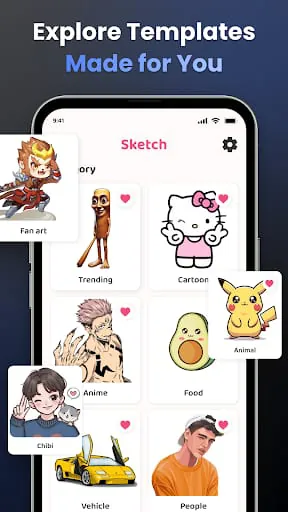
Offers a library of ready-made templates across various categories (anime, animals, landscapes, etc.).
-
Layout Tools:
Basic adjustments like opacity and zoom are available for the AR projection.
-
Typography Options:
Not a focus of the app.
-
Grid System:
Not a noted feature.
-
Alignment Tools:
Opacity, zoom, and positioning controls aid alignment.
-
Export Options:
Users can create videos of their drawing process and share them.
Professional Features
-
Project Management:
Limited, focused on individual creation rather than team projects.
-
Asset Library:
Includes a library of images and templates for tracing.
-
Version Control:
Not applicable for this type of app.
-
Collaboration Tools:
Not a feature.
-
Cloud Integration:
Not specified.
-
Professional Export:
Video export of the drawing process is available.
User Interface
-
Tool Organization:
Generally described as user-friendly and intuitive, allowing easy navigation.
-
Workspace Layout:
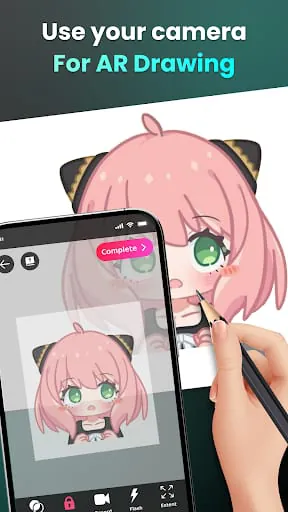
The AR view combined with the drawing surface forms the workspace.
-
Customization Options:
Opacity, zoom, and filters offer some customization.
-
Gesture Support:
Standard touch gestures for zooming and panning are likely supported.
-
Quick Access:
Features are generally accessible, though some users report ads interrupting the flow.
-
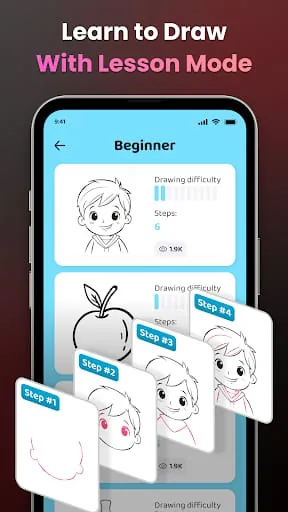
Tutorial System:
Offers video tutorials for beginners and a structured lesson system in some related apps.
Performance
-
Canvas Performance:
Relies on AR projection; performance can be affected by device capabilities and lighting.
-
File Handling:
Imports images from gallery; exports videos of the drawing process.
-
Memory Management:
Not detailed.
-
Undo/Redo System:
Not a prominent feature for tracing apps.
-
Auto-save:
Not specified.
-
Project Backup:
Not a specified feature.
Learning Resources
-
Tutorial Content:
Video tutorials are mentioned, guiding beginners through specific drawings.
-
Reference Materials:
The app provides images and templates for tracing and AI-generated art.
-
Community Gallery:
Some related apps mention sharing with a community.
-
Inspiration Feed:
Not a primary feature.
-
Tips & Tricks:
Implicitly provided through tutorials and the app's functionality.
-
User Guides:
Available in the form of tutorials and descriptions within the app stores.
Professional Review
Moments of Insight
User Reviews and Experience
-
Overall User Satisfaction:
Mixed, with some users finding it very helpful for learning to draw and trace, while others report technical issues.
-
Common User Feedback:
Positive remarks often highlight the app's effectiveness in improving drawing skills and its ease of use for tracing.
-
User Rating Distribution:
Ratings are generally around 3.2 to 4.3 stars across different platforms, indicating room for improvement.
-
Most Appreciated Features:
The core AR tracing functionality, AI image generation, and its utility for beginners are frequently praised.
-
Common Complaints:
Technical glitches, such as the app not loading or displaying black screens, and the presence of excessive advertisements are recurring issues.
Technical Performance
-
App Size and Requirements:
App size is around 89.8 MB, with requirements varying by OS version (e.g., iOS 15 or later).
-
Battery Consumption:
Not explicitly detailed, but AR features can be battery-intensive.
-
Loading Speed:
Some users report long loading times, with one instance of waiting an hour.
-
Stability:
Issues with stability and bugs, such as the app not proceeding past the loading screen, have been reported.
-
Offline Capabilities:
Not specified, but AR features typically require an active internet connection for some functionalities.
Updates and Maintenance
-
Update Frequency:
Regular updates focusing on bug fixes and performance improvements are released. Versions like 1.9.42 and 1.0.6 have been noted.
-
Latest Version Changes:
Recent updates often include AI drawing features, AR drawing enhancements, and general bug fixes.
-
Bug Fix Response Time:
User feedback suggests a continuous effort to address bugs, though some persistent issues remain.
-
Developer Support Quality:
Direct feedback on developer support is limited, but update logs indicate ongoing maintenance.
Security and Privacy
-
Data Collection Practices:
The developer indicates that data may be collected but not linked to the user, and no data is shared with third parties. Data can be encrypted in transit.
-
Privacy Policy Clarity:
Information is provided by the developer, but its verification by platforms like Apple is pending.
-
Security Measures:
Data is encrypted in transit.
-
Permission Requirements:
Requires access to camera and storage for its core functionalities.
-
Data Storage Methods:
Not explicitly detailed, but data is encrypted in transit. Data deletion might not be possible.
Monetization Strategy
-
Pricing Model:
Offers a free version with in-app purchases and subscriptions (e.g., premium monthly/yearly options, coin packs).
-
In-app Purchases:
Available for premium features, additional coins, and access to more templates.
-
Subscription Options:
Monthly and yearly subscription plans are offered.
-
Free vs Paid Features:
Core tracing and some basic features are free, while advanced filters, more templates, and an ad-free experience likely require payment.
-
Value for Money:
Mixed; some users find the free version sufficient, while others feel the paid features offer good value for enhanced capabilities.
Market Position
-
Competitor Comparison:
Competes with other AR drawing and tracing apps like Sketchar, ArtEasy, and Da Vinci Eye. Some competitors offer more extensive features or different pricing models.
-
Market Share:
Not specifically quantified, but the app has garnered millions of installs.
-
Unique Selling Points:
Combines AI drawing generation with AR tracing, a user-friendly interface, and filters for edge control, contrast, and noise.
-
Target Audience Fit:
Effectively targets beginners and hobbyists looking to improve drawing and tracing skills, as well as those interested in creative AR experiences.
Category-Specific Analysis
Creative Tools
-
Drawing Tools:
Primarily focuses on tracing, with AI-generated images also available for drawing.
-
Brush System:
Not a primary focus; the app is more about tracing outlines.
-
Layer Management:
Not a prominent feature.
-
Color Palette:
Not detailed, likely basic if present for coloring.
-
Canvas Options:
Utilizes the real world as a canvas via AR projection.
-
Effect Library:
Includes filters like Edge Level, Contrast, and Noise for image enhancement before tracing.
Design Features
-
Template System:
Offers a library of ready-made templates across various categories (anime, animals, landscapes, etc.).
-
Layout Tools:
Basic adjustments like opacity and zoom are available for the AR projection.
-
Typography Options:
Not a focus of the app.
-
Grid System:
Not a noted feature.
-
Alignment Tools:
Opacity, zoom, and positioning controls aid alignment.
-
Export Options:
Users can create videos of their drawing process and share them.
Professional Features
-
Project Management:
Limited, focused on individual creation rather than team projects.
-
Asset Library:
Includes a library of images and templates for tracing.
-
Version Control:
Not applicable for this type of app.
-
Collaboration Tools:
Not a feature.
-
Cloud Integration:
Not specified.
-
Professional Export:
Video export of the drawing process is available.
User Interface
-
Tool Organization:
Generally described as user-friendly and intuitive, allowing easy navigation.
-
Workspace Layout:
The AR view combined with the drawing surface forms the workspace.
-
Customization Options:
Opacity, zoom, and filters offer some customization.
-
Gesture Support:
Standard touch gestures for zooming and panning are likely supported.
-
Quick Access:
Features are generally accessible, though some users report ads interrupting the flow.
-
Tutorial System:
Offers video tutorials for beginners and a structured lesson system in some related apps.
Performance
-
Canvas Performance:
Relies on AR projection; performance can be affected by device capabilities and lighting.
-
File Handling:
Imports images from gallery; exports videos of the drawing process.
-
Memory Management:
Not detailed.
-
Undo/Redo System:
Not a prominent feature for tracing apps.
-
Auto-save:
Not specified.
-
Project Backup:
Not a specified feature.
Learning Resources
-
Tutorial Content:
Video tutorials are mentioned, guiding beginners through specific drawings.
-
Reference Materials:
The app provides images and templates for tracing and AI-generated art.
-
Community Gallery:
Some related apps mention sharing with a community.
-
Inspiration Feed:
Not a primary feature.
-
Tips & Tricks:
Implicitly provided through tutorials and the app's functionality.
-
User Guides:
Available in the form of tutorials and descriptions within the app stores.
Professional Review
Moments of Insight
Creative Tools
- Drawing Tools: Primarily focuses on tracing, with AI-generated images also available for drawing.
- Brush System: Not a primary focus; the app is more about tracing outlines.
- Layer Management: Not a prominent feature.
- Color Palette: Not detailed, likely basic if present for coloring.
- Canvas Options: Utilizes the real world as a canvas via AR projection.
- Effect Library: Includes filters like Edge Level, Contrast, and Noise for image enhancement before tracing.
Design Features
- Template System: Offers a library of ready-made templates across various categories (anime, animals, landscapes, etc.).
- Layout Tools: Basic adjustments like opacity and zoom are available for the AR projection.
- Typography Options: Not a focus of the app.
- Grid System: Not a noted feature.
- Alignment Tools: Opacity, zoom, and positioning controls aid alignment.
- Export Options: Users can create videos of their drawing process and share them.
Professional Features
- Project Management: Limited, focused on individual creation rather than team projects.
- Asset Library: Includes a library of images and templates for tracing.
- Version Control: Not applicable for this type of app.
- Collaboration Tools: Not a feature.
- Cloud Integration: Not specified.
- Professional Export: Video export of the drawing process is available.
User Interface
- Tool Organization: Generally described as user-friendly and intuitive, allowing easy navigation.
- Workspace Layout: The AR view combined with the drawing surface forms the workspace.
- Customization Options: Opacity, zoom, and filters offer some customization.
- Gesture Support: Standard touch gestures for zooming and panning are likely supported.
- Quick Access: Features are generally accessible, though some users report ads interrupting the flow.
- Tutorial System: Offers video tutorials for beginners and a structured lesson system in some related apps.
Performance
- Canvas Performance: Relies on AR projection; performance can be affected by device capabilities and lighting.
- File Handling: Imports images from gallery; exports videos of the drawing process.
- Memory Management: Not detailed.
- Undo/Redo System: Not a prominent feature for tracing apps.
- Auto-save: Not specified.
- Project Backup: Not a specified feature.
Learning Resources
- Tutorial Content: Video tutorials are mentioned, guiding beginners through specific drawings.
- Reference Materials: The app provides images and templates for tracing and AI-generated art.
- Community Gallery: Some related apps mention sharing with a community.
- Inspiration Feed: Not a primary feature.
- Tips & Tricks: Implicitly provided through tutorials and the app's functionality.
- User Guides: Available in the form of tutorials and descriptions within the app stores.
Moments of Insight
The core function of this application offers a fascinating intersection of digital and physical creation. By projecting an image onto a physical surface via augmented reality, it bridges the gap between a digital reference and a tangible sketchpad. This process can evoke a sense of wonder, transforming a commonplace drawing session into an almost magical experience. For those struggling with foundational drawing skills, these projected outlines can serve as gentle guides, fostering a sense of accomplishment and encouraging further exploration of their creative potential.
Balanced Perspectives
While the augmented reality tracing feature is undoubtedly innovative and accessible, its utility is tempered by certain limitations. The reliance on device placement (often requiring a stand) and the potential for technical hitches, such as slow loading times or unstable projections, can interrupt the creative flow. Furthermore, the frequent appearance of advertisements in the free version can detract from the user's immersion and create a less than tranquil experience. Balancing these aspects, the app provides a valuable tool for learning and practice, but users should approach it with an understanding of its current technological constraints and monetization model.
Mindful Observations
The design philosophy behind this app seems to center on democratizing the art of drawing. By simplifying the initial steps of proportion and line work through AR projection, it lowers the barrier to entry for aspiring artists. This mindful approach acknowledges that the journey into art can be daunting and offers a supportive stepping stone. The inclusion of AI-generated image prompts also adds a layer of modern creative exploration, allowing users to generate unique starting points for their tracing endeavors. It’s a thoughtful consideration for those seeking inspiration.
Thoughtful Reflections
In an era saturated with digital distractions, an application that encourages hands-on creation, even with technological assistance, can contribute positively to digital well-being. It steers users away from passive consumption and towards active engagement. The act of tracing and drawing, regardless of the method, can be a meditative practice, fostering focus and mindfulness. By making this process more accessible, the app offers an opportunity for users to unwind, connect with their creativity, and experience the quiet satisfaction of bringing an image to life.
Harmonious Integrations
The integration of AR technology within a drawing application represents a harmonious blend of innovation and traditional art forms. It doesn’t seek to replace the tactile experience of drawing but rather to enhance and guide it. The app’s ability to project images in real-time, coupled with adjustable settings like opacity, allows for a personalized and adaptable workflow. This thoughtful integration ensures that the technology serves as a supportive companion to the user's creative process, rather than an intrusive overlay, fostering a balanced and rewarding artistic journey.









