
Advertisement
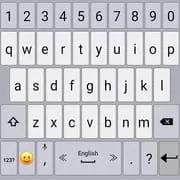
Classic Big Keyboard
4.00
4.2k+ Reviews4.00
4.2k + Reviews
1
12%
2
6%
3
10%
4
19%
5
54%
User Reviews

Arizona Coleman
★★★★★
January 9, 2026Since the recent update on 01/07/2026, I can say this the only keyboard I use. However auto capitalisation has ceased functioning. It is the only one I have with keys this large & allows me to precisely navigate through the text documents I compose. the built-in calculator is a nice touch as well. I just wish autofill provided more than 3 options. At times the right form of the word I am typing is not present and I must manually type it in anyway.

TOM RANCADORE
★★★★★
October 3, 2025I have used this app for years and really like it. I boughrt a motorola phone and started using it. After 2 weeks, it started doing a speech to text preview. Very annoying I don't know how to turn off, or if it is classic keyboard. From research it appears the keyboard is the only component that could do this. That being said Gboard does it too. Help I want to get rid of it

gregg wilson
★★★★★
November 2, 2020So far perfect. I dont give demerits for spellchecking or emojis. I'm old. But being able to type in a password that contains lower and upper case letters, numbers, and symbols without switching keyboards is very cool beans. Later. I really like the ? too Right now I'm trying to see if the "Rate the app" on the top right goes away if I do this.
Advertisement
Brandon Smith
★★★★★
July 15, 2021I originally thought the keyboard was awesome. It did what I wanted it to do... until it didn't. I realized quickly you can't type fast on this thing. The space bar is too close to the lower keys and often I will type a word with a b in place of the space. Like this: hellobthere and it doesn't correct it. No matter how I adjust height, or corrections it refuses to fix the most basic spelling errors. Wish I hadn't spent money to unlock to full version when it just doesn't type as well.

Jenny Levich Westberg
★★★★★
July 4, 2023Gorgeous! But looks aren't everything. When installing, it says, "This input method may be able to collect all the text you type, including personal data like passwords & credit card numbers." That's not good! If you go on, it warns that if you have a screen lock, the keyboard can't start until you unlock the phone. Huh? I need SOME keyboard to unlock my phone. It's kinda like, hey, there's a chance this app will paralyze the keyboard, but if not, mind the security risk! :-O

A Google user
★★★★★
June 6, 2019i didn't think it would be so hard to find a good keyboard. i didn't like gboard, i couldn't get the keys wide enough. and i tried cheetah, but the buttons were too small. i tried about 10 of them. this one is simple, i can see it in bright light. i'm not accidentally pushing the wrong buttons like i was on other ones. this one is simple, large keys, one touch mic (no holding down a key). and you can have another mic on the top row too. it does have word suggest, but it doesn't pop up everywhere, like on google i couldn't get it to list there. so far i have no issues with it. i'm not sure what the difference is between regular and the new version, wish i could see it side by side, they looked the same, only i think the smile wasn't there.
A Google user
★★★★★
October 16, 2019Needs improvements!! It says it uses phone dictionary as back up, but it doesn't. I've even tried adding to this app's dictionary. Still replaces "Don't" with "don't" at the beginning of sentences even though I've saved both versions in the dictionary. It doesn't correctly capitalize or punctuate. The autocorrect is the worst I've ever experienced. Word prediction is terrible. You just really need to focus more on making it easier for your customers to use. Appearance is fine, but that's all.

Gemini61375
★★★★★
April 30, 2020After having (thoroughly) checked out all the top recommended keyboards over the years, nothing even comes close to this one. Which has also been around for years but never making anyone's list..which I will never understand. The (only) gripe I have, as opposed to the countless ones I've had with others, is wishing the bottom row was more customizable. To me the mic and emoji buttons are unnecessary. If could get rid of em and extend the space bar, thatd be great. Other then that...it's perfect.

P A McCullough
★★★★★
October 3, 2020I want to ❤ this keyboard. Right now, I just like it. The ability to size it is great. The themes are adequate. Visually it's clean! I think that it leaves something to be desired in regards to word corrections. It's not intuitive or aggressive enough! For example: I can spell "itzs" & it won't automatically correct it to "it's", or "wont" won't automatically go to "won't". Nonexistent words need to be underlined/highlighted! The space-after-suggested-word option shouldn't apply to punctuation!

Henri Sanville
★★★★★
January 23, 2021I really like this keyboard app. The customization options are perfect for what I needed. My main beef is the custom library - It auto saves mispelled words and asks if I want to remove it, rather than ask if I want to save it. The option to "remove" disapears once I start the next word. I then have to manually delete these typos from the dictionary, which is quite simple to do. I also wish the spacebar was longer as I accidentally input periods when I wanted a space.
A Google user
★★★★★
May 29, 2019I have been using this keyboard for a while, and overall, I really like it. The one thing I am NOT happy about is the bottom-row layout I always used seems to be no more. It was language toggle, emoji, comma (no mic!, with other punctuation), space bar, period (question, exclamation), return. I have been mistyping everything, and am not a happy camper. Please bring this layout back! I'm a writer, and having the comma as a basic no-hold key is essential. The question mark is not.

Sondra Dee
★★★★★
September 3, 2020The app constantly saves incorrectly spelled words and then it asked if one wants to remove the incorrectly spelled words that should never be saved in the first place. That and contractions should not only be offered with lowercase letters but uppercase as well. I would be nice if the app was a tad smarter to match smart phones. Lastly, it'd be great if the app allowed the keyboard to be enlarged. Would come in handy for larger phones. Thank you!

Charles Woodley
★★★★★
August 11, 2020Like the layout options as well as the selection of🙂's. Location of extra characters accessed by long press on a letter are not standardized, but location is not difficult to learn. The "." has msny useful symbols. The major weakness is word prediction. Initially, "tho" & partial words seem to be a favorites. Next word prediction is negligible. Also, if inserting a word where there is initial overlap, such as "andthe" , the need for a space is not recognised. Will get the paid version.
A Google user
★★★★★
May 10, 2019Key size is good. I like the microphone being visible at all times. I like having cursor movement arrows available at all times. I like being able to choose alternate frequently use punctuation marks by long pressing on the period or ? keys. Word suggestions don't show words that I have used frequently like proper names. I have to spell my name completely every time. I now see then I can add words to a personal dictionary.

RMX Automotive
★★★★★
November 13, 2024Note: recent updates (early 2024?) introduce obnoxious ads. My prior review: The only keyboard that doesn't constantly make me want to smash the phone into tiny pieces. I like that it doesn't try to censor me or insert garbage that I never intended to type. I had all but given up on the whole Android platform until I found this. It's not quite perfect, but it's the best there is, especially for highly literate and multilingual users.
Cheryl Leath
★★★★★
May 26, 2022Ok, Sorry I have to edit my review from 2 years ago. Though, I'm not about to uninstall it, I have to give it 4 stars, because the spell checker isn't working on it, since I installed it onto my Samsung Tab A.☹ I have to keep it, because I love that I can enlarge the keyboard letters, and the black background helps with aging eyes.😄 Sure hope it remains free, because it makes corresponding, and web surfing easier.

Joshua Fritz
★★★★★
August 13, 2022The keyboard is decent, good even. Ill preface this that I'm still using ot and plan to continue, even though I'm very dissatisfied with one thing in particular: the autocorrection functions need a lot more work. IDK if its just me, a set of very specific typoes that I make. But quite frequently (like, several times a day) it seems to swap out some seemingly minor but different typos with, of all things, 'KKK' Please just take that put as a correction. No one needs to say that so badly often.
shaboo2
★★★★★
August 3, 2023The absolute WORST correcting and predictive text of any I have ever used. Not even close. UPDATE 7-18-23, three years later: STILL the worst predictions and most limited spellcheck dictionary ANYWHERE. Example: type Ill, (the contraction for "I will") ALL other keyboards on the planet will auto-correct to " I'll ". This one not only didn't correct, it also didn't even give the OPTION to select the correct one! And that's not even the worst. Deleted app. Gone forever. Poof.

Leonard Krashoc
★★★★★
July 5, 2020So many adds I could not set up the keyboard! And the one thing I really needed, right and left arrow keys, I could not find. Maybe hiding some where, maybe in premium verson, but I don't have time to waste looking. Please learn to have all info upfront, easy to find, and not blocked by a parade of non-stop pop up adds. Show me what I get with premium, and I might just buy that up front. As of now, Classic Big Keyboard is just another deleted app.
Kevin Montgomery
★★★★★
January 8, 2025So, here's my experience: A 30-second unskippable and very loud full-screen ad for Instagram popped up when I first opened the app. Then there was a banner ad for Temu featuring Nazi flags on the bottom of the home screen. And then I find out that I have to pay $2 a month to use an onscreen keyboard without seeing annoying ads for Temu and Instagram and other garbage apps I never intend to use or download. Nope. Can't do it. I promptly uninstalled the app. Don't waste your time with it.
You Might Like

Read With Akili - So Many Diff
100k+
4.90

Scientific calculator plus 991
10M+
4.90

HelloChinese: Learn Chinese
5M+
4.90

Citizen Now: US Citizenship
100k+
4.90

Dhikr & Dua
500k+
4.90

Doh A Tu (Learn With Us)
10k+
4.90

Ethical Hacking University App
500k+
4.90

The Happy Child Parenting App
500k+
4.90

CDL Prep Test 2024
500k+
4.90

Speak English with Loora AI
5M+
4.90