
User Reviews and Experience
User feedback for the Cloud PC application is mixed. While some users find the standard plan to be reasonably priced and sufficient for their needs, others express significant dissatisfaction. Common praises include the affordability of the standard plan, with one user noting it's "really cheap". However, complaints frequently cite laggy performance, screen unresponsiveness, and issues with file handling. The user interface and controls are also a point of contention, with one review stating, "The app itself sucks, especially the controls". The free trial is also mentioned as being problematic, with one user calling it a "scam". User ratings are generally low, with some users giving it one or two stars due to these technical issues.
Technical Performance
The technical performance of the Cloud PC application is a significant area of concern for users. Lag and unresponsiveness are frequently reported issues. While the application aims to provide a Windows computer on a phone, its actual performance on mobile devices seems to be a bottleneck. Some users suggest that the performance is adequate for basic tasks but can struggle with more demanding applications or multi-tasking. The bottleneck is often attributed to network latency rather than the cloud PC's compute power itself. There's no mention of offline capabilities, as an internet connection is inherently required for cloud-based services.
Updates and Maintenance
Information regarding the frequency of updates and the developer's response time to bugs is not readily available from user reviews. However, the persistent nature of the complaints about performance and controls suggests that either updates are infrequent or not effectively addressing the core issues.
Security and Privacy
Specific details on the app's data collection practices, privacy policy clarity, security measures, permission requirements, or data storage methods are not provided in the user feedback. As with any cloud service, users should exercise caution and review the app's privacy policy before sharing sensitive information.
Monetization Strategy
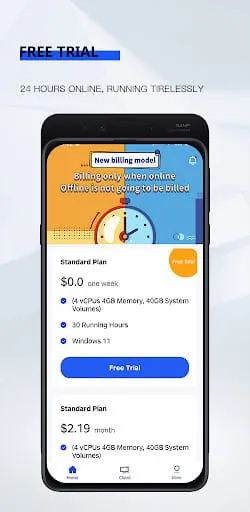
The app offers a "standard plan" which is described as "really cheap". There are also mentions of "free boot time" and a "free trial," though the latter is criticized for being inaccessible. This suggests a freemium model with subscription-based tiers for enhanced features or usage limits.
Market Position
Cloud PC applications aim to provide accessible computing power, especially for mobile users. Competitors in this space include Microsoft's Windows 365 and Azure Virtual Desktop, which are often seen as more robust alternatives, though potentially at a higher cost or complexity. The unique selling point of apps like this is often their mobile-first approach and potentially lower price point, targeting users who need computing power on the go.
Core Functionality (Tool Apps)
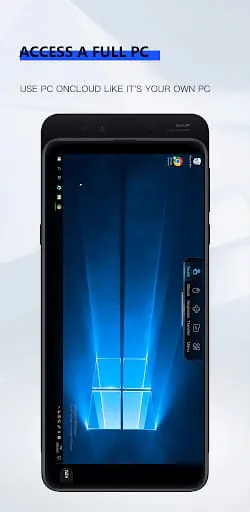
The core functionality revolves around providing a remote Windows desktop experience accessible from various devices. Feature completeness appears to be a work in progress, with users reporting issues with basic operations like responsiveness and file management. Tool accuracy and processing speed are frequently cited as areas needing improvement.
User Interface (Tool Apps)
The user interface is a significant weakness, with users describing it as "sucking" and citing poor controls. Navigation logic and layout efficiency seem to be lacking, contributing to a frustrating user experience.
Data Management (Tool Apps)
The app includes a "cloud hard drive" for saving software, games, documents, and data archives with permanent storage and expansion support. This suggests some level of file format support and cloud integration for data persistence.
Integration Capabilities (Tool Apps)
While the app is designed to be a standalone cloud PC, some users employ it in conjunction with other tools like Chrome Remote Desktop. There's no explicit mention of third-party integrations or API availability.
Professional Features (Tool Apps)
The app's professional features are limited, with the focus appearing to be on basic remote desktop access. Advanced settings, power user tools, or extensive customization options are not highlighted in user feedback.
Performance Optimization (Tool Apps)
Performance optimization is a critical area where the app seems to fall short. High resource usage and noticeable battery drain on mobile devices are likely concerns, though not explicitly detailed in user reviews. Startup time and background behavior would also be crucial for a smooth experience, but these aspects are overshadowed by the primary issue of lag and unresponsiveness.
Moments of Insight
The promise of a full Windows PC in one's pocket is a compelling vision, offering a pathway to productivity and accessibility previously unavailable to mobile-first users. This application taps into that potential, aiming to democratize computing power. The insight here is that the desire for a seamless, always-on computing experience is strong, transcending device limitations.
Balanced Perspectives
While the "Cloud PC" app strives to deliver a full desktop experience on mobile devices, its current implementation presents a duality. On one hand, it offers affordability and the core functionality of cloud computing. On the other, it grapples with significant performance issues and a clunky user interface that can undermine the very productivity it aims to foster. Users must weigh the cost savings against the potential frustrations.
Mindful Observations
The developer's offering, despite its technical shortcomings, represents a thoughtful consideration of user needs for accessible computing. The inclusion of a persistent cloud hard drive, for example, demonstrates an awareness of the importance of data permanence. However, mindful design would also involve robust performance optimization and intuitive controls, areas where improvement is clearly needed to truly enhance digital well-being.
Thoughtful Reflections
Reflecting on the user feedback, it's evident that the aspiration behind "Cloud PC" is commendable. The concept of anywhere, anytime access to a Windows environment can indeed simplify routines and reduce the reliance on physical hardware. Yet, the execution seems to fall short of this ideal, suggesting that the bridge between human needs and elegant technological solutions requires more refinement. True digital wellness is achieved when technology empowers without overwhelming, a balance yet to be fully realized here.
Harmonious Integrations
The potential for harmonious integration lies in how seamlessly this cloud computing solution can blend into a user's daily workflow. If the performance issues were resolved, it could offer a cohesive experience across devices, allowing users to switch between tasks without friction. The current state, however, suggests a dissonance, where the core functionality is present but not yet harmonized with a smooth, reliable user experience.