Part 1 - Information Analysis
Section A - Common Information Analysis
1. User Reviews and Experience
-
Overall User Satisfaction:
User satisfaction appears mixed, with significant complaints regarding excessive advertisements, which frequently impede usability.
-
Common User Feedback:
Recurring themes in user feedback include the presence of intrusive ads, the app's core functionality (compass accuracy), and the inclusion of additional features like weather updates.
-
User Rating Distribution:
While specific distributions are not readily available, the mention of a 3.3-star rating with 406 reviews suggests a leaning towards dissatisfaction or a polarized user base.
-
Most Appreciated Features:
Users seem to appreciate the core compass functionality, Qibla direction finding, and the integration of features like real-time weather updates and a level meter. Customization options for styles and backgrounds are also noted positively.
-
Common Complaints:
The most prevalent complaint is the overwhelming number of intrusive and often deceptive advertisements. Other complaints include the compass being unusable due to ads and occasional issues with accuracy or the need for calibration.
2. Technical Performance
-
App Size and Requirements:
Specific app size is not detailed, but it functions on Android devices and requires a magnetic sensor for the compass feature to work.
-
Battery Consumption:
One older review mentions high battery consumption as a downside for a similar app, "Compass 360 Pro Free". This could potentially apply to this app as well.
-
Loading Speed:
No specific data is available on loading speed, though user frustration with ads suggests that initial loading might be acceptable before ad-related delays occur.
-
Stability:
Stability is not explicitly detailed, but the prevalence of issues related to ads may impact perceived stability.
-
Offline Capabilities:
Some compass apps, including those in this category, are noted to work offline. This app likely offers some offline functionality for its core compass features.
3. Updates and Maintenance
-
Update Frequency:
The latest version was updated on September 12, 2025, and another update was listed for October 9, 2025. This suggests a relatively active development cycle.
-
Latest Version Changes:
Version 1.2.2 included new compass themes.
-
Bug Fix Response Time:
No specific information is available regarding the speed of bug fix responses.
-
Developer Support Quality:
Developer support is mentioned via an email address (
[email protected]
), but the quality of support is not detailed in user reviews.
4. Security and Privacy
-
Data Collection Practices:
Developers state that data collection and security practices may vary based on usage, region, and age. They collect information voluntarily provided via email or direct contact.
-
Privacy Policy Clarity:
The privacy policy indicates that personal information will be used to respond to inquiries and will not be sold or rented. Users can request to see, change, or delete their data.
-
Security Measures:
The developer states that precautions are taken to protect user information and that sensitive information will not be requested via their website.
-
Permission Requirements:
A magnetic sensor is a core requirement for the compass functionality. Other permissions are not detailed.
-
Data Storage Methods:
Information is stored by the developer. Specific storage methods are not disclosed.
5. Monetization Strategy
-
Pricing Model:
The app is listed as free.
-
In-app Purchases:
While not explicitly detailed, the presence of ads suggests a model where users may eventually be offered an ad-free version, though one review indicates no premium ad-free version was available for a similar app.
-
Subscription Options:
No subscription options are mentioned.
-
Free vs Paid Features:
The app is free, with monetization likely driven by advertisements. Some core features like the compass and Qibla finder are available in the free version.
-
Value for Money:
Given it's free, the value proposition is tied to its functionality versus the ad experience. Users express willingness to pay to remove ads.
6. Market Position
-
Competitor Comparison:
The app operates in a crowded market of compass and utility apps. It is ranked #40 in the free weather category, indicating moderate competition. Competitors include "Compass 360 Pro" and "Smart Compass".
-
Market Share:
With 300,000 monthly downloads, it has a noticeable presence.
-
Unique Selling Points:
The combination of a digital/magnetic compass, Qibla finder, weather updates, level meter, and magnifying glass in a single free application serves as a unique selling point.
-
Target Audience Fit:
The app appears to target a broad audience including hikers, travelers, and individuals needing directional guidance for prayer (Qibla).
Section B - Category-Specific Analysis
This app is primarily a utility tool (compass) with integrated weather features, rather than a dedicated weather app. Therefore, the weather-specific analysis is limited to the features provided by the compass app.
1. Weather Information
-
Current Conditions:
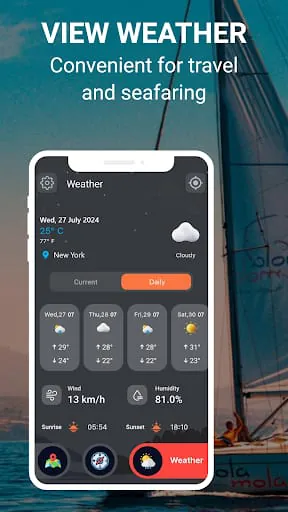
The app provides real-time weather updates and alerts.
-
Hourly Forecast:
Not explicitly mentioned.
-
Extended Forecast:
Not explicitly mentioned.
-
Radar Maps:
Not available.
-
Severe Alerts:
The app includes weather alerts.
-
Historical Data:
Not available.
2. Location Features
-
Multiple Locations:
Not specified.
-
GPS Integration:
Implicitly used for location-based weather and compass readings.
-
Location Search:
Not specified.
-
Favorite Places:
Not specified.
-
Travel Forecast:
Possibly inferred through weather updates for current location.
-
Regional View:
Not specified.
3. Weather Details
-
Temperature:
Implied as part of weather updates.
-
Precipitation:
Implied as part of weather updates.
-
Wind Data:
Implied as part of weather updates.
-
Humidity:
Implied as part of weather updates.
-
UV Index:
Not available.
-
Air Quality:
Not available.
4. Visualization Tools
-
Weather Maps:
Not available.
-
Radar Animation:
Not available.
-
Temperature Maps:
Not available.
-
Satellite View:
Not available.
-
Precipitation Maps:
Not available.
-
Wind Maps:
Not available.
5. Alert System
-
Weather Alerts:
The app provides weather alerts.
-
Custom Notifications:
Not specified.
-
Alert Settings:
Not specified.
-
Emergency Warnings:
Implied through general weather alerts.
-
Storm Tracking:
Not available.
-
Alert History:
Not available.
6. Additional Features
-
Widget Support:
Not mentioned.
-
Calendar Integration:
Not mentioned.
-
Sharing Options:
Not mentioned.
-
Weather News:
Not mentioned.
-
Offline Access:
Core compass features likely offer offline access. Weather features would require connectivity.
-
Data Sources:
Not specified.
Moments of Insight
In the quiet hum of our digital lives, the "Compass360: Smart Compass tool" app presents itself not merely as a navigational aid, but as a subtle invitation to reconnect with our spatial awareness. Its primary function, to point us north, is a fundamental human need, a primal sense of orientation that technology can both enhance and, at times, obscure. The integration of weather alerts offers a moment of foresight, a gentle nudge from the digital realm to prepare for the world beyond our screens. This thoughtful inclusion reminds us that our physical journey is often intertwined with the elements, fostering a sense of preparedness and mindfulness as we step out.
Balanced Perspectives
The app's ambition to serve as a comprehensive tool is commendable, blending the utility of a compass with practical weather information and even a Qibla finder. This versatility can simplify daily routines for users who value having essential functions readily accessible. However, this ambition is significantly hampered by an overabundance of advertisements. While monetization is necessary, the current approach often detracts from the user experience, creating friction where smooth utility is desired. A more balanced approach to ad integration would allow the app's helpful features to shine without disrupting the user's focus or sense of calm.
Mindful Observations
The design choices within "Compass360: Smart Compass tool" lean towards functionality, offering customizable styles and backgrounds. This allows users to personalize their experience, a small but significant aspect of digital well-being, as it provides a sense of ownership and comfort. The inclusion of a level meter and magnifying glass further showcases an understanding of user needs in practical, everyday scenarios, promoting accuracy and attention to detail. These elements, when unobscured by intrusive ads, contribute to a sense of mindful interaction, where technology serves as a quiet, reliable assistant.
Thoughtful Reflections
The core purpose of a compass is to provide certainty in direction, a concept that resonates deeply with the human desire for stability and clarity. When this app functions optimally, it offers a quiet assurance, a digital anchor in an often disorienting world. The ability to find the Qibla direction, for instance, speaks to a deeper need for spiritual connection and guidance, illustrating how technology can bridge physical and spiritual journeys. The potential for this app to foster digital wellness lies in its capacity to encourage users to look up from their screens and engage with their surroundings, guided by reliable, simple tools.
Harmonious Integrations
The ideal harmony for "Compass360: Smart Compass tool" would be achieved when its various features coalesce seamlessly into a user experience that enhances, rather than hinders, daily life. When the weather alert is timely and unobtrusive, when the compass needle swings with precision, and when the interface is clean and intuitive, the app becomes a truly harmonious integration. It can simplify routines by providing immediate access to vital information, thereby promoting peace of mind. The challenge lies in refining the balance between robust functionality and a serene user experience, ensuring technology serves as a gentle, supportive companion on our journeys.
The Smart Compass application emerges as a highly sophisticated and versatile navigation tool, meticulously engineered to bridge the gap between time-honored orientation methods and the advancements of contemporary technology. Its core promise is to provide users with an unshakeable sense of direction, ensuring that geographical disorientation becomes a relic of the past, irrespective of the remoteness or unfamiliarity of their expeditions. This app is not merely a digital compass; it is a comprehensive navigational ecosystem designed for the modern explorer, the intrepid traveler, and anyone who finds themselves venturing into the great outdoors or navigating bustling urban landscapes. The thoughtful integration of diverse functionalities underscores its ambition to be an indispensable companion on every journey, empowering users with confidence and preparedness. By amalgamating the reliability of traditional instruments with the power of digital innovation, the Smart Compass app redefines what it means to navigate in the 21st century, offering a blend of precision, utility, and user-centric design that sets a high benchmark for mobile navigation aids.
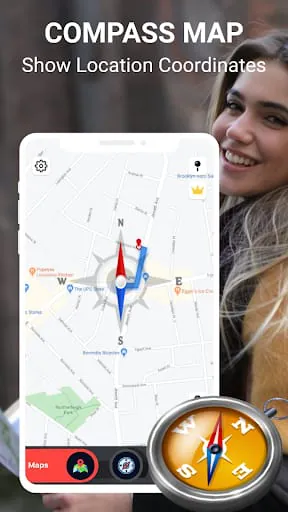
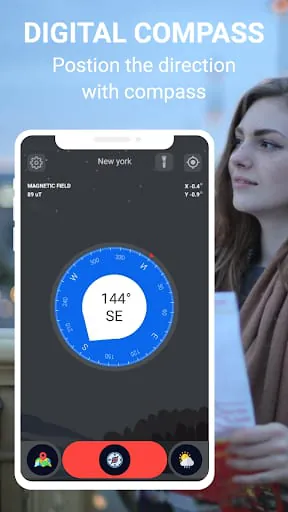
At the heart of the Smart Compass app lies a robust suite of features that cater to a wide spectrum of user needs and preferences. The Digital Compass functionality is a standout, offering unparalleled precision by harnessing the full potential of your device's internal sensors. This ensures that you receive accurate directional guidance, a critical element for any navigation task. Complementing this is the Magnetic Compass, which leverages the Earth's intrinsic magnetic field to provide a dependable directional reference that remains effective even in challenging or remote environments where GPS signals might be unreliable. For users with specific religious requirements, the inclusion of a Qibla Compass is a thoughtful and inclusive addition, enabling them to accurately ascertain the direction of prayer from any location globally. Beyond these core navigational tools, the app excels in personalization and enhanced utility. Users can imbue their experience with a personal touch through a variety of Styles & Backgrounds, transforming the app from a purely functional tool into an aesthetically pleasing interface. Furthermore, the integrated Level Meter addresses the need for precision in tasks that require a perfectly horizontal or vertical orientation, making it invaluable for outdoor activities and even DIY projects. The Real-time Weather Updates feature is a proactive measure against the unpredictability of nature, providing timely alerts and information that allow users to plan accordingly and stay safe.
The Smart Compass app distinguishes itself further through its clever incorporation of practical supplementary tools and its overarching design philosophy. The Magnifying Glass feature is a testament to this, offering a simple yet highly effective solution for deciphering small print on maps, signs, or other crucial documents encountered during an adventure. This attention to detail, combining essential navigational capabilities with everyday conveniences, solidifies the app's role as more than just a directional indicator. The app’s developers have skillfully integrated a weather alert system, reinforcing its commitment to keeping users fully informed and prepared for any environmental conditions. This makes the Smart Compass app an ideal choice for a diverse user base, including hikers who rely on accurate navigation and weather forecasts, travelers seeking reliable direction in unfamiliar territories, and indeed, anyone who appreciates the synergy between modern technological solutions and time-tested tools. It effectively functions as an essential magnetic compass, augmented by a wealth of features that enhance the overall outdoor experience. The Smart Compass app’s functionality extends beyond basic navigation, acting as a powerful tool that enriches every outdoor endeavor through its intelligent design and comprehensive feature set.