
Advertisement
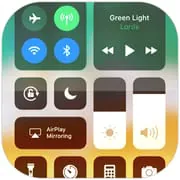
Control Center iOS 15
4.70
52.9k+ Reviews4.70
52.9k + Reviews
1
3%
2
1%
3
3%
4
10%
5
83%
User Reviews

A Google user
★★★★★
April 18, 2020Honestly it's the best launcher I've used! I literally just turned my Samsung Galaxy J3 into a iPhone 10 XD. There is one small flaw (it can be fixed by user). If you want the position of it on the bottom, the spacebar on your virtual keyboard might open it on addicent, but just simply move it to the right so it's out of the way! And one last thing... The adds, they have to go!
A Google user
★★★★★
January 6, 2019overall its good and easy to use but there are some obvious bugs. for example: when i try to change the position of the control panel (whether is shows from the top, bottom, left, or right), only half of the control panel shows up on screen so i end up having to restart the program. also, i find it annoying that it asks me to review it every 2 seconds so thats why im even typing this in the first place. but thats liveable with i guess.
A Google user
★★★★★
October 13, 2018Best control center app. But I on the control center if my music player is Spotify it doesn't actually say what song or podcast is playing, it just has a skip, pause, or rewind buttons that work, but it doesn't show the song. Pls fix. Also, the screen recorder button won't even show up on control center for some reason. I have a Google Pixel XL.
Advertisement
dragonlord.nuggets
★★★★★
September 21, 2020So, I decided to edit the entire review because I think the Developer thought I was being sarcastic about the ad thing. No, really. The ads are fine. They only appear on the app when you switch to different settings instead of an ad popping up while out of the app and are using it. I didn't think too much on my first review because it wanted me to rate it as soon as I opened it up and I was being generous and rated it 5 stars. Then I used it some more and was doing just fine! Great app!
A Google user
★★★★★
August 18, 2019Waited a few months and still no update. My problem is that I need control center to have a position at the top left or right. People who have phones with gesture control cannot use control center. For example look at the iphone x and the way it handles control center. You notice how there is a small bar at the top right to access control center. There should be a position at the top left or right so you can use control center while also being able to use your phone's dropdown menu.
A Google user
★★★★★
February 11, 2019I love my android, but the one thing I missed about my iPhone was the control center. This app lets me use the iPhone control center on my android; the addition is seemless and looks like it belongs there! It also has cool customization options that I didnt even have with my iPhone. I was worried when I saw that it had ads, but the ads only come up while you're in the settings for the control center. They don't pop up or interrupt at any other time. So they are nothing to worry about. Love it!
A Google user
★★★★★
October 30, 2019I love this and its really helpful for me. But I do have one small problem. After I assign an app under the "customize controls" tab, it appears as a pink plus in the control center and won't do anything if I tap on it. There is one other thing that isnt much of a problem. It dissapears for a few seconds sometimes. It always comes back, so its not that much of a problem. But I would really like if the apps turned to pink pluses could get fixed. Thanks for your time and consideration.
A Google user
★★★★★
January 23, 2019It's a great app. Has some ads in settings but none in the actual action center. Nicely customizable. Adds lots of useful settings in an easy to access way. With that said, I've noticed one major issue. I hide my navigation bar and use thir party navigation (Fluid NG). Other apps, such as my keyboard app and Bottom Quick Settings, can still tell where the bottom of the device is and display normally. Control Center, though, cuts off the bottom portion and over-scans. Please fix!
A Google user
★★★★★
June 15, 2019The overall app is pretty decent, but there are A LOT of ads. Like if you click on something, an ad immediately pops up. However, the controls are really good, and the customize controls thing is decent. One thing I hope you could fix is the screen recording video quality. I don't know why, but when I screen record the video becomes really blurry. This app is really helpful, and I would certainly recommend it to others.

Amira Ahmed
★★★★★
September 30, 2020This app seems pretty good when I downloaded it, but it doesn't work at all! I opened the app and I noticed my phone got a bit more laggy, but that was fine. Then I tried to set it up, which was super hard to do since the lag and the confusing layout. After 5 minutes I finally set it up. It starts asking for weird permissions, then it reset my phone! I had to open my phone again, then it happened twice! Also, the music player did not work and it didn't play the music. I have an LG K20.
A Google user
★★★★★
March 7, 2019Really simple and very smooth, but I have only one issue with it. I use Fluid Navigation Gesture, so I do not have the navigation bar at the bottom of my phone, so the bottom apps (camera, flashlight, etc.) are cut off. Other control center apps don't have this issue, but they don't function nearly as well.
A Google user
★★★★★
September 26, 2018There is a bug where the flashlight updates and sets itself as off, even though the flashlight is still on. This happens after turning the flashlight on through the control centre, and then waiting for the screen to turn off. Otherwise, great app. Very responsive. Great degree of customisation. (This bug can now be circumvented by closing the control centre when the flashlight is off.
A Google user
★★★★★
February 22, 2019When this app is installed, if you lock the screen while the keyboard is open, it stays on the screen when you try to unlock it. (and prevents you from unlocking if you use pattern - i need to restart my phone every time). I'm using Galaxy S6, Android 7.0, Gboard keyboard. Other than that, best app in the world. Edit: several months later, still an issue. please fix :( Only reason I use this one is because it stays open in the background unlike others.

Hamza Hussain
★★★★★
July 4, 2022Amazing, it's was kind of laggy but seem to be smoother now but I gave it 4 stars because, most of the time when I play music it doesn't show the music name and instead shows the name of the last video I saw. The music controls don't work most of the time, the pause/play takes too long to work. And dear Luutinh Developer, I humbly request you to make it so that when you hold the area where it has the WiFi, Bluetooth, airplane mode, etc., It expands just like iOS

TheLBOZO
★★★★★
December 16, 2025Why do I have to have the app open for it to work?? This is so weird I can't even close the app like with the iOS Launcher 26. If I didn't have to keep it open all of the time, it would be a pretty good app.
A Google user
★★★★★
September 30, 2018Incredible app. Use it everyday, love everything about it. My only issue, is the screen record function doesn't work. I press the button in the control center, the notification comes up in my notification tray, but the timer stays at 0, and when I try to stop, the notification sticks. Once that is fixed, this will easily be a 5 star app

Rudy Francisco
★★★★★
October 12, 2020Same thing happened to me. like the app so much! But I hate the thing that, I can only use the control panel when I didn't close the app in the background. When I close it, It disappears. Even though I turned it on in floating window management in settings. Can you please improve it...? I'll be really happy if you did.
A Google user
★★★★★
October 25, 2018So cool, I didn't expect it to work but it's really easy to figure out. However, I have the iOS app that makes my phone look like an iPhone as well as the control center from you, and they clash with something. When I tried to allow audio when screen recording, it keeps saying "stop app overlay form settings"
A Google user
★★★★★
March 25, 2019Good app but some minor bug issues. When I use a third-party bluelight filter, it doesn't allow my keyboard (Google keyboard) to adjust to the brightness change for some reason. Also, if the keyboard is opened when the screen is locked, it stays opened when I try to unlock my phone. This makes it impossible to unlock my phone with a passcode. If these minor problems could ve fixed would be a perfect app.
Eli_aintEli :3
★★★★★
August 4, 2020It was great! I could record videos with the screen recorder, also if you record a video and theres no sound thats because your sound is off, go to screen recorder settings, press advance and ut will let you, also i had another issue, it kept saying "control center is about to record" the only way i found to fix that is to press "dont show again" then press ok, it will stop popping up for no reason that way.
You Might Like

Read With Akili - So Many Diff
100k+
4.90

Scientific calculator plus 991
10M+
4.90

HelloChinese: Learn Chinese
5M+
4.90

Citizen Now: US Citizenship
100k+
4.90

Dhikr & Dua
500k+
4.90

Doh A Tu (Learn With Us)
10k+
4.90

Ethical Hacking University App
500k+
4.90

The Happy Child Parenting App
500k+
4.90

CDL Prep Test 2024
500k+
4.90

Speak English with Loora AI
5M+
4.90