
Advertisement
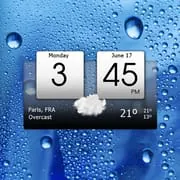
Digital Clock & World Weather
4.10
1.6k+ Reviews4.10
1.6k + Reviews
1
17%
2
2%
3
6%
4
9%
5
66%
User Reviews

JD C
★★★★★
July 2, 2022This app *used* to work beautifully... until it didn't after I got a new phone. The alarm will go off, but there is literally no way to turn it off, snooze, etc. I've even turned the toggle off for the alarm. Guess what? It still went off! The only thing that shut up the alarm was rebooting the phone altogether. I'll be finding a new app, but I'm not happy about it!

A Google user
★★★★★
April 17, 2019The weather feature could be better. When you first go to it, it should concise and clear to read. If someone wants more info, they can scroll down or swipe right or left, whichever the app does. Also I've tried to remove it from my screen, due to my phone already has that info displayed, and unfortunately, I can NOT remove it.

Adiel Cohen
★★★★★
February 3, 2023Somehow this clock is always slow. Also completely inaccurate, the weather says heavy snow and it never snowed. It's a great clock for decoration just expect nothing from it. There's nothing wrong with my launcher, this has occurred on 2 different phones now, boths firmware completely updated. I'd uninstall this and download something different but I just don't care anymore. And whoo hoo it's snowing right now but it isn't! I love a good placebo.
Advertisement

Elimosaria Maeda
★★★★★
April 19, 2024The App is excellent. I have it on two of my handsets and its widget displays the time, date and day of the week. In addition there are weather display showing cloud status & temperature in degrees Celsius or Fahrenheit. These units have to be set by the user. There are days these fail due to failures in location detection. That is an area calling for improvement.

Bhavya Bodalkar
★★★★★
October 18, 2025This is a great app! If anyone wants a frutiger aero styled clock, this is perfect app! There are also great customization options.

kelley coronado
★★★★★
January 26, 2024I have been using this app for years through multiple phones an now it's broken. An no this ⬇️ is not a option because I've looked everywhere in my phone. I even did it word for word in settings an Under widget there's only one choice. MACHAPP Software Ltd Thank you for the feedback Please go to "settings", "appearance settings", and "widget skin", and choose the skin that you like.

Delbert Allen
★★★★★
March 8, 2024The app no longer shows my current location when I travel. I've tried setting the location choices to no avail! New problem!! Today's date: 3/8/2024. Am totally unable to access timer/alarm feature! It should activate when tapping the hour button; but there is no response to that action. It's checkmarked in advanced settings, but no success there, either!!
A Google user
★★★★★
November 8, 2018I had to install this clock to replace my Machapp 3D Flip Clock and Weather which mysteriously started to freeze and display the wrong time. It's identical to my previous clock apart from the design and customisation features which allowed me to choose a colour of my choice. This clock doesn't allow you to do that but it works equally as well as my previous one apart from no freezing problems. It still looks good but I do miss the customisation feature of the 3D Flip Clock. 5 stars nevertheless.
A Google user
★★★★★
April 8, 2020It's OK but, your weather app has to many ads. Also your weather is always at least 8 degrees off. Have to drop some stars for that. You cannot customize the font or numbers. Just look at Beautiful Widgets, even though the developer skipped town the app itself was number one. The customization choices were second to none. UPDATE : I'm boosting the rating due to developers response which makes a lot of sense. I guess the BW app was just one of a kind which you can't get anymore. Thank you guys...

Dave Frailey
★★★★★
July 27, 2021I like this clock /weather format better than all the other formats from this vendor, but for some incomprehensible reason the app is filtering which apps you can select for custom actions. For example, amdroid (my favorite alarm app) is filtered from the hour custom action (or any other custom action), and the same for Google Calendar (it's absent from the selection choices while the Samsung calendar does show), and the Google clock app is filtered while the Samsung clock isn't. Crazy!

Adiel Cohen
★★★★★
March 5, 2023Looks great but never keeps the correct time. Great decor though, it at least appears like it's a clock. Wish I could give it less than one star 🌟. Numerous updates and yet the clock lags behind at least 10 minutes, and nope it has nothing to do with Android settings lol 😆 The app just simply sucks, it's just for show but don't expect anything from it. Just look forward to each and every frivolous app updates, I'd delete it but I'm hoping it'll grow even more dysfunctional as time goes on 💩

Mark
★★★★★
April 5, 2022Looks good, but not enough options to change date format/order, widget settings, order of tiles. Developer said you can but there is no widget option in settings in the app, the widget doesn't have any settings, the only option for the date is to have it on or off, you can't move tiles in app unless pay for premium.

Peter Smith
★★★★★
March 13, 2023Not a bad weather app. One problem though is that I'll set the weather as the wallpaper and it'll keep resetting to the phone's factory wallpaper? I like that this is replicating HTC's widget from years back but being fussy, the effects are very low quality on a 1080p screen. Reply to your comment: why can't it be your app? All other wallpapers when applied have no issues nor do any other weather apps?

Brad Bush
★★★★★
July 24, 2022Really like this app. I love the "hot keys" to launch other apps. The weather app is very good, too. Not a battery hog, either! Developers are on the job, also. I came from Beautiful Widgets - didn’t think I'd find anything as good, but these guys are trying hard. After recent phone upgrade to Ultra S22, the clock loses sync regularly. It's annoying. The developers sent me an email with suggested fixes, but none of them worked. The clock feature is pretty critical. Developers, please help!
A Google user
★★★★★
March 5, 2020Just downloaded and love the app, my only issue is with the size of the widget. I downloaded this app because I needed to replace my Beautiful Widgets app... it has not been able to update WeatherUnderground in over a year with android updates. But, I had stayed because I loved how much variety was offered for widgets and skins. This app is user friendly and attractive. Again, if you could offer a range of sizes for widgets to accommodate various screen sizes, then I will give 5 stars.

Thavsotharith Prak
★★★★★
July 23, 2020I have noticed after using the app for awhile now. Whenever the app automatically update the weather, it does not update the location. It uses the last location data. Only if we manually go to my location first then click update, then it updates the new location. Pls fix this asap.

Dragos Schwartz
★★★★★
August 30, 2023The button for "manage consent" on personal data can't be used because it is overlayed by a pop-up window for either: "premium subscription" or "agree terms and conditions". Regardless of your action, the "manage consent" button disappears. Moreover, in the app menu, there is no way to manage your data. This is not only a violation of the personal data regulations, but also filfthy practice, which by itself speaks volumes about the company that develops the app.

Sonyc Temple
★★★★★
January 23, 2022I got a new phone Xiaomi 11 5G lite with Android 11 and MIUI 12.5 about 3 months ago. The application crashed all the time, cant select Hour click app - in my case it is Calendar, minute click app etc. From Desktop when i click on any point on app it is does not appears anything. From restore settings can't navigate to the backup file. Fix it please!!
A Google user
★★★★★
April 2, 2020Everything feels great except for occasional icon bug, it's related to the widget skin. There are times whereby the clock background becomes deformed and needs a phone restart before it goes back into its original shape. But it seldomly happens only. Still a great widget for me
Papa Tom Thune
★★★★★
May 14, 2020One of the mst informative weather apps I've seen. The onlyy thing that would be better would be an increase of the text size for the clock and keeping the clock stationary at the top while scrolling through the weather portion of the app. Keep up the good work!
You Might Like

Read With Akili - So Many Diff
100k+
4.90

Scientific calculator plus 991
10M+
4.90

HelloChinese: Learn Chinese
5M+
4.90

Citizen Now: US Citizenship
100k+
4.90

Dhikr & Dua
500k+
4.90

Doh A Tu (Learn With Us)
10k+
4.90

Ethical Hacking University App
500k+
4.90

The Happy Child Parenting App
500k+
4.90

CDL Prep Test 2024
500k+
4.90

Speak English with Loora AI
5M+
4.90