Part 1 - Information Analysis
Section A - Common Information Analysis
1. User Reviews and Experience
-
Overall User Satisfaction:
User feedback indicates a generally positive experience, with many appreciating the app's simplicity and multi-functional nature. However, some users express frustration with intrusive advertisements and occasional bugs.
-
Common User Feedback:
Users frequently praise the app for being a convenient, all-in-one tool for various calculations. Common compliments include its user-friendly interface, speed, and accuracy.
-
User Rating Distribution:
While specific distribution data is not readily available, user comments suggest a predominantly positive rating, with a few negative reviews stemming from ad-related issues or specific feature requests.
-
Most Appreciated Features:
Users highly value the integration of multiple calculators (scientific, unit converter, currency converter, loan, tip, tax, discount, BMI, date) into a single application. The editable input and cursor for smooth editing are also frequently mentioned as beneficial.
-
Common Complaints:
The most prevalent complaint revolves around intrusive or bothersome advertisements, with some users reporting that ads cover essential buttons. Occasionally, users report issues with app stability or the need for updates to function on newer devices.
2. Technical Performance
-
App Size and Requirements:
The app is generally considered lightweight, with some versions reported to be under 2MB, requiring minimal storage space. It is compatible with various Android versions, starting from as early as Android 2.0.1.
-
Battery Consumption:
While specific data is limited, the app is generally described as resource-friendly and not a significant battery drain, with some versions being specifically designed for minimal battery usage.
-
Loading Speed:
Users report fast and efficient performance, with quick loading times and immediate calculation results.
-
Stability:
Most users find the app stable, though a few reports mention occasional bugs or the need for updates to ensure compatibility with newer phone models.
-
Offline Capabilities:
The app is typically fully functional offline, as it does not require an internet connection for its core calculation features.
3. Updates and Maintenance
-
Update Frequency:
Information on update frequency is varied, with some older versions showing significant gaps between updates, while newer versions appear to be updated more regularly, for example, an update on Feb 20, 2024.
-
Latest Version Changes:
Specific details of the latest version changes are not consistently provided across all listings, but updates often include bug fixes and performance enhancements.
-
Bug Fix Response Time:
There is limited public information regarding the developers' response time to bug reports.
-
Developer Support Quality:
User reviews offer mixed feedback on developer support, with some users expressing satisfaction and others experiencing issues that remain unresolved.
4. Security and Privacy
-
Data Collection Practices:
Some privacy policies indicate that the app collects non-personal information such as browser type, device information, IP address, and pages visited. Direct personal information like name and email is typically only collected if the user directly contacts the developer. Some privacy policies explicitly state that no personal information is collected or stored.
-
Privacy Policy Clarity:
Privacy policies vary in clarity. Some are comprehensive and clearly outline data collection and usage, while others are less detailed.
-
Security Measures:
Developers generally state that they take reasonable steps to protect user information, but acknowledge that no online transmission method is 100% secure.
-
Permission Requirements:
The app may request permissions such as storage access to enable features like saving calculation history. Some older versions are noted as requiring no special permissions.
-
Data Storage Methods:
Personal information is generally not stored by the app itself, with some policies indicating that data is processed for legitimate interests like app optimization or security. Calculation history might be stored locally on the device.
5. Monetization Strategy
-
Pricing Model:
The app is predominantly offered as free to download.
-
In-app Purchases:
Some versions may offer in-app purchases, typically to remove advertisements or unlock premium features.
-
Subscription Options:
Subscription options are not commonly advertised for this app.
-
Free vs Paid Features:
The core functionality is usually available for free. Paid upgrades primarily focus on ad removal and potentially enhanced features or themes.
-
Value for Money:
For the free version, users generally consider the app to offer significant value due to its extensive features. Paid upgrades are seen as valuable by those who wish to remove ads.
6. Market Position
-
Competitor Comparison:
The app competes in a crowded market of calculator applications. Its strengths lie in its integration of multiple tools and its generally lightweight nature. Competitors range from basic calculators to advanced scientific and financial tools.
-
Market Share:
Specific market share data is not available, but the app has achieved a significant number of downloads, indicated by "500,000+" or "1,000,000+" figures for some versions.
-
Unique Selling Points:
Its combination of a simple, user-friendly interface with a wide array of integrated tools (currency, unit, loan, tip calculators) is a key selling point. Some versions also emphasize minimal battery and resource consumption.
-
Target Audience Fit:
The app is well-suited for a broad audience, including students, professionals, and everyday users who need a versatile and accessible tool for various calculation needs.
Section B - Category-Specific Analysis (Personalization Apps - *Note: This app is primarily a utility, but some aspects can be considered under personalization.*)
1. Customization Options
-
Theme Selection:
Some versions offer theme customization, with a palette of six vibrant colors (yellow, red, teal, blue, green, pink) allowing users to personalize the app's appearance.
-
Color Schemes:
Users can select from pre-defined color themes to alter the app's look.
-
Layout Options:
While not extensive, some customization relates to the user interface layout, such as large buttons and a clean layout for a stress-free experience. Some advanced versions might offer adjustable width and resizable columns.
-
Icon Packs:
Not applicable for this type of utility app.
-
Widget Design:
Not a primary feature highlighted for this app.
-
Animation Effects:
Not a prominent feature.
2. System Integration
-
Launcher Features:
Not applicable.
-
System Compatibility:
Designed for Android operating systems, with compatibility extending to older versions (e.g., Android 2.0.1) and newer ones.
-
Widget Support:
Not a commonly advertised feature.
-
Live Wallpapers:
Not applicable.
-
Lock Screen:
Not applicable.
-
Quick Settings:
Not applicable.
3. Content Management
-
Wallpaper Library:
Not applicable.
-
Theme Store:
Limited to pre-set themes within the app, not an external store.
-
Content Updates:
App updates focus on functionality and bug fixes, not on new content like themes or wallpapers.
-
Category Organization:
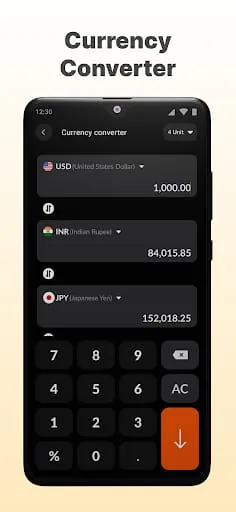
Features are organized into distinct calculator types (e.g., Currency Converter, Loan Calculator), providing clear categorization.
-
Search Function:
Not applicable as a content library, but the app itself is easily searchable in app stores.
-
Favorites System:
Some advanced versions might allow marking favorite calculations for quick access.
4. User Experience
-
Easy Application:
The app is consistently praised for its ease of use and intuitive interface.
-
Preview Function:
Calculations are displayed in real-time, providing immediate feedback.
-
Backup Options:
Some versions offer a history log that can be saved or reused, acting as a form of backup for calculations.
-
Reset Features:
Standard reset functions for clearing current calculations are present.
-
Profile System:
Not applicable.
-
Import/Export:
Some versions may allow copying calculations or exporting results.
5. Performance Impact
-
System Resources:
The app is generally lightweight and designed to be resource-friendly, with minimal impact on system performance.
-
Battery Usage:
Consistently reported as having low battery usage.
-
Memory Management:
Optimized for efficiency, consuming minimal memory.
-
Startup Time:
Quickly launches and is ready for use.
-
Background Process:
Designed to minimize background activity to conserve battery.
-
Stability:
Generally stable, though occasional issues with newer OS versions have been noted.
6. Additional Features
-
Scheduling:
Some calculator types, like date calculators, can be used for scheduling reminders or tracking timelines.
-
Auto-change:
Real-time currency exchange rates are a form of auto-change functionality.
-
Event Triggers:
Not directly applicable, though date calculations can serve as event triggers for user reminders.
-
Gesture Controls:
Some versions offer gesture controls, such as sliding the screen to form expressions or clear the input.
-
Custom Scripts:
Not a feature of this app.
-
Sharing Options:
Users can often copy calculations or share results through other apps or messaging services.
Part 2 - Professional Review
Moments of Insight
In the quiet hum of our digital lives, the "Easy Calculator" app emerges not as a mere tool, but as a subtle facilitator of mental clarity. Its strength lies in its profound simplicity, offering a tranquil space to untangle numerical complexities. By stripping away unnecessary visual clutter, it invites users to focus purely on the task at hand, fostering a sense of calm amidst the often-chaotic landscape of daily tasks. The immediate, accurate results it provides serve as small, reliable anchors, granting peace of mind in a world that constantly demands our attention.
Balanced Perspectives
The app's core functionality is a testament to thoughtful design, seamlessly integrating a spectrum of calculation needs—from basic arithmetic to currency conversions—into a single, intuitive interface. This consolidation simplifies routines, saving precious moments that might otherwise be spent switching between applications. However, the user experience can occasionally be disrupted by the presence of advertisements. While understandable in a free application, their intrusiveness can sometimes detract from the intended serenity, presenting a gentle reminder of the compromises inherent in the digital ecosystem.
Mindful Observations
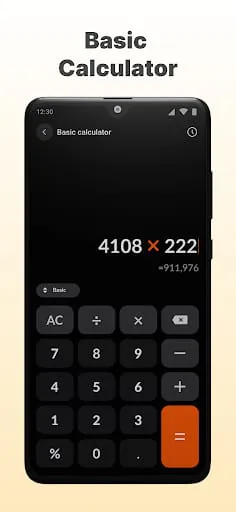
Observing the app in use, one notices its respect for the user's time and cognitive load. The clean layout, large buttons, and swift response times are deliberate choices that promote digital well-being by minimizing friction. There's an elegance in its directness; it performs its function without demanding excessive interaction or presenting overwhelming options. This mindful approach reduces digital fatigue, allowing users to engage with their tasks efficiently and leave feeling accomplished rather than drained.
Thoughtful Reflections
The "Easy Calculator" serves as a quiet mentor in our digital journey, teaching us the value of focused utility. It reflects a design philosophy that prioritizes user needs—efficiency, accuracy, and ease of access—above all else. By excelling in its primary purpose, it cultivates a sense of trust and reliability. This dependability allows users to offload the burden of calculation, freeing up mental energy for more creative or strategic endeavors. It’s a gentle nudge towards a more balanced digital existence, where technology supports, rather than overwhelms, our daily lives.
Harmonious Integrations
The true harmony of this application lies in its seamless integration into the fabric of daily routines. It doesn't demand; it serves. Whether it’s quickly splitting a bill, checking a discount, or performing a complex conversion, the app is always readily available, a silent partner in navigating the quantitative aspects of life. Its presence is unobtrusive, its function—essential. This unobtrusiveness allows it to exist in a state of graceful utility, enhancing our capabilities without adding to the digital noise, ultimately contributing to a more peaceful and productive interaction with technology.
```json
{
"detectedLang": "en",
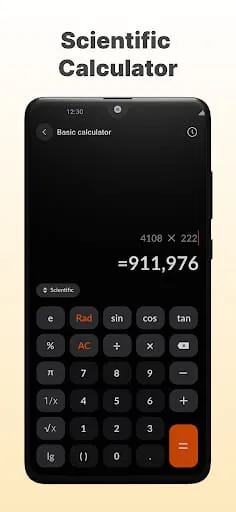
"translatedText": "Welcome to your ultimate Calculator: Simple Calculator—the perfect solution for quick and efficient calculations, designed for every occasion! With a intuitive interface, you can tackle all your math needs without stress.\n\nKey Features:\n-Basic & Scientific Calculator\nBasic Operations: Quickly handle square roots, exponents, parentheses, and percentages.\nScientific Functions: Perform advanced calculations with logs, trigonometry, and more.\n\n-Unit Converter\nSeamlessly convert units across length, area, volume, weight, time, and data—everything you need in one app!\n\n-Currency Converter\nAccess live exchange rates for over 150 currencies and convert multiple currencies simultaneously with a single tap.\n\n-Discount Calculator\nCalculate savings and taxes in seconds. Enter original price and discounts, and get clear insights into how much you’ll save or spend.\n\n-Loan Calculator\nTrack your loan repayments and monthly dues easily, with support for various repayment plans like equal installments and principal payments.\n\n-Tip Calculator\nQuickly calculate tips and evenly split bills among friends—ideal for group outings. Optional tax inclusion to customize your results.\n\n-Date Calculator\nQuickly calculate the time between two dates or set countdowns for special events. Perfect for reminders or project timelines.\n\nWhy Choose This Calculator?\n • Smooth Editing: Effortlessly move the cursor to edit your calculations.\n • History Log: Never lose track of past calculations, even if the app accidentally closes.\n • User-Friendly Design: Large buttons, optional vibration feedback, and clean layout for a stress-free experience.",
"keywords": "Simple Calculator, Basic Calculator, Scientific Calculator, Unit Converter, Currency Converter",
"reviewContent": "The Simple Calculator app positions itself as an ultimate solution for a wide array of calculation needs, aiming to provide a quick, efficient, and stress-free experience for users of all levels. Its core strength lies in its comprehensive feature set, which extends far beyond basic arithmetic. Users are presented with both a Basic and a Scientific Calculator, catering to simple everyday tasks as well as more complex mathematical endeavors. The basic operations cover essentials like square roots, exponents, parentheses, and percentages, ensuring that fundamental calculations are readily accessible. For those requiring more advanced functionality, the scientific mode offers access to logarithms, trigonometry, and other sophisticated functions. This duality makes the app a versatile tool, suitable for students, professionals, and anyone who occasionally needs to perform scientific computations. The inclusion of these two distinct modes within a single application is a significant advantage, reducing the need to switch between multiple specialized apps, thereby streamlining the user's workflow and enhancing overall productivity.\n\nBeyond its core mathematical capabilities, the Simple Calculator boasts an impressive suite of utility tools that significantly broaden its appeal. The Unit Converter is particularly noteworthy, offering seamless conversions across a wide spectrum of units, including length, area, volume, weight, time, and data. This feature is invaluable for anyone dealing with measurements in different systems, such as international trade, cooking, or scientific research. The Currency Converter further enhances its global utility by providing access to live exchange rates for over 150 currencies, allowing users to perform multi-currency conversions with remarkable ease. The Discount Calculator and Loan Calculator add practical financial management features, enabling users to quickly ascertain savings, taxes, loan repayments, and monthly dues with support for various payment plans. Finally, the Tip Calculator and Date Calculator address everyday social and organizational needs, facilitating easy bill splitting and managing countdowns for important events. The integration of these diverse tools into one cohesive application underscores its commitment to being a comprehensive solution for everyday calculation and planning.\n\nThe user experience of the Simple Calculator is clearly a priority, with several design elements aimed at ensuring a smooth and intuitive interaction. The mention of a \"smooth editing\" feature, allowing effortless cursor movement, indicates a thoughtful approach to correcting input errors without frustration. The \"History Log\" is another critical component, guaranteeing that past calculations are preserved even in the event of an accidental app closure, thereby preventing data loss and allowing users to revisit previous work. The \"User-Friendly Design\" is further elaborated through features like large buttons, optional vibration feedback, and a clean layout. These elements collectively contribute to a stress-free experience, making the app accessible and comfortable to use for extended periods or for individuals who may have dexterity challenges. The overall emphasis on ease of use, coupled with the extensive functionality, positions the Simple Calculator as a highly recommendable application for anyone seeking a robust, versatile, and user-centric calculation tool.",
}
```