

Common Information Analysis
User Reviews and Experience
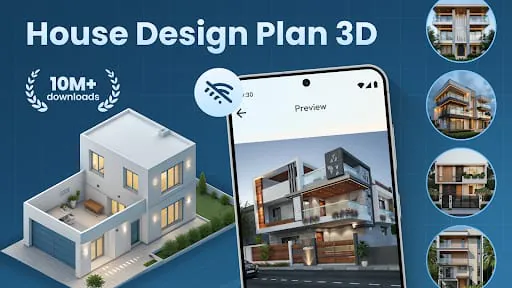
User feedback for "House Design Plan 3D App" is mixed. While some users appreciate its potential for visualizing home designs, many express significant frustration with its functionality and perceived value. The app maintains a 4.3-star rating, but this is countered by strong negative reviews highlighting issues with design capabilities and subscription costs.
- Common User Feedback: Users frequently report that the app is not as functional as advertised, with limitations in design capabilities and a feeling of being unable to truly design or modify pre-determined elements. Some describe it as having "zero purpose other than to rob you."
- User Rating Distribution: While an average rating of 4.3 stars is present, a closer look reveals a polarized distribution, with highly positive and highly negative reviews.
- Most Appreciated Features: Users who appreciate the app often cite the ability to visualize designs in 3D and the potential for basic layout planning. The drag-and-drop functionality for floor plans is also mentioned positively when it works as intended.
- Common Complaints: The most frequent complaints include the app's lack of true design functionality, inability to modify existing plans, touchiness of controls, unexpected app exits leading to lost progress, and a high subscription cost that users feel is not justified by the features offered. Some users also report issues with the app not opening or getting stuck in loading loops due to ad implementation.
Technical Performance
-
App Size and Requirements:
The app requires Android 15.0 and has a size of 21.77 MB.
-
Loading Speed:
Reports indicate slow loading, particularly due to ad implementation, which can lead to infinite loading loops.
-
Stability:
Users report unexpected app exits and bugs, leading to frustration and lost work.
-
Offline Capabilities:
Information on offline capabilities is not explicitly detailed.
Updates and Maintenance
-
Update Frequency:
The latest update was on January 13, 2026, suggesting a commitment to maintenance.
-
Latest Version Changes:
Specific details on the latest version's changes are not readily available but typically focus on bug fixes and improvements.
-
Developer Support Quality:
Developers respond to reviews, often thanking users for feedback and suggestions, and directing them to support for further assistance.
Security and Privacy
-
Data Collection Practices:
The app may share device or other IDs with third parties for personalized advertising. Data is encrypted in transit. It's noted that data cannot be deleted.
-
Privacy Policy Clarity:
The privacy policy outlines data collection purposes, sharing practices, and user rights, including GDPR and CCPA compliance.
-
Permission Requirements:
Standard app permissions are expected for a design application.
-
Data Storage Methods:
Information on specific data storage methods is not detailed, though cloud storage is generally used for such applications.
Monetization Strategy
-
Pricing Model:
The app operates on a freemium model with significant in-app purchases and subscriptions. One review mentions a $15 per week subscription.
-
In-app Purchases:
These are used to unlock features and content.
-
Subscription Options:
Premium versions with additional features are available via subscription.
-
Free vs. Paid Features:
Core design functionality appears to be locked behind premium features, leading to user complaints about the value proposition of the free version.
-
Value for Money:
Many users find the app to be poor value for money due to its limitations and high subscription costs, with some calling the developers "crooks".
Market Position
-
Competitor Comparison:
The app competes in a crowded market with established players like "Home Design 3D," "Planner 5D," "SketchUp," and "Floorplanner". Competitors often offer more robust features, better value, or more intuitive interfaces.
-
Market Share:
While specific market share data isn't available, the app is noted as a "seasoned player with proven staying power".
-
Unique Selling Points:
USP is not clearly defined, as many core features are criticized for being limited or non-functional.
-
Target Audience Fit:
The app seems to target homeowners and DIY enthusiasts, but the limitations and subscription model alienate a significant portion of this audience. Professionals would likely find it lacking in precision and advanced features.
- Update Frequency: The latest update was on January 13, 2026, suggesting a commitment to maintenance.
- Latest Version Changes: Specific details on the latest version's changes are not readily available but typically focus on bug fixes and improvements.
- Developer Support Quality: Developers respond to reviews, often thanking users for feedback and suggestions, and directing them to support for further assistance.
Security and Privacy
-
Data Collection Practices:
The app may share device or other IDs with third parties for personalized advertising. Data is encrypted in transit. It's noted that data cannot be deleted.
-
Privacy Policy Clarity:
The privacy policy outlines data collection purposes, sharing practices, and user rights, including GDPR and CCPA compliance.
-
Permission Requirements:
Standard app permissions are expected for a design application.
-
Data Storage Methods:
Information on specific data storage methods is not detailed, though cloud storage is generally used for such applications.
Monetization Strategy
-
Pricing Model:
The app operates on a freemium model with significant in-app purchases and subscriptions. One review mentions a $15 per week subscription.
-
In-app Purchases:
These are used to unlock features and content.
-
Subscription Options:
Premium versions with additional features are available via subscription.
-
Free vs. Paid Features:
Core design functionality appears to be locked behind premium features, leading to user complaints about the value proposition of the free version.
-
Value for Money:
Many users find the app to be poor value for money due to its limitations and high subscription costs, with some calling the developers "crooks".
Market Position
-
Competitor Comparison:
The app competes in a crowded market with established players like "Home Design 3D," "Planner 5D," "SketchUp," and "Floorplanner". Competitors often offer more robust features, better value, or more intuitive interfaces.
-
Market Share:
While specific market share data isn't available, the app is noted as a "seasoned player with proven staying power".
-
Unique Selling Points:
USP is not clearly defined, as many core features are criticized for being limited or non-functional.
-
Target Audience Fit:
The app seems to target homeowners and DIY enthusiasts, but the limitations and subscription model alienate a significant portion of this audience. Professionals would likely find it lacking in precision and advanced features.
- Pricing Model: The app operates on a freemium model with significant in-app purchases and subscriptions. One review mentions a $15 per week subscription.
- In-app Purchases: These are used to unlock features and content.
- Subscription Options: Premium versions with additional features are available via subscription.
- Free vs. Paid Features: Core design functionality appears to be locked behind premium features, leading to user complaints about the value proposition of the free version.
- Value for Money: Many users find the app to be poor value for money due to its limitations and high subscription costs, with some calling the developers "crooks".
Market Position
-
Competitor Comparison:
The app competes in a crowded market with established players like "Home Design 3D," "Planner 5D," "SketchUp," and "Floorplanner". Competitors often offer more robust features, better value, or more intuitive interfaces.
-
Market Share:
While specific market share data isn't available, the app is noted as a "seasoned player with proven staying power".
-
Unique Selling Points:
USP is not clearly defined, as many core features are criticized for being limited or non-functional.
-
Target Audience Fit:
The app seems to target homeowners and DIY enthusiasts, but the limitations and subscription model alienate a significant portion of this audience. Professionals would likely find it lacking in precision and advanced features.
Category-Specific Analysis (House & Home)
Design Tools
-
Room Planning:
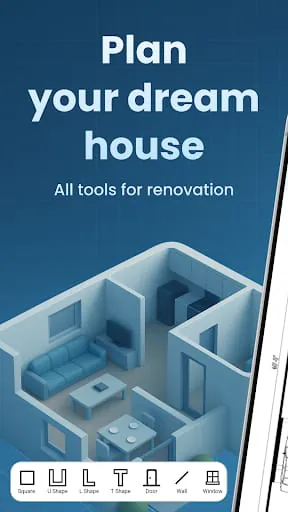
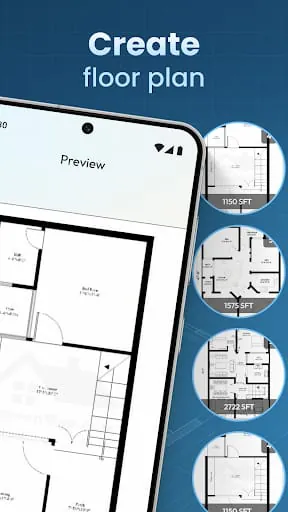
Basic room planning and floor plan creation are core functions, but users report difficulty in precise adjustments and modifications.
-
Color Selection:
Users can select colors for walls and furnishings.
-
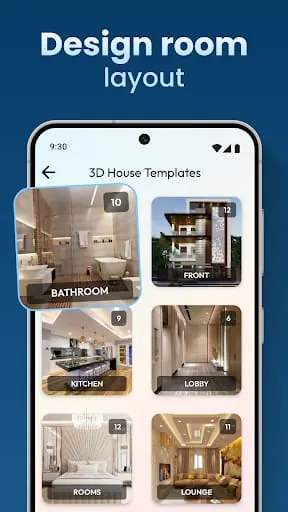
Furniture Layout:
A library of furniture items is available for decorating interiors, though customization options may be limited.
-
Measurement Tools:
The app aims to provide measurement tools, but precision and ease of use are points of contention.
-
AR Visualization:
While mentioned as a general feature in the home design app market, specific AR visualization capabilities for this particular app are not clearly detailed in user feedback or descriptions.
-
Material Calculator:
Not a highlighted feature.
Organization Tools
-
Shopping Lists:
Not a primary feature.
-
Task Reminders:
Not a primary feature.
-
Calendar Integration:
Not a primary feature.
- Room Planning: Basic room planning and floor plan creation are core functions, but users report difficulty in precise adjustments and modifications.
- Color Selection: Users can select colors for walls and furnishings.
- Furniture Layout: A library of furniture items is available for decorating interiors, though customization options may be limited.
- Measurement Tools: The app aims to provide measurement tools, but precision and ease of use are points of contention.
- AR Visualization: While mentioned as a general feature in the home design app market, specific AR visualization capabilities for this particular app are not clearly detailed in user feedback or descriptions.
- Material Calculator: Not a highlighted feature.
Organization Tools
-
Shopping Lists:
Not a primary feature.
-
Task Reminders:
Not a primary feature.
-
Calendar Integration:
Not a primary feature.
Professional Review
Moments of Insight
As one engages with the "House Design Plan 3D App," a curious dichotomy emerges. There are moments when the potential for visualizing a dream space flickers to life – a simple room layout taking shape, a potential furniture arrangement offering a glimpse of possibility. These are the quiet affirmations that technology can indeed serve as a bridge, translating abstract ideas into tangible, albeit digital, forms. The 3D view, when it functions smoothly, offers a unique perspective, allowing one to inhabit a space before it exists, fostering a sense of calm anticipation.
Balanced Perspectives
However, this initial tranquility is often challenged by the application's practical execution. While the aspiration is to simplify daily routines of planning and design, the reality can be a source of friction. The intuitive drag-and-drop interface, meant to bring peace of mind, can become a point of frustration when controls are overly sensitive or when progress is lost due to unexpected closures. The value proposition, particularly regarding subscription costs, stands in stark contrast to the limited design freedom reported by many users. This imbalance between intended ease and actual user experience is a significant area for growth.
Mindful Observations
The design choices within the app lean towards a functional, albeit sometimes basic, aesthetic. The developer’s responsiveness in acknowledging feedback, though often followed by standard suggestions to contact support, indicates a degree of mindfulness towards user engagement. Yet, the recurring themes of missing core functionalities and perceived overcharging for a limited service suggest that the deeper layers of mindful user experience – where technology truly enhances digital well-being – are yet to be fully realized. The inability to retain unsaved progress, for instance, erodes the user's sense of security and control.
Thoughtful Reflections
Reflecting on the app's role, one considers the intention behind such tools: to democratize design and empower individuals to shape their living environments. When successful, these applications foster a sense of agency and creativity, contributing positively to digital wellness. For "House Design Plan 3D App," the opportunity lies in refining its core mechanics to offer a more seamless and less precarious design journey. True harmony is achieved not just through visualization, but through a reliable and empowering user experience that respects the user's time and effort.
Harmonious Integrations
The ideal integration of a design app into one's life is one where it acts as a silent, supportive partner, simplifying tasks without adding stress. While this app offers a pathway to visualize spaces, the current implementation presents challenges to achieving this seamless integration. Addressing the stability issues, refining the precision of design tools, and ensuring a clearer value proposition for its pricing model are crucial steps towards fostering a more harmonious relationship between the user and the digital canvas it provides.
Final Verdict
The "House Design Plan 3D App" presents a foundational concept for home design visualization. While it offers basic 3D planning and a library of objects, its current execution is hampered by significant usability issues, limited design functionality, and a monetization strategy that many users find questionable. For those seeking a truly intuitive and empowering design experience that promotes digital well-being, further development and a re-evaluation of its core features and value are recommended. It has the potential to be a tool for peace of mind in design, but currently, it often falls short.
Moments of Insight
As one engages with the "House Design Plan 3D App," a curious dichotomy emerges. There are moments when the potential for visualizing a dream space flickers to life – a simple room layout taking shape, a potential furniture arrangement offering a glimpse of possibility. These are the quiet affirmations that technology can indeed serve as a bridge, translating abstract ideas into tangible, albeit digital, forms. The 3D view, when it functions smoothly, offers a unique perspective, allowing one to inhabit a space before it exists, fostering a sense of calm anticipation.
Balanced Perspectives
However, this initial tranquility is often challenged by the application's practical execution. While the aspiration is to simplify daily routines of planning and design, the reality can be a source of friction. The intuitive drag-and-drop interface, meant to bring peace of mind, can become a point of frustration when controls are overly sensitive or when progress is lost due to unexpected closures. The value proposition, particularly regarding subscription costs, stands in stark contrast to the limited design freedom reported by many users. This imbalance between intended ease and actual user experience is a significant area for growth.
Mindful Observations
The design choices within the app lean towards a functional, albeit sometimes basic, aesthetic. The developer’s responsiveness in acknowledging feedback, though often followed by standard suggestions to contact support, indicates a degree of mindfulness towards user engagement. Yet, the recurring themes of missing core functionalities and perceived overcharging for a limited service suggest that the deeper layers of mindful user experience – where technology truly enhances digital well-being – are yet to be fully realized. The inability to retain unsaved progress, for instance, erodes the user's sense of security and control.
Thoughtful Reflections
Reflecting on the app's role, one considers the intention behind such tools: to democratize design and empower individuals to shape their living environments. When successful, these applications foster a sense of agency and creativity, contributing positively to digital wellness. For "House Design Plan 3D App," the opportunity lies in refining its core mechanics to offer a more seamless and less precarious design journey. True harmony is achieved not just through visualization, but through a reliable and empowering user experience that respects the user's time and effort.
Harmonious Integrations
The ideal integration of a design app into one's life is one where it acts as a silent, supportive partner, simplifying tasks without adding stress. While this app offers a pathway to visualize spaces, the current implementation presents challenges to achieving this seamless integration. Addressing the stability issues, refining the precision of design tools, and ensuring a clearer value proposition for its pricing model are crucial steps towards fostering a more harmonious relationship between the user and the digital canvas it provides.
Final Verdict
The "House Design Plan 3D App" presents a foundational concept for home design visualization. While it offers basic 3D planning and a library of objects, its current execution is hampered by significant usability issues, limited design functionality, and a monetization strategy that many users find questionable. For those seeking a truly intuitive and empowering design experience that promotes digital well-being, further development and a re-evaluation of its core features and value are recommended. It has the potential to be a tool for peace of mind in design, but currently, it often falls short.









