

User Reviews and Experience
Overall User Satisfaction
User satisfaction appears to be mixed. While some users praise the app for its simplicity and effectiveness in creating ID photos at a lower cost than professional services, others express significant frustration with intrusive ads and a perceived lack of advertised features, such as background clearing. Some reviews suggest that the free version might not fully meet expectations, hinting at a potential difference in the paid version.
Common User Feedback
Positive feedback frequently highlights the app's ease of use and its ability to generate photos suitable for printing at home, saving both time and money. Conversely, negative feedback often centers on intrusive advertising, disappointment with the app's inability to perform certain functions (like background removal), and issues with saving or printing locations.
User Rating Distribution
While specific rating distributions are not detailed, aggregate ratings suggest a generally positive reception. For instance, on the Apple App Store, the app has a rating of 4.8 stars based on 3.4K ratings. On other platforms, it is listed with an average rating of 4.7 stars.
Most Appreciated Features
Users appreciate the app's ability to create ID photo data quickly from a smartphone, the flexibility in specifying various ID photo sizes, and the option to retake photos multiple times, making it suitable for children. The cost-effectiveness compared to traditional photo booths is also a significant advantage.
Common Complaints
The most recurring complaints include intrusive advertisements that disrupt the user experience, the app not living up to advertised features (e.g., background removal not working), and difficulties with printing or saving the generated photos.
Technical Performance
App Size and Requirements
The app size varies slightly by version but is generally around 43 MB. It requires Android 6.0+ (API 23) or later versions, and is also available on iOS.
Battery Consumption
Information regarding specific battery consumption is not readily available. However, typical photo editing applications can have moderate battery usage depending on the complexity of operations performed.
Loading Speed
Specific loading speeds are not detailed, but user feedback suggests that the app is generally quick and easy to operate for its intended purpose.
Stability
Stability issues are not widely reported, although some users have experienced problems with printing functionality, which might indicate occasional stability concerns in specific use cases.
Offline Capabilities
The app's core functionality of creating and saving ID photo data appears to be available offline, as it focuses on image manipulation and generation. However, specific features or the ability to print might require an internet connection.
Updates and Maintenance
Update Frequency
The app receives regular updates, with new versions being released frequently. For example, version 1.1.91 was released around December 2025, and other versions like 1.1.90 and 1.1.78 were also available in late 2025 and 2024 respectively.
Latest Version Changes
Recent updates primarily focus on aligning the app with Google Play policies. Specific feature additions or significant changes in the latest versions are not detailed in the provided information.
Bug Fix Response Time
There is no specific information available regarding the developer's bug fix response time. However, the frequency of updates suggests ongoing maintenance.
Developer Support Quality
Developer support quality is not explicitly mentioned in the reviews. Contact is typically through a developer email (
[email protected]
).
Security and Privacy
Data Collection Practices
The app may collect data such as app activity, app information and performance, and device or other IDs. It is noted that this data might be shared with third parties.
Privacy Policy Clarity
While privacy policies are mentioned by developers like siranet GK, detailed clarity and accessibility of the policy for users are not thoroughly described in the provided snippets. It's stated that data privacy practices may vary based on usage, region, and age.
Security Measures
The app states that data is encrypted in transit. However, more in-depth security measures are not specified.
Permission Requirements
Specific permission requirements are not detailed, but typical photography apps might require access to the camera and storage. Some APK download sites list 11 permissions for the app.
Data Storage Methods
The developer provided information that data is encrypted in transit. For photo processing, temporary storage on the server is mentioned for up to 6 hours, after which the data is deleted.
Monetization Strategy
Pricing Model
The app is generally offered as free to download. However, there are in-app purchases, which include an option to "Remove ads for 1 month" for $8.99 on the Apple App Store. One user reported being unexpectedly charged for the app, suggesting potential confusion around its free or paid features.
In-app Purchases
The primary in-app purchase mentioned is the removal of ads for a limited duration.
Subscription Options
A subscription option for removing ads is available. One user expressed concern about being charged multiple times and sought help to cancel a subscription, although the specifics of subscription models beyond ad removal are not clear.
Free vs Paid Features
The free version provides core functionality for creating ID photos. The paid option appears to be primarily for removing advertisements. Some users feel that certain advertised features might be locked behind a paid version or are not functional in the free version.
Value for Money
For users who find the core functionality sufficient and can tolerate ads or opt for the ad-removal purchase, the app offers good value by significantly reducing the cost of obtaining ID photos compared to professional services.
Market Position
Competitor Comparison
The app competes in the crowded market of photo editing and passport/ID photo creation tools. Alternatives include apps like "Passport Photo Maker & Checker," "Passport Photo - ID Photo," and "ID Photo: Passport Photo Maker." Its main competitors offer similar functionalities, with differentiation often coming down to user interface, feature set, and pricing.
Market Share
Specific market share data is not available. However, the app has a significant number of downloads, with figures reaching over 10 million on Google Play and over 115,000 reviews cited on AppFollow.
Unique Selling Points
The app's key selling points are its user-friendly interface for creating ID photos, customizable size options, and the cost savings it offers users compared to traditional photo studios.
Target Audience Fit
The app is well-suited for individuals needing to create official identification photos for passports, visas, driver's licenses, or other documents, especially those looking for a budget-friendly and convenient solution.
Camera Features
Manual Controls
The app does not appear to offer manual camera controls. Its focus is on editing existing photos or using the phone's camera for basic capture.
Shooting Modes
No specific shooting modes are mentioned. The app likely utilizes the standard camera interface of the device.
Focus Options
Focusing is likely handled by the device's native camera capabilities.
Exposure Control
Exposure control is not a specified feature of the app's camera interface.
Timer Functions
Timer functions are not explicitly listed as a feature.
Grid/Composition Tools
Grid or composition tools are not mentioned. The app's focus is on post-capture editing for ID photo requirements.
Editing Capabilities
Basic Adjustments
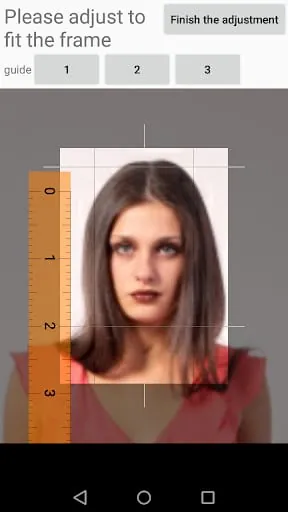
The app allows for basic adjustments related to cropping to specific ID photo dimensions and potentially some color adjustments, including black and white conversion.
Filter Quality
Filter quality is not a primary focus, as the app aims for standard ID photo compliance rather than artistic enhancement.
Advanced Editing Tools
Advanced editing tools are generally not offered. The app's capabilities are streamlined for ID photo creation.
Retouching Features
Specific retouching features are not mentioned. The goal is to produce compliant ID photos, not to alter appearance significantly.
Layer Support
Layer support is not a feature of this application.
Selective Editing
Selective editing capabilities are not provided, as the focus is on overall image parameters for ID photos.
Creative Tools
Effects Library
The app does not feature an effects library, as its purpose is functional rather than creative.
Template System
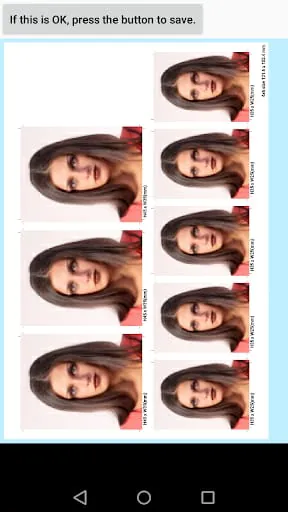
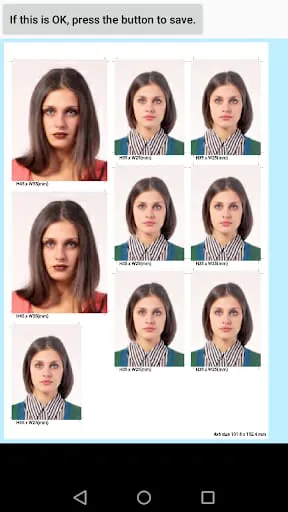
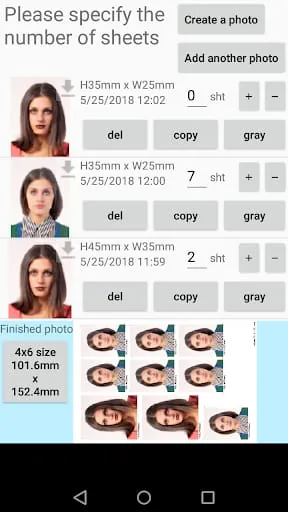
The app does offer a form of template system by allowing users to specify print sizes (e.g., 4x6 inches) and arrange multiple ID photos on a single print.
Collage Maker
While not a traditional collage maker, the ability to place multiple ID photos on one print sheet acts as a simplified collage function for printing purposes.
Text/Sticker Tools
Text and sticker tools are not part of the app's functionality.
Frame Options
Frame options are not a feature, as ID photos typically do not include decorative frames.
Artistic Filters
Artistic filters are not available; the app adheres to the requirements for official identification photos.
Output & Sharing
Export Quality
The app creates JPEG files, which are standard for most digital cameras and smartphones, implying a decent export quality suitable for printing.
Format Options
The primary output format is JPEG.
Batch Processing
The app allows for placing multiple ID photos on a single print sheet, which can be considered a form of batch output for printing.
Social Integration
Social media integration is not a feature of this application.
Cloud Backup
Cloud backup options are not specified for the generated ID photos.
Print Services
The app facilitates printing by creating files compatible with home printers and standard photo print sizes (e.g., 4x6 inches), enabling users to print themselves or at local print shops.
Professional Features
RAW Support
RAW image format support is not available.
Histogram
Histogram display for image analysis is not a feature.
Curve Adjustment
Advanced curve adjustments for color and tone are not offered.
Color Management
Sophisticated color management tools are absent; the app focuses on producing compliant, standard color ID photos.
Preset System
A preset system for editing styles is not a feature, as the app is utility-focused.
Watermark Tools
Watermarking capabilities are not provided.
Performance
Processing Speed
The app is generally described as fast and easy to use for its core function of creating ID photos.
Memory Usage
Specific memory usage metrics are not provided, but the app is relatively lightweight for its function.
Storage Management
Generated ID photos are saved as JPEG files to the device's storage. Management of these files would rely on the device's native file system.
Battery Impact
Battery impact is not explicitly detailed, but typical photo editing tasks would consume moderate battery power.
Background Tasks
There is no indication of significant background tasks that would impact performance or battery life.
Cache System
Information regarding a specific cache system is not available.
Moments of Insight
The application offers a singular, focused purpose: to democratize the creation of official identification photographs. It elegantly strips away the complexities often associated with professional photography, allowing users to leverage their existing smartphone cameras for a task that can often be a source of stress and expense. The insight here is the recognition that even mundane tasks can be significantly improved by thoughtful, accessible technology.
Balanced Perspectives
While the application successfully simplifies the process of generating ID photos, its user experience is somewhat marred by intrusive advertising in the free version. Some users have also reported that certain functionalities, like background removal, may not perform as expected. This presents a duality: a powerful tool for cost-saving and convenience, yet one that requires user tolerance for ads or a potential upgrade for a smoother, more complete experience.
Mindful Observations
The design choices lean towards utility over aesthetics, which aligns with its practical purpose. The ability to retry photo capture multiple times without penalty is a considerate touch, particularly for those creating photos for children. This reflects an understanding of user needs beyond mere technical execution, promoting a less rushed and more comfortable process.
Thoughtful Reflections
In a digital world that often encourages constant engagement, this application offers a moment of focused productivity. It addresses a specific need efficiently, allowing users to complete a task and then disengage, thereby contributing to a more balanced digital routine. Its existence prompts reflection on how technology can serve specific, practical needs without demanding continuous interaction.
Harmonious Integrations
The application harmoniously integrates with the user's existing device by utilizing the smartphone's camera and saving files in standard formats (JPEG) compatible with home printers. This seamless integration minimizes the learning curve and empowers users to manage the entire process from capture to print, creating a self-contained, efficient workflow.
Final Verdict
This application serves as a practical bridge between human necessity and digital solution, providing an accessible and cost-effective way to produce ID photographs. While there are areas for refinement, particularly concerning advertisements and feature consistency, its core functionality offers a valuable service that promotes a sense of control and economy for the user.
Overall User Satisfaction
User satisfaction appears to be mixed. While some users praise the app for its simplicity and effectiveness in creating ID photos at a lower cost than professional services, others express significant frustration with intrusive ads and a perceived lack of advertised features, such as background clearing. Some reviews suggest that the free version might not fully meet expectations, hinting at a potential difference in the paid version.
Common User Feedback
Positive feedback frequently highlights the app's ease of use and its ability to generate photos suitable for printing at home, saving both time and money. Conversely, negative feedback often centers on intrusive advertising, disappointment with the app's inability to perform certain functions (like background removal), and issues with saving or printing locations.
User Rating Distribution
While specific rating distributions are not detailed, aggregate ratings suggest a generally positive reception. For instance, on the Apple App Store, the app has a rating of 4.8 stars based on 3.4K ratings. On other platforms, it is listed with an average rating of 4.7 stars.
Most Appreciated Features
Users appreciate the app's ability to create ID photo data quickly from a smartphone, the flexibility in specifying various ID photo sizes, and the option to retake photos multiple times, making it suitable for children. The cost-effectiveness compared to traditional photo booths is also a significant advantage.
Common Complaints
The most recurring complaints include intrusive advertisements that disrupt the user experience, the app not living up to advertised features (e.g., background removal not working), and difficulties with printing or saving the generated photos.
App Size and Requirements
The app size varies slightly by version but is generally around 43 MB. It requires Android 6.0+ (API 23) or later versions, and is also available on iOS.
Battery Consumption
Information regarding specific battery consumption is not readily available. However, typical photo editing applications can have moderate battery usage depending on the complexity of operations performed.
Loading Speed
Specific loading speeds are not detailed, but user feedback suggests that the app is generally quick and easy to operate for its intended purpose.
Stability
Stability issues are not widely reported, although some users have experienced problems with printing functionality, which might indicate occasional stability concerns in specific use cases.
Offline Capabilities
The app's core functionality of creating and saving ID photo data appears to be available offline, as it focuses on image manipulation and generation. However, specific features or the ability to print might require an internet connection.
Updates and Maintenance
Update Frequency
The app receives regular updates, with new versions being released frequently. For example, version 1.1.91 was released around December 2025, and other versions like 1.1.90 and 1.1.78 were also available in late 2025 and 2024 respectively.
Latest Version Changes
Recent updates primarily focus on aligning the app with Google Play policies. Specific feature additions or significant changes in the latest versions are not detailed in the provided information.
Bug Fix Response Time
There is no specific information available regarding the developer's bug fix response time. However, the frequency of updates suggests ongoing maintenance.
Developer Support Quality
Developer support quality is not explicitly mentioned in the reviews. Contact is typically through a developer email (
[email protected]
).
Security and Privacy
Data Collection Practices
The app may collect data such as app activity, app information and performance, and device or other IDs. It is noted that this data might be shared with third parties.
Privacy Policy Clarity
While privacy policies are mentioned by developers like siranet GK, detailed clarity and accessibility of the policy for users are not thoroughly described in the provided snippets. It's stated that data privacy practices may vary based on usage, region, and age.
Security Measures
The app states that data is encrypted in transit. However, more in-depth security measures are not specified.
Permission Requirements
Specific permission requirements are not detailed, but typical photography apps might require access to the camera and storage. Some APK download sites list 11 permissions for the app.
Data Storage Methods
The developer provided information that data is encrypted in transit. For photo processing, temporary storage on the server is mentioned for up to 6 hours, after which the data is deleted.
Monetization Strategy
Pricing Model
The app is generally offered as free to download. However, there are in-app purchases, which include an option to "Remove ads for 1 month" for $8.99 on the Apple App Store. One user reported being unexpectedly charged for the app, suggesting potential confusion around its free or paid features.
In-app Purchases
The primary in-app purchase mentioned is the removal of ads for a limited duration.
Subscription Options
A subscription option for removing ads is available. One user expressed concern about being charged multiple times and sought help to cancel a subscription, although the specifics of subscription models beyond ad removal are not clear.
Free vs Paid Features
The free version provides core functionality for creating ID photos. The paid option appears to be primarily for removing advertisements. Some users feel that certain advertised features might be locked behind a paid version or are not functional in the free version.
Value for Money
For users who find the core functionality sufficient and can tolerate ads or opt for the ad-removal purchase, the app offers good value by significantly reducing the cost of obtaining ID photos compared to professional services.
Market Position
Competitor Comparison
The app competes in the crowded market of photo editing and passport/ID photo creation tools. Alternatives include apps like "Passport Photo Maker & Checker," "Passport Photo - ID Photo," and "ID Photo: Passport Photo Maker." Its main competitors offer similar functionalities, with differentiation often coming down to user interface, feature set, and pricing.
Market Share
Specific market share data is not available. However, the app has a significant number of downloads, with figures reaching over 10 million on Google Play and over 115,000 reviews cited on AppFollow.
Unique Selling Points
The app's key selling points are its user-friendly interface for creating ID photos, customizable size options, and the cost savings it offers users compared to traditional photo studios.
Target Audience Fit
The app is well-suited for individuals needing to create official identification photos for passports, visas, driver's licenses, or other documents, especially those looking for a budget-friendly and convenient solution.
Camera Features
Manual Controls
The app does not appear to offer manual camera controls. Its focus is on editing existing photos or using the phone's camera for basic capture.
Shooting Modes
No specific shooting modes are mentioned. The app likely utilizes the standard camera interface of the device.
Focus Options
Focusing is likely handled by the device's native camera capabilities.
Exposure Control
Exposure control is not a specified feature of the app's camera interface.
Timer Functions
Timer functions are not explicitly listed as a feature.
Grid/Composition Tools
Grid or composition tools are not mentioned. The app's focus is on post-capture editing for ID photo requirements.
Editing Capabilities
Basic Adjustments
The app allows for basic adjustments related to cropping to specific ID photo dimensions and potentially some color adjustments, including black and white conversion.
Filter Quality
Filter quality is not a primary focus, as the app aims for standard ID photo compliance rather than artistic enhancement.
Advanced Editing Tools
Advanced editing tools are generally not offered. The app's capabilities are streamlined for ID photo creation.
Retouching Features
Specific retouching features are not mentioned. The goal is to produce compliant ID photos, not to alter appearance significantly.
Layer Support
Layer support is not a feature of this application.
Selective Editing
Selective editing capabilities are not provided, as the focus is on overall image parameters for ID photos.
Creative Tools
Effects Library
The app does not feature an effects library, as its purpose is functional rather than creative.
Template System
The app does offer a form of template system by allowing users to specify print sizes (e.g., 4x6 inches) and arrange multiple ID photos on a single print.
Collage Maker
While not a traditional collage maker, the ability to place multiple ID photos on one print sheet acts as a simplified collage function for printing purposes.
Text/Sticker Tools
Text and sticker tools are not part of the app's functionality.
Frame Options
Frame options are not a feature, as ID photos typically do not include decorative frames.
Artistic Filters
Artistic filters are not available; the app adheres to the requirements for official identification photos.
Output & Sharing
Export Quality
The app creates JPEG files, which are standard for most digital cameras and smartphones, implying a decent export quality suitable for printing.
Format Options
The primary output format is JPEG.
Batch Processing
The app allows for placing multiple ID photos on a single print sheet, which can be considered a form of batch output for printing.
Social Integration
Social media integration is not a feature of this application.
Cloud Backup
Cloud backup options are not specified for the generated ID photos.
Print Services
The app facilitates printing by creating files compatible with home printers and standard photo print sizes (e.g., 4x6 inches), enabling users to print themselves or at local print shops.
Professional Features
RAW Support
RAW image format support is not available.
Histogram
Histogram display for image analysis is not a feature.
Curve Adjustment
Advanced curve adjustments for color and tone are not offered.
Color Management
Sophisticated color management tools are absent; the app focuses on producing compliant, standard color ID photos.
Preset System
A preset system for editing styles is not a feature, as the app is utility-focused.
Watermark Tools
Watermarking capabilities are not provided.
Performance
Processing Speed
The app is generally described as fast and easy to use for its core function of creating ID photos.
Memory Usage
Specific memory usage metrics are not provided, but the app is relatively lightweight for its function.
Storage Management
Generated ID photos are saved as JPEG files to the device's storage. Management of these files would rely on the device's native file system.
Battery Impact
Battery impact is not explicitly detailed, but typical photo editing tasks would consume moderate battery power.
Background Tasks
There is no indication of significant background tasks that would impact performance or battery life.
Cache System
Information regarding a specific cache system is not available.
Moments of Insight
The application offers a singular, focused purpose: to democratize the creation of official identification photographs. It elegantly strips away the complexities often associated with professional photography, allowing users to leverage their existing smartphone cameras for a task that can often be a source of stress and expense. The insight here is the recognition that even mundane tasks can be significantly improved by thoughtful, accessible technology.
Balanced Perspectives
While the application successfully simplifies the process of generating ID photos, its user experience is somewhat marred by intrusive advertising in the free version. Some users have also reported that certain functionalities, like background removal, may not perform as expected. This presents a duality: a powerful tool for cost-saving and convenience, yet one that requires user tolerance for ads or a potential upgrade for a smoother, more complete experience.
Mindful Observations
The design choices lean towards utility over aesthetics, which aligns with its practical purpose. The ability to retry photo capture multiple times without penalty is a considerate touch, particularly for those creating photos for children. This reflects an understanding of user needs beyond mere technical execution, promoting a less rushed and more comfortable process.
Thoughtful Reflections
In a digital world that often encourages constant engagement, this application offers a moment of focused productivity. It addresses a specific need efficiently, allowing users to complete a task and then disengage, thereby contributing to a more balanced digital routine. Its existence prompts reflection on how technology can serve specific, practical needs without demanding continuous interaction.
Harmonious Integrations
The application harmoniously integrates with the user's existing device by utilizing the smartphone's camera and saving files in standard formats (JPEG) compatible with home printers. This seamless integration minimizes the learning curve and empowers users to manage the entire process from capture to print, creating a self-contained, efficient workflow.
Final Verdict
This application serves as a practical bridge between human necessity and digital solution, providing an accessible and cost-effective way to produce ID photographs. While there are areas for refinement, particularly concerning advertisements and feature consistency, its core functionality offers a valuable service that promotes a sense of control and economy for the user.
Update Frequency
The app receives regular updates, with new versions being released frequently. For example, version 1.1.91 was released around December 2025, and other versions like 1.1.90 and 1.1.78 were also available in late 2025 and 2024 respectively.
Latest Version Changes
Recent updates primarily focus on aligning the app with Google Play policies. Specific feature additions or significant changes in the latest versions are not detailed in the provided information.
Bug Fix Response Time
There is no specific information available regarding the developer's bug fix response time. However, the frequency of updates suggests ongoing maintenance.
Developer Support Quality
Developer support quality is not explicitly mentioned in the reviews. Contact is typically through a developer email ( [email protected] ).
Data Collection Practices
The app may collect data such as app activity, app information and performance, and device or other IDs. It is noted that this data might be shared with third parties.
Privacy Policy Clarity
While privacy policies are mentioned by developers like siranet GK, detailed clarity and accessibility of the policy for users are not thoroughly described in the provided snippets. It's stated that data privacy practices may vary based on usage, region, and age.
Security Measures
The app states that data is encrypted in transit. However, more in-depth security measures are not specified.
Permission Requirements
Specific permission requirements are not detailed, but typical photography apps might require access to the camera and storage. Some APK download sites list 11 permissions for the app.
Data Storage Methods
The developer provided information that data is encrypted in transit. For photo processing, temporary storage on the server is mentioned for up to 6 hours, after which the data is deleted.
Monetization Strategy
Pricing Model
The app is generally offered as free to download. However, there are in-app purchases, which include an option to "Remove ads for 1 month" for $8.99 on the Apple App Store. One user reported being unexpectedly charged for the app, suggesting potential confusion around its free or paid features.
In-app Purchases
The primary in-app purchase mentioned is the removal of ads for a limited duration.
Subscription Options
A subscription option for removing ads is available. One user expressed concern about being charged multiple times and sought help to cancel a subscription, although the specifics of subscription models beyond ad removal are not clear.
Free vs Paid Features
The free version provides core functionality for creating ID photos. The paid option appears to be primarily for removing advertisements. Some users feel that certain advertised features might be locked behind a paid version or are not functional in the free version.
Value for Money
For users who find the core functionality sufficient and can tolerate ads or opt for the ad-removal purchase, the app offers good value by significantly reducing the cost of obtaining ID photos compared to professional services.
Market Position
Competitor Comparison
The app competes in the crowded market of photo editing and passport/ID photo creation tools. Alternatives include apps like "Passport Photo Maker & Checker," "Passport Photo - ID Photo," and "ID Photo: Passport Photo Maker." Its main competitors offer similar functionalities, with differentiation often coming down to user interface, feature set, and pricing.
Market Share
Specific market share data is not available. However, the app has a significant number of downloads, with figures reaching over 10 million on Google Play and over 115,000 reviews cited on AppFollow.
Unique Selling Points
The app's key selling points are its user-friendly interface for creating ID photos, customizable size options, and the cost savings it offers users compared to traditional photo studios.
Target Audience Fit
The app is well-suited for individuals needing to create official identification photos for passports, visas, driver's licenses, or other documents, especially those looking for a budget-friendly and convenient solution.
Camera Features
Manual Controls
The app does not appear to offer manual camera controls. Its focus is on editing existing photos or using the phone's camera for basic capture.
Shooting Modes
No specific shooting modes are mentioned. The app likely utilizes the standard camera interface of the device.
Focus Options
Focusing is likely handled by the device's native camera capabilities.
Exposure Control
Exposure control is not a specified feature of the app's camera interface.
Timer Functions
Timer functions are not explicitly listed as a feature.
Grid/Composition Tools
Grid or composition tools are not mentioned. The app's focus is on post-capture editing for ID photo requirements.
Editing Capabilities
Basic Adjustments
The app allows for basic adjustments related to cropping to specific ID photo dimensions and potentially some color adjustments, including black and white conversion.
Filter Quality
Filter quality is not a primary focus, as the app aims for standard ID photo compliance rather than artistic enhancement.
Advanced Editing Tools
Advanced editing tools are generally not offered. The app's capabilities are streamlined for ID photo creation.
Retouching Features
Specific retouching features are not mentioned. The goal is to produce compliant ID photos, not to alter appearance significantly.
Layer Support
Layer support is not a feature of this application.
Selective Editing
Selective editing capabilities are not provided, as the focus is on overall image parameters for ID photos.
Creative Tools
Effects Library
The app does not feature an effects library, as its purpose is functional rather than creative.
Template System
The app does offer a form of template system by allowing users to specify print sizes (e.g., 4x6 inches) and arrange multiple ID photos on a single print.
Collage Maker
While not a traditional collage maker, the ability to place multiple ID photos on one print sheet acts as a simplified collage function for printing purposes.
Text/Sticker Tools
Text and sticker tools are not part of the app's functionality.
Frame Options
Frame options are not a feature, as ID photos typically do not include decorative frames.
Artistic Filters
Artistic filters are not available; the app adheres to the requirements for official identification photos.
Output & Sharing
Export Quality
The app creates JPEG files, which are standard for most digital cameras and smartphones, implying a decent export quality suitable for printing.
Format Options
The primary output format is JPEG.
Batch Processing
The app allows for placing multiple ID photos on a single print sheet, which can be considered a form of batch output for printing.
Social Integration
Social media integration is not a feature of this application.
Cloud Backup
Cloud backup options are not specified for the generated ID photos.
Print Services
The app facilitates printing by creating files compatible with home printers and standard photo print sizes (e.g., 4x6 inches), enabling users to print themselves or at local print shops.
Professional Features
RAW Support
RAW image format support is not available.
Histogram
Histogram display for image analysis is not a feature.
Curve Adjustment
Advanced curve adjustments for color and tone are not offered.
Color Management
Sophisticated color management tools are absent; the app focuses on producing compliant, standard color ID photos.
Preset System
A preset system for editing styles is not a feature, as the app is utility-focused.
Watermark Tools
Watermarking capabilities are not provided.
Performance
Processing Speed
The app is generally described as fast and easy to use for its core function of creating ID photos.
Memory Usage
Specific memory usage metrics are not provided, but the app is relatively lightweight for its function.
Storage Management
Generated ID photos are saved as JPEG files to the device's storage. Management of these files would rely on the device's native file system.
Battery Impact
Battery impact is not explicitly detailed, but typical photo editing tasks would consume moderate battery power.
Background Tasks
There is no indication of significant background tasks that would impact performance or battery life.
Cache System
Information regarding a specific cache system is not available.
Moments of Insight
The application offers a singular, focused purpose: to democratize the creation of official identification photographs. It elegantly strips away the complexities often associated with professional photography, allowing users to leverage their existing smartphone cameras for a task that can often be a source of stress and expense. The insight here is the recognition that even mundane tasks can be significantly improved by thoughtful, accessible technology.
Balanced Perspectives
While the application successfully simplifies the process of generating ID photos, its user experience is somewhat marred by intrusive advertising in the free version. Some users have also reported that certain functionalities, like background removal, may not perform as expected. This presents a duality: a powerful tool for cost-saving and convenience, yet one that requires user tolerance for ads or a potential upgrade for a smoother, more complete experience.
Mindful Observations
The design choices lean towards utility over aesthetics, which aligns with its practical purpose. The ability to retry photo capture multiple times without penalty is a considerate touch, particularly for those creating photos for children. This reflects an understanding of user needs beyond mere technical execution, promoting a less rushed and more comfortable process.
Thoughtful Reflections
In a digital world that often encourages constant engagement, this application offers a moment of focused productivity. It addresses a specific need efficiently, allowing users to complete a task and then disengage, thereby contributing to a more balanced digital routine. Its existence prompts reflection on how technology can serve specific, practical needs without demanding continuous interaction.
Harmonious Integrations
The application harmoniously integrates with the user's existing device by utilizing the smartphone's camera and saving files in standard formats (JPEG) compatible with home printers. This seamless integration minimizes the learning curve and empowers users to manage the entire process from capture to print, creating a self-contained, efficient workflow.
Final Verdict
This application serves as a practical bridge between human necessity and digital solution, providing an accessible and cost-effective way to produce ID photographs. While there are areas for refinement, particularly concerning advertisements and feature consistency, its core functionality offers a valuable service that promotes a sense of control and economy for the user.
Pricing Model
The app is generally offered as free to download. However, there are in-app purchases, which include an option to "Remove ads for 1 month" for $8.99 on the Apple App Store. One user reported being unexpectedly charged for the app, suggesting potential confusion around its free or paid features.
In-app Purchases
The primary in-app purchase mentioned is the removal of ads for a limited duration.
Subscription Options
A subscription option for removing ads is available. One user expressed concern about being charged multiple times and sought help to cancel a subscription, although the specifics of subscription models beyond ad removal are not clear.
Free vs Paid Features
The free version provides core functionality for creating ID photos. The paid option appears to be primarily for removing advertisements. Some users feel that certain advertised features might be locked behind a paid version or are not functional in the free version.
Value for Money
For users who find the core functionality sufficient and can tolerate ads or opt for the ad-removal purchase, the app offers good value by significantly reducing the cost of obtaining ID photos compared to professional services.
Competitor Comparison
The app competes in the crowded market of photo editing and passport/ID photo creation tools. Alternatives include apps like "Passport Photo Maker & Checker," "Passport Photo - ID Photo," and "ID Photo: Passport Photo Maker." Its main competitors offer similar functionalities, with differentiation often coming down to user interface, feature set, and pricing.
Market Share
Specific market share data is not available. However, the app has a significant number of downloads, with figures reaching over 10 million on Google Play and over 115,000 reviews cited on AppFollow.
Unique Selling Points
The app's key selling points are its user-friendly interface for creating ID photos, customizable size options, and the cost savings it offers users compared to traditional photo studios.
Target Audience Fit
The app is well-suited for individuals needing to create official identification photos for passports, visas, driver's licenses, or other documents, especially those looking for a budget-friendly and convenient solution.
Camera Features
Manual Controls
The app does not appear to offer manual camera controls. Its focus is on editing existing photos or using the phone's camera for basic capture.
Shooting Modes
No specific shooting modes are mentioned. The app likely utilizes the standard camera interface of the device.
Focus Options
Focusing is likely handled by the device's native camera capabilities.
Exposure Control
Exposure control is not a specified feature of the app's camera interface.
Timer Functions
Timer functions are not explicitly listed as a feature.
Grid/Composition Tools
Grid or composition tools are not mentioned. The app's focus is on post-capture editing for ID photo requirements.
Editing Capabilities
Basic Adjustments
The app allows for basic adjustments related to cropping to specific ID photo dimensions and potentially some color adjustments, including black and white conversion.
Filter Quality
Filter quality is not a primary focus, as the app aims for standard ID photo compliance rather than artistic enhancement.
Advanced Editing Tools
Advanced editing tools are generally not offered. The app's capabilities are streamlined for ID photo creation.
Retouching Features
Specific retouching features are not mentioned. The goal is to produce compliant ID photos, not to alter appearance significantly.
Layer Support
Layer support is not a feature of this application.
Selective Editing
Selective editing capabilities are not provided, as the focus is on overall image parameters for ID photos.
Creative Tools
Effects Library
The app does not feature an effects library, as its purpose is functional rather than creative.
Template System
The app does offer a form of template system by allowing users to specify print sizes (e.g., 4x6 inches) and arrange multiple ID photos on a single print.
Collage Maker
While not a traditional collage maker, the ability to place multiple ID photos on one print sheet acts as a simplified collage function for printing purposes.
Text/Sticker Tools
Text and sticker tools are not part of the app's functionality.
Frame Options
Frame options are not a feature, as ID photos typically do not include decorative frames.
Artistic Filters
Artistic filters are not available; the app adheres to the requirements for official identification photos.
Output & Sharing
Export Quality
The app creates JPEG files, which are standard for most digital cameras and smartphones, implying a decent export quality suitable for printing.
Format Options
The primary output format is JPEG.
Batch Processing
The app allows for placing multiple ID photos on a single print sheet, which can be considered a form of batch output for printing.
Social Integration
Social media integration is not a feature of this application.
Cloud Backup
Cloud backup options are not specified for the generated ID photos.
Print Services
The app facilitates printing by creating files compatible with home printers and standard photo print sizes (e.g., 4x6 inches), enabling users to print themselves or at local print shops.
Professional Features
RAW Support
RAW image format support is not available.
Histogram
Histogram display for image analysis is not a feature.
Curve Adjustment
Advanced curve adjustments for color and tone are not offered.
Color Management
Sophisticated color management tools are absent; the app focuses on producing compliant, standard color ID photos.
Preset System
A preset system for editing styles is not a feature, as the app is utility-focused.
Watermark Tools
Watermarking capabilities are not provided.
Performance
Processing Speed
The app is generally described as fast and easy to use for its core function of creating ID photos.
Memory Usage
Specific memory usage metrics are not provided, but the app is relatively lightweight for its function.
Storage Management
Generated ID photos are saved as JPEG files to the device's storage. Management of these files would rely on the device's native file system.
Battery Impact
Battery impact is not explicitly detailed, but typical photo editing tasks would consume moderate battery power.
Background Tasks
There is no indication of significant background tasks that would impact performance or battery life.
Cache System
Information regarding a specific cache system is not available.
Moments of Insight
The application offers a singular, focused purpose: to democratize the creation of official identification photographs. It elegantly strips away the complexities often associated with professional photography, allowing users to leverage their existing smartphone cameras for a task that can often be a source of stress and expense. The insight here is the recognition that even mundane tasks can be significantly improved by thoughtful, accessible technology.
Balanced Perspectives
While the application successfully simplifies the process of generating ID photos, its user experience is somewhat marred by intrusive advertising in the free version. Some users have also reported that certain functionalities, like background removal, may not perform as expected. This presents a duality: a powerful tool for cost-saving and convenience, yet one that requires user tolerance for ads or a potential upgrade for a smoother, more complete experience.
Mindful Observations
The design choices lean towards utility over aesthetics, which aligns with its practical purpose. The ability to retry photo capture multiple times without penalty is a considerate touch, particularly for those creating photos for children. This reflects an understanding of user needs beyond mere technical execution, promoting a less rushed and more comfortable process.
Thoughtful Reflections
In a digital world that often encourages constant engagement, this application offers a moment of focused productivity. It addresses a specific need efficiently, allowing users to complete a task and then disengage, thereby contributing to a more balanced digital routine. Its existence prompts reflection on how technology can serve specific, practical needs without demanding continuous interaction.
Harmonious Integrations
The application harmoniously integrates with the user's existing device by utilizing the smartphone's camera and saving files in standard formats (JPEG) compatible with home printers. This seamless integration minimizes the learning curve and empowers users to manage the entire process from capture to print, creating a self-contained, efficient workflow.
Final Verdict
This application serves as a practical bridge between human necessity and digital solution, providing an accessible and cost-effective way to produce ID photographs. While there are areas for refinement, particularly concerning advertisements and feature consistency, its core functionality offers a valuable service that promotes a sense of control and economy for the user.
Manual Controls
The app does not appear to offer manual camera controls. Its focus is on editing existing photos or using the phone's camera for basic capture.
Shooting Modes
No specific shooting modes are mentioned. The app likely utilizes the standard camera interface of the device.
Focus Options
Focusing is likely handled by the device's native camera capabilities.
Exposure Control
Exposure control is not a specified feature of the app's camera interface.
Timer Functions
Timer functions are not explicitly listed as a feature.
Grid/Composition Tools
Grid or composition tools are not mentioned. The app's focus is on post-capture editing for ID photo requirements.
Basic Adjustments
The app allows for basic adjustments related to cropping to specific ID photo dimensions and potentially some color adjustments, including black and white conversion.
Filter Quality
Filter quality is not a primary focus, as the app aims for standard ID photo compliance rather than artistic enhancement.
Advanced Editing Tools
Advanced editing tools are generally not offered. The app's capabilities are streamlined for ID photo creation.
Retouching Features
Specific retouching features are not mentioned. The goal is to produce compliant ID photos, not to alter appearance significantly.
Layer Support
Layer support is not a feature of this application.
Selective Editing
Selective editing capabilities are not provided, as the focus is on overall image parameters for ID photos.
Creative Tools
Effects Library
The app does not feature an effects library, as its purpose is functional rather than creative.
Template System
The app does offer a form of template system by allowing users to specify print sizes (e.g., 4x6 inches) and arrange multiple ID photos on a single print.
Collage Maker
While not a traditional collage maker, the ability to place multiple ID photos on one print sheet acts as a simplified collage function for printing purposes.
Text/Sticker Tools
Text and sticker tools are not part of the app's functionality.
Frame Options
Frame options are not a feature, as ID photos typically do not include decorative frames.
Artistic Filters
Artistic filters are not available; the app adheres to the requirements for official identification photos.
Output & Sharing
Export Quality
The app creates JPEG files, which are standard for most digital cameras and smartphones, implying a decent export quality suitable for printing.
Format Options
The primary output format is JPEG.
Batch Processing
The app allows for placing multiple ID photos on a single print sheet, which can be considered a form of batch output for printing.
Social Integration
Social media integration is not a feature of this application.
Cloud Backup
Cloud backup options are not specified for the generated ID photos.
Print Services
The app facilitates printing by creating files compatible with home printers and standard photo print sizes (e.g., 4x6 inches), enabling users to print themselves or at local print shops.
Professional Features
RAW Support
RAW image format support is not available.
Histogram
Histogram display for image analysis is not a feature.
Curve Adjustment
Advanced curve adjustments for color and tone are not offered.
Color Management
Sophisticated color management tools are absent; the app focuses on producing compliant, standard color ID photos.
Preset System
A preset system for editing styles is not a feature, as the app is utility-focused.
Watermark Tools
Watermarking capabilities are not provided.
Performance
Processing Speed
The app is generally described as fast and easy to use for its core function of creating ID photos.
Memory Usage
Specific memory usage metrics are not provided, but the app is relatively lightweight for its function.
Storage Management
Generated ID photos are saved as JPEG files to the device's storage. Management of these files would rely on the device's native file system.
Battery Impact
Battery impact is not explicitly detailed, but typical photo editing tasks would consume moderate battery power.
Background Tasks
There is no indication of significant background tasks that would impact performance or battery life.
Cache System
Information regarding a specific cache system is not available.
Moments of Insight
The application offers a singular, focused purpose: to democratize the creation of official identification photographs. It elegantly strips away the complexities often associated with professional photography, allowing users to leverage their existing smartphone cameras for a task that can often be a source of stress and expense. The insight here is the recognition that even mundane tasks can be significantly improved by thoughtful, accessible technology.
Balanced Perspectives
While the application successfully simplifies the process of generating ID photos, its user experience is somewhat marred by intrusive advertising in the free version. Some users have also reported that certain functionalities, like background removal, may not perform as expected. This presents a duality: a powerful tool for cost-saving and convenience, yet one that requires user tolerance for ads or a potential upgrade for a smoother, more complete experience.
Mindful Observations
The design choices lean towards utility over aesthetics, which aligns with its practical purpose. The ability to retry photo capture multiple times without penalty is a considerate touch, particularly for those creating photos for children. This reflects an understanding of user needs beyond mere technical execution, promoting a less rushed and more comfortable process.
Thoughtful Reflections
In a digital world that often encourages constant engagement, this application offers a moment of focused productivity. It addresses a specific need efficiently, allowing users to complete a task and then disengage, thereby contributing to a more balanced digital routine. Its existence prompts reflection on how technology can serve specific, practical needs without demanding continuous interaction.
Harmonious Integrations
The application harmoniously integrates with the user's existing device by utilizing the smartphone's camera and saving files in standard formats (JPEG) compatible with home printers. This seamless integration minimizes the learning curve and empowers users to manage the entire process from capture to print, creating a self-contained, efficient workflow.
Final Verdict
This application serves as a practical bridge between human necessity and digital solution, providing an accessible and cost-effective way to produce ID photographs. While there are areas for refinement, particularly concerning advertisements and feature consistency, its core functionality offers a valuable service that promotes a sense of control and economy for the user.
Effects Library
The app does not feature an effects library, as its purpose is functional rather than creative.
Template System
The app does offer a form of template system by allowing users to specify print sizes (e.g., 4x6 inches) and arrange multiple ID photos on a single print.
Collage Maker
While not a traditional collage maker, the ability to place multiple ID photos on one print sheet acts as a simplified collage function for printing purposes.
Text/Sticker Tools
Text and sticker tools are not part of the app's functionality.
Frame Options
Frame options are not a feature, as ID photos typically do not include decorative frames.
Artistic Filters
Artistic filters are not available; the app adheres to the requirements for official identification photos.
Export Quality
The app creates JPEG files, which are standard for most digital cameras and smartphones, implying a decent export quality suitable for printing.
Format Options
The primary output format is JPEG.
Batch Processing
The app allows for placing multiple ID photos on a single print sheet, which can be considered a form of batch output for printing.
Social Integration
Social media integration is not a feature of this application.
Cloud Backup
Cloud backup options are not specified for the generated ID photos.
Print Services
The app facilitates printing by creating files compatible with home printers and standard photo print sizes (e.g., 4x6 inches), enabling users to print themselves or at local print shops.
Professional Features
RAW Support
RAW image format support is not available.
Histogram
Histogram display for image analysis is not a feature.
Curve Adjustment
Advanced curve adjustments for color and tone are not offered.
Color Management
Sophisticated color management tools are absent; the app focuses on producing compliant, standard color ID photos.
Preset System
A preset system for editing styles is not a feature, as the app is utility-focused.
Watermark Tools
Watermarking capabilities are not provided.
Performance
Processing Speed
The app is generally described as fast and easy to use for its core function of creating ID photos.
Memory Usage
Specific memory usage metrics are not provided, but the app is relatively lightweight for its function.
Storage Management
Generated ID photos are saved as JPEG files to the device's storage. Management of these files would rely on the device's native file system.
Battery Impact
Battery impact is not explicitly detailed, but typical photo editing tasks would consume moderate battery power.
Background Tasks
There is no indication of significant background tasks that would impact performance or battery life.
Cache System
Information regarding a specific cache system is not available.
Moments of Insight
The application offers a singular, focused purpose: to democratize the creation of official identification photographs. It elegantly strips away the complexities often associated with professional photography, allowing users to leverage their existing smartphone cameras for a task that can often be a source of stress and expense. The insight here is the recognition that even mundane tasks can be significantly improved by thoughtful, accessible technology.
Balanced Perspectives
While the application successfully simplifies the process of generating ID photos, its user experience is somewhat marred by intrusive advertising in the free version. Some users have also reported that certain functionalities, like background removal, may not perform as expected. This presents a duality: a powerful tool for cost-saving and convenience, yet one that requires user tolerance for ads or a potential upgrade for a smoother, more complete experience.
Mindful Observations
The design choices lean towards utility over aesthetics, which aligns with its practical purpose. The ability to retry photo capture multiple times without penalty is a considerate touch, particularly for those creating photos for children. This reflects an understanding of user needs beyond mere technical execution, promoting a less rushed and more comfortable process.
Thoughtful Reflections
In a digital world that often encourages constant engagement, this application offers a moment of focused productivity. It addresses a specific need efficiently, allowing users to complete a task and then disengage, thereby contributing to a more balanced digital routine. Its existence prompts reflection on how technology can serve specific, practical needs without demanding continuous interaction.
Harmonious Integrations
The application harmoniously integrates with the user's existing device by utilizing the smartphone's camera and saving files in standard formats (JPEG) compatible with home printers. This seamless integration minimizes the learning curve and empowers users to manage the entire process from capture to print, creating a self-contained, efficient workflow.
Final Verdict
This application serves as a practical bridge between human necessity and digital solution, providing an accessible and cost-effective way to produce ID photographs. While there are areas for refinement, particularly concerning advertisements and feature consistency, its core functionality offers a valuable service that promotes a sense of control and economy for the user.
RAW Support
RAW image format support is not available.
Histogram
Histogram display for image analysis is not a feature.
Curve Adjustment
Advanced curve adjustments for color and tone are not offered.
Color Management
Sophisticated color management tools are absent; the app focuses on producing compliant, standard color ID photos.
Preset System
A preset system for editing styles is not a feature, as the app is utility-focused.
Watermark Tools
Watermarking capabilities are not provided.
Processing Speed
The app is generally described as fast and easy to use for its core function of creating ID photos.
Memory Usage
Specific memory usage metrics are not provided, but the app is relatively lightweight for its function.
Storage Management
Generated ID photos are saved as JPEG files to the device's storage. Management of these files would rely on the device's native file system.
Battery Impact
Battery impact is not explicitly detailed, but typical photo editing tasks would consume moderate battery power.
Background Tasks
There is no indication of significant background tasks that would impact performance or battery life.
Cache System
Information regarding a specific cache system is not available.
Moments of Insight
The application offers a singular, focused purpose: to democratize the creation of official identification photographs. It elegantly strips away the complexities often associated with professional photography, allowing users to leverage their existing smartphone cameras for a task that can often be a source of stress and expense. The insight here is the recognition that even mundane tasks can be significantly improved by thoughtful, accessible technology.
Balanced Perspectives
While the application successfully simplifies the process of generating ID photos, its user experience is somewhat marred by intrusive advertising in the free version. Some users have also reported that certain functionalities, like background removal, may not perform as expected. This presents a duality: a powerful tool for cost-saving and convenience, yet one that requires user tolerance for ads or a potential upgrade for a smoother, more complete experience.
Mindful Observations
The design choices lean towards utility over aesthetics, which aligns with its practical purpose. The ability to retry photo capture multiple times without penalty is a considerate touch, particularly for those creating photos for children. This reflects an understanding of user needs beyond mere technical execution, promoting a less rushed and more comfortable process.
Thoughtful Reflections
In a digital world that often encourages constant engagement, this application offers a moment of focused productivity. It addresses a specific need efficiently, allowing users to complete a task and then disengage, thereby contributing to a more balanced digital routine. Its existence prompts reflection on how technology can serve specific, practical needs without demanding continuous interaction.
Harmonious Integrations
The application harmoniously integrates with the user's existing device by utilizing the smartphone's camera and saving files in standard formats (JPEG) compatible with home printers. This seamless integration minimizes the learning curve and empowers users to manage the entire process from capture to print, creating a self-contained, efficient workflow.
Final Verdict
This application serves as a practical bridge between human necessity and digital solution, providing an accessible and cost-effective way to produce ID photographs. While there are areas for refinement, particularly concerning advertisements and feature consistency, its core functionality offers a valuable service that promotes a sense of control and economy for the user.









