

Information Analysis
Section A - Common Information Analysis
1. User Reviews and Experience
-
Overall User Satisfaction:
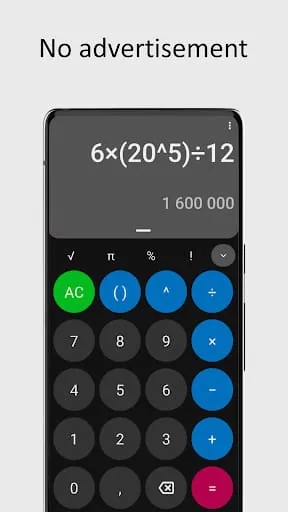
The app generally receives positive feedback, with a rating of 4.19 out of 5 stars based on 880 ratings. Users appreciate its simplicity, effectiveness, and the absence of advertisements.
-
Common User Feedback:
Users find the calculator simple, beautiful, and effective. Positive comments highlight its ad-free nature and open-source status.
-
User Rating Distribution:
While specific distribution data is not fully detailed, the overall rating of 4.19 suggests a strong positive sentiment.
-
Most Appreciated Features:
Users value the absence of ads, its open-source nature, its simplicity and clean design, and its customizability.
-
Common Complaints:
Some users have reported issues with the history being randomly erased, even after updates. One user noted that the running total is temporarily hidden during operations, which can be inconvenient. Another user found the dark theme buttons "egregious" and the RGB UI "amateur."
2. Technical Performance
-
App Size and Requirements:
The APK size is approximately 1.96 MB to 2.7 MB. It is designed for Android version 5.0+ and newer.
-
Battery Consumption:
No specific data is available regarding battery consumption.
-
Loading Speed:
No specific data is available regarding loading speed, but the app is generally described as lightweight and simple.
-
Stability:
While generally stable, some users have reported issues with history deletion.
-
Offline Capabilities:
As a calculator, it is expected to function offline. No specific information contradicts this.
3. Updates and Maintenance
-
Update Frequency:
The latest version was released on January 22, 2025, with other sources indicating updates around September 2025 and January 2025.
-
Latest Version Changes:
The latest update (as of January 23, 2025) includes a fix for history deletion.
-
Bug Fix Response Time:
The developer has addressed the history deletion bug, indicating responsiveness to user feedback.
-
Developer Support Quality:
The developer's email is provided for support (
[email protected]
). The app is open source, suggesting community involvement.
4. Security and Privacy
-
Data Collection Practices:
The developer states that no data is collected.
-
Privacy Policy Clarity:
Some sources indicate "No Details Provided" for privacy policies. However, the app's open-source nature and explicit statement of not collecting data suggest a commitment to privacy.
-
Security Measures:
The app has verified signatures, indicating a level of security.
-
Permission Requirements:
The app requires no unnecessary permissions. Some specific permissions mentioned include control vibration and dynamic receiver not exported permission.
-
Data Storage Methods:
As no data is collected, there are no specific data storage methods to report.
5. Monetization Strategy
-
Pricing Model:
The app is free to download.
-
In-app Purchases:
There are no in-app purchases.
-
Subscription Options:
No subscription options are available.
-
Free vs Paid Features:
All features are available in the free version.
-
Value for Money:
As a free app with no ads or in-app purchases, it offers excellent value.
6. Market Position
-
Competitor Comparison:
Competitors include Google's Calculator, CALCU Stylish Basic Calculator, Desmos Scientific Calculator, and others. OpenCalc differentiates itself through its open-source nature and lack of ads.
-
Market Share:
With over 100,000 to 250,000+ downloads, it holds a moderate position in the utility app market.
-
Unique Selling Points:
Key USPs are being free, open-source, and completely ad-free.
-
Target Audience Fit:
It appeals to users seeking a straightforward, functional, and unobtrusive calculator.
Section B - Category-Specific Analysis
1. Core Functionality
-
Feature Completeness:
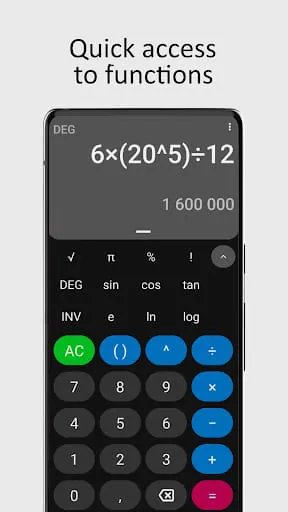
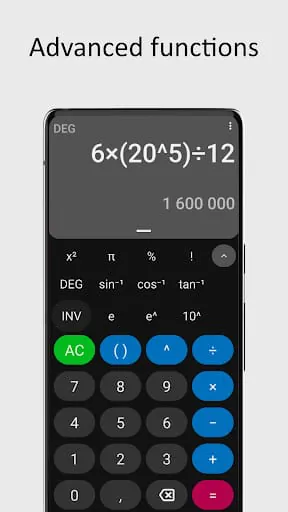
Offers basic and scientific functions including multiplication, division, root, powers, factorials, and trigonometry.
-
Tool Accuracy:
Described as effective, suggesting accuracy in calculations. It has its own algebra system for flexibility.
-
Processing Speed:
No specific data, but described as lightweight and simple, implying good speed.
-
Batch Operations:
Not a feature explicitly mentioned.
-
Automation Capabilities:
Not applicable for a calculator.
-
Advanced Features:
Scientific mode and trigonometry functions are available.
2. User Interface
-
Layout Efficiency:
Described as simple and beautiful, with a well-organized screen.
-
Navigation Logic:
Straightforward and intuitive for a calculator.
-
Customization Options:
Offers different themes (dark, light, amoled, Material You).
-
Quick Access Tools:
Has a Quick Settings Tile.
-
Gesture Support:
Not explicitly mentioned.
-
Widget Support:
Not explicitly mentioned.
3. Data Management
-
File Format Support:
Not applicable.
-
Import/Export Options:
Not applicable.
-
Backup Features:
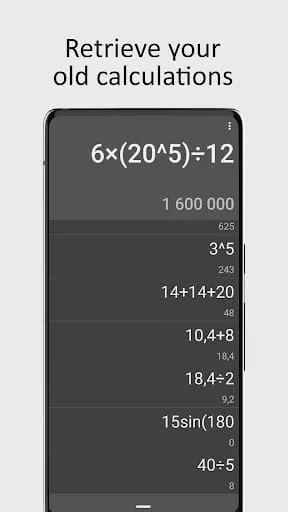
History feature is available but has reported issues.
-
Cloud Integration:
Not applicable.
-
Storage Efficiency:
Lightweight app size indicates efficient storage usage.
-
Data Security:
Stated that no data is collected, implying high data security.
4. Integration Capabilities
-
Third-party Integration:
No specific integrations mentioned.
-
API Availability:
It is open source, suggesting potential for integration if developers access the code.
-
Share Options:
Not explicitly mentioned.
-
Cross-platform Sync:
Not applicable.
-
Plugin Support:
Not applicable.
-
Extension System:
Not applicable.
5. Professional Features
-
Advanced Settings:
Customizable themes and functions.
-
Power User Tools:
Scientific functions are available.
-
Keyboard Shortcuts:
Not applicable for a mobile app interface.
-
Macro Support:
Not applicable.
-
Batch Processing:
Not applicable.
-
Custom Templates:
Not applicable.
6. Performance Optimization
-
Resource Usage:
Described as lightweight, indicating low resource usage.
-
Battery Impact:
No specific data, but expected to be minimal due to lightweight nature.
-
Startup Time:
Expected to be fast due to its simple design.
-
Background Behavior:
Not applicable as it is an active calculation tool.
-
Cache Management:
Requires additional storage for cache management.
-
Memory Efficiency:
Lightweight design suggests good memory efficiency.
Professional Review
Moments of Insight
1. User Reviews and Experience
- Overall User Satisfaction: The app generally receives positive feedback, with a rating of 4.19 out of 5 stars based on 880 ratings. Users appreciate its simplicity, effectiveness, and the absence of advertisements.
- Common User Feedback: Users find the calculator simple, beautiful, and effective. Positive comments highlight its ad-free nature and open-source status.
- User Rating Distribution: While specific distribution data is not fully detailed, the overall rating of 4.19 suggests a strong positive sentiment.
- Most Appreciated Features: Users value the absence of ads, its open-source nature, its simplicity and clean design, and its customizability.
- Common Complaints: Some users have reported issues with the history being randomly erased, even after updates. One user noted that the running total is temporarily hidden during operations, which can be inconvenient. Another user found the dark theme buttons "egregious" and the RGB UI "amateur."
2. Technical Performance
- App Size and Requirements: The APK size is approximately 1.96 MB to 2.7 MB. It is designed for Android version 5.0+ and newer.
- Battery Consumption: No specific data is available regarding battery consumption.
- Loading Speed: No specific data is available regarding loading speed, but the app is generally described as lightweight and simple.
- Stability: While generally stable, some users have reported issues with history deletion.
- Offline Capabilities: As a calculator, it is expected to function offline. No specific information contradicts this.
3. Updates and Maintenance
- Update Frequency: The latest version was released on January 22, 2025, with other sources indicating updates around September 2025 and January 2025.
- Latest Version Changes: The latest update (as of January 23, 2025) includes a fix for history deletion.
- Bug Fix Response Time: The developer has addressed the history deletion bug, indicating responsiveness to user feedback.
- Developer Support Quality: The developer's email is provided for support ( [email protected] ). The app is open source, suggesting community involvement.
4. Security and Privacy
- Data Collection Practices: The developer states that no data is collected.
- Privacy Policy Clarity: Some sources indicate "No Details Provided" for privacy policies. However, the app's open-source nature and explicit statement of not collecting data suggest a commitment to privacy.
- Security Measures: The app has verified signatures, indicating a level of security.
- Permission Requirements: The app requires no unnecessary permissions. Some specific permissions mentioned include control vibration and dynamic receiver not exported permission.
- Data Storage Methods: As no data is collected, there are no specific data storage methods to report.
5. Monetization Strategy
- Pricing Model: The app is free to download.
- In-app Purchases: There are no in-app purchases.
- Subscription Options: No subscription options are available.
- Free vs Paid Features: All features are available in the free version.
- Value for Money: As a free app with no ads or in-app purchases, it offers excellent value.
6. Market Position
- Competitor Comparison: Competitors include Google's Calculator, CALCU Stylish Basic Calculator, Desmos Scientific Calculator, and others. OpenCalc differentiates itself through its open-source nature and lack of ads.
- Market Share: With over 100,000 to 250,000+ downloads, it holds a moderate position in the utility app market.
- Unique Selling Points: Key USPs are being free, open-source, and completely ad-free.
- Target Audience Fit: It appeals to users seeking a straightforward, functional, and unobtrusive calculator.
Section B - Category-Specific Analysis
1. Core Functionality
-
Feature Completeness:
Offers basic and scientific functions including multiplication, division, root, powers, factorials, and trigonometry.
-
Tool Accuracy:
Described as effective, suggesting accuracy in calculations. It has its own algebra system for flexibility.
-
Processing Speed:
No specific data, but described as lightweight and simple, implying good speed.
-
Batch Operations:
Not a feature explicitly mentioned.
-
Automation Capabilities:
Not applicable for a calculator.
-
Advanced Features:
Scientific mode and trigonometry functions are available.
2. User Interface
-
Layout Efficiency:
Described as simple and beautiful, with a well-organized screen.
-
Navigation Logic:
Straightforward and intuitive for a calculator.
-
Customization Options:
Offers different themes (dark, light, amoled, Material You).
-
Quick Access Tools:
Has a Quick Settings Tile.
-
Gesture Support:
Not explicitly mentioned.
-
Widget Support:
Not explicitly mentioned.
3. Data Management
-
File Format Support:
Not applicable.
-
Import/Export Options:
Not applicable.
-
Backup Features:
History feature is available but has reported issues.
-
Cloud Integration:
Not applicable.
-
Storage Efficiency:
Lightweight app size indicates efficient storage usage.
-
Data Security:
Stated that no data is collected, implying high data security.
4. Integration Capabilities
-
Third-party Integration:
No specific integrations mentioned.
-
API Availability:
It is open source, suggesting potential for integration if developers access the code.
-
Share Options:
Not explicitly mentioned.
-
Cross-platform Sync:
Not applicable.
-
Plugin Support:
Not applicable.
-
Extension System:
Not applicable.
5. Professional Features
-
Advanced Settings:
Customizable themes and functions.
-
Power User Tools:
Scientific functions are available.
-
Keyboard Shortcuts:
Not applicable for a mobile app interface.
-
Macro Support:
Not applicable.
-
Batch Processing:
Not applicable.
-
Custom Templates:
Not applicable.
6. Performance Optimization
-
Resource Usage:
Described as lightweight, indicating low resource usage.
-
Battery Impact:
No specific data, but expected to be minimal due to lightweight nature.
-
Startup Time:
Expected to be fast due to its simple design.
-
Background Behavior:
Not applicable as it is an active calculation tool.
-
Cache Management:
Requires additional storage for cache management.
-
Memory Efficiency:
Lightweight design suggests good memory efficiency.
Professional Review
Moments of Insight
Moments of Insight
In the quiet hum of our digital lives, finding tools that seamlessly blend utility with peace of mind is a rare gift. OpenCalc, in its elegant simplicity, offers just that. It reminds us that powerful functionality doesn't need to be complex or intrusive. The developers' commitment to an ad-free, open-source experience fosters a sense of trust and respect for the user, creating a space where calculations can be performed without digital noise.
Balanced Perspectives
The app's core strength lies in its unadulterated focus on being a reliable calculator. Its scientific functions, customizable themes, and lightweight design are commendable. However, the reported intermittent issue with history deletion, while addressed, still lingers for some users, hinting at the delicate balance between new features and maintaining long-term stability. Furthermore, while the UI is generally praised, specific aesthetic choices in themes could be refined to universally please all users.
Mindful Observations
OpenCalc embodies a mindful approach to design by minimizing distractions. The absence of ads and unnecessary permissions encourages focused use. The ability to customize themes allows users to tailor the visual experience to their preference, contributing to a calmer interaction. This deliberate design choice promotes digital well-being by reducing cognitive load and fostering a sense of control over the digital tools we use.
Thoughtful Reflections
The commitment to being open-source is a profound act of transparency, inviting users to understand and even contribute to the app's development. This ethos cultivates a deeper connection between the user and the technology, transforming a simple tool into a collaborative effort. It reflects a thoughtful consideration for user autonomy and privacy, which are paramount in today's digital landscape.
Harmonious Integrations
While OpenCalc is a standalone application, its harmonious integration into a user's daily routine is evident in its unobtrusive nature. It doesn't demand excessive attention or resources, fitting fluidly into the ebb and flow of tasks requiring calculation. Its straightforward functionality ensures it complements, rather than complicates, the user's workflow, thereby achieving a quiet synergy between human needs and technological solutions.









