

Part 1 - Information Analysis
Section A - Common Information Analysis
1. User Reviews and Experience
-
Overall User Satisfaction:
Generally favorable, with users appreciating its core functionality as a free pedometer.
-
Common User Feedback:
Positive feedback highlights battery efficiency, offline capabilities, and the absence of mandatory sign-in. Some users find the step counting inconsistent at home or with screen lock.
-
User Rating Distribution:
The app generally holds a high rating, often around 4.5 to 4.6 stars on Google Play, based on thousands of reviews.
-
Most Appreciated Features:
Battery-friendly operation, automatic step counting without wearables, clear graphs for data visualization, and being completely free are frequently praised.
-
Common Complaints:
Inconsistent step counting at home or with the screen locked, occasional intrusive ads, and a perceived lack of improvement in newer Android versions have been noted.
2. Technical Performance
-
App Size and Requirements:
The app is relatively small, requiring Android 5.0 or higher, with a package name of com.welltastic.stepcounter.pedometer.
-
Battery Consumption:
Users generally report low battery consumption, with the app being described as "battery-friendly" due to its use of built-in sensors rather than GPS.
-
Loading Speed:
Specific data on loading speed is not readily available, but the app is generally perceived as responsive.
-
Stability:
Most users report good stability, though some instances of the app freezing or having issues with step counting on certain devices are mentioned.
-
Offline Capabilities:
The app functions offline, tracking steps without requiring an internet or Wi-Fi connection.
3. Updates and Maintenance
-
Update Frequency:
Updates are released periodically, with recent updates noted in late 2025 and early 2026, focusing on minor bug fixes and improvements.
-
Latest Version Changes:
Recent updates typically involve bug fixes and performance enhancements.
-
Bug Fix Response Time:
While not explicitly detailed, the developers have responded to some user feedback regarding issues.
-
Developer Support Quality:
Developer responses to negative reviews sometimes indicate a willingness to support users, though user experiences with support quality can vary.
4. Security and Privacy
-
Data Collection Practices:
The app may collect location data and health/fitness information. However, the developer states no personal data is collected or shared with third parties.
-
Privacy Policy Clarity:
While a privacy policy exists, some users have expressed concerns about data being "not encrypted" and "can't be deleted," which contradicts the developer's claims of not collecting personal data.
-
Security Measures:
The app states that data is encrypted in transit, but there are user reports suggesting data is not encrypted.
-
Permission Requirements:
Permissions typically include location access for tracking and potentially others related to health and fitness data.
-
Data Storage Methods:
Users can back up and restore data via Google Drive, suggesting cloud storage options.
5. Monetization Strategy
-
Pricing Model:
The app is fundamentally free-to-use with all features accessible without payment.
-
In-app Purchases:
While advertised as free, there are mentions of ads, and one user reported an unexpected $30 charge, suggesting potential issues with monetization or misunderstandings about its free nature. Some reviews suggest an option to pay to remove ads.
-
Subscription Options:
No explicit subscription options are mentioned for core features.
-
Free vs Paid Features:
All core features are stated to be 100% free.
-
Value for Money:
Given its free nature and core functionality, it offers good value for users seeking a basic step counter.
6. Market Position
-
Competitor Comparison:
It competes with numerous other free and paid pedometer apps, including Google Fit, Fitbit, and StepsApp.
-
Market Share:
Specific market share data is not available, but it has a significant number of downloads (over 1 million).
-
Unique Selling Points:
Its simplicity, battery efficiency, offline functionality, and complete free access are key selling points.
-
Target Audience Fit:
It is well-suited for users looking for a straightforward, no-frills step counter without complex features or mandatory hardware.
Section B - Category-Specific Analysis (Health & Fitness)
1. Workout Features
-
Exercise Library:
Not a primary focus; the app centers on step tracking.
-
Workout Plans:
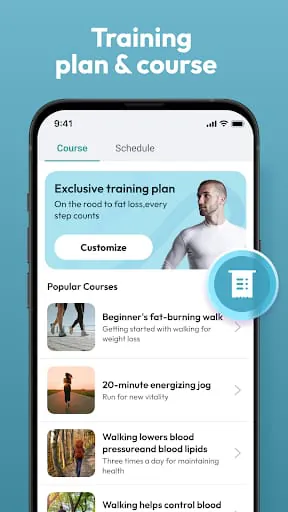
Mentions of "training courses & plans" are present, suggesting some basic guidance is offered.
-
Form Guidance:
Not a feature of this app.
-
Video Tutorials:
Not available.
-
Custom Routines:
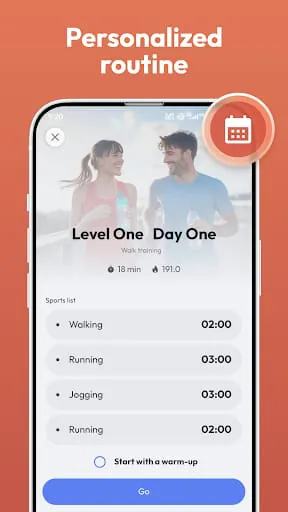
Limited customization, focusing on step goals.
-
Training Programs:
Some basic training programs may be included.
2. Health Tracking
-
Vital Signs Monitoring:
Not directly, though some related apps from the developer might offer manual logging for things like water intake.
-
Activity Tracking:
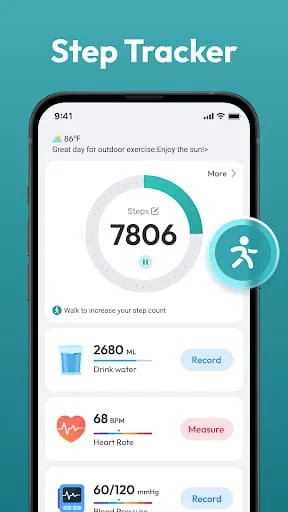
Core function is step tracking, distance, calories burned, and walking time.
-
Sleep Analysis:
Not a feature.
-
Nutrition Logging:
Not a feature.
-
Weight Management:
Can contribute to weight management goals by encouraging activity, but does not offer direct tracking or plans.
-
Progress Charts:
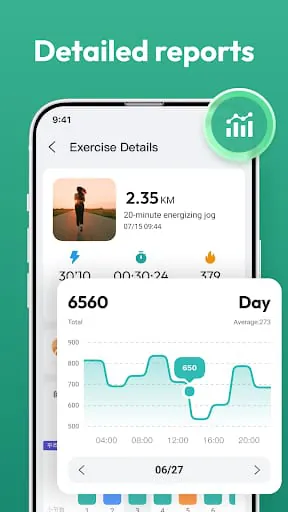
Daily, weekly, and monthly charts are provided for step data.
3. Device Integration
-
Wearable Compatibility:
Not explicitly stated, but focuses on phone sensors. Some reviews mention syncing with Google Fit.
-
Health Kit Integration:
Some integrations with Google Fit are mentioned.
-
Sensor Accuracy:
Relies on the phone's built-in sensor, with accuracy varying by device. Sensitivity adjustment is available.
-
Data Sync:
Syncing with Google Fit is mentioned.
-
Real-time Monitoring:
Provides real-time step counting.
-
Cross-device Support:
Data backup and restore via Google Drive allows for some cross-device continuity.
4. Nutrition Features
-
Nutrition logging, meal planning, calorie tracking, dietary restrictions, recipe suggestions, and macro tracking are not features of this app.
5. Professional Guidance
-
Expert Advice:
Not provided.
-
Personal Coaching:
Not provided.
-
Form Correction:
Not applicable.
-
Workout Tips:
Limited to the "training courses & plans."
-
Health Insights:
Basic insights derived from step data trends.
-
Community Support:
Not a prominent feature.
6. Goal Management
-
Goal Setting:
Users can set daily step goals.
-
Progress Tracking:
Tracks progress towards daily, weekly, and monthly goals through charts.
-
Achievement System:
Mentions of "streaks" for consecutive goal achievement.
-
Milestone Rewards:
Streaks serve as a form of motivation.
-
Habit Formation:
Encourages habit formation through consistent step tracking and goal setting.
-
Performance Analytics:
Provides analytics on steps, distance, calories, and time.
Part 2 - Professional Review
Moments of Insight
1. User Reviews and Experience
- Overall User Satisfaction: Generally favorable, with users appreciating its core functionality as a free pedometer.
- Common User Feedback: Positive feedback highlights battery efficiency, offline capabilities, and the absence of mandatory sign-in. Some users find the step counting inconsistent at home or with screen lock.
- User Rating Distribution: The app generally holds a high rating, often around 4.5 to 4.6 stars on Google Play, based on thousands of reviews.
- Most Appreciated Features: Battery-friendly operation, automatic step counting without wearables, clear graphs for data visualization, and being completely free are frequently praised.
- Common Complaints: Inconsistent step counting at home or with the screen locked, occasional intrusive ads, and a perceived lack of improvement in newer Android versions have been noted.
2. Technical Performance
- App Size and Requirements: The app is relatively small, requiring Android 5.0 or higher, with a package name of com.welltastic.stepcounter.pedometer.
- Battery Consumption: Users generally report low battery consumption, with the app being described as "battery-friendly" due to its use of built-in sensors rather than GPS.
- Loading Speed: Specific data on loading speed is not readily available, but the app is generally perceived as responsive.
- Stability: Most users report good stability, though some instances of the app freezing or having issues with step counting on certain devices are mentioned.
- Offline Capabilities: The app functions offline, tracking steps without requiring an internet or Wi-Fi connection.
3. Updates and Maintenance
- Update Frequency: Updates are released periodically, with recent updates noted in late 2025 and early 2026, focusing on minor bug fixes and improvements.
- Latest Version Changes: Recent updates typically involve bug fixes and performance enhancements.
- Bug Fix Response Time: While not explicitly detailed, the developers have responded to some user feedback regarding issues.
- Developer Support Quality: Developer responses to negative reviews sometimes indicate a willingness to support users, though user experiences with support quality can vary.
4. Security and Privacy
- Data Collection Practices: The app may collect location data and health/fitness information. However, the developer states no personal data is collected or shared with third parties.
- Privacy Policy Clarity: While a privacy policy exists, some users have expressed concerns about data being "not encrypted" and "can't be deleted," which contradicts the developer's claims of not collecting personal data.
- Security Measures: The app states that data is encrypted in transit, but there are user reports suggesting data is not encrypted.
- Permission Requirements: Permissions typically include location access for tracking and potentially others related to health and fitness data.
- Data Storage Methods: Users can back up and restore data via Google Drive, suggesting cloud storage options.
5. Monetization Strategy
- Pricing Model: The app is fundamentally free-to-use with all features accessible without payment.
- In-app Purchases: While advertised as free, there are mentions of ads, and one user reported an unexpected $30 charge, suggesting potential issues with monetization or misunderstandings about its free nature. Some reviews suggest an option to pay to remove ads.
- Subscription Options: No explicit subscription options are mentioned for core features.
- Free vs Paid Features: All core features are stated to be 100% free.
- Value for Money: Given its free nature and core functionality, it offers good value for users seeking a basic step counter.
6. Market Position
- Competitor Comparison: It competes with numerous other free and paid pedometer apps, including Google Fit, Fitbit, and StepsApp.
- Market Share: Specific market share data is not available, but it has a significant number of downloads (over 1 million).
- Unique Selling Points: Its simplicity, battery efficiency, offline functionality, and complete free access are key selling points.
- Target Audience Fit: It is well-suited for users looking for a straightforward, no-frills step counter without complex features or mandatory hardware.
Section B - Category-Specific Analysis (Health & Fitness)
1. Workout Features
-
Exercise Library:
Not a primary focus; the app centers on step tracking.
-
Workout Plans:
Mentions of "training courses & plans" are present, suggesting some basic guidance is offered.
-
Form Guidance:
Not a feature of this app.
-
Video Tutorials:
Not available.
-
Custom Routines:
Limited customization, focusing on step goals.
-
Training Programs:
Some basic training programs may be included.
2. Health Tracking
-
Vital Signs Monitoring:
Not directly, though some related apps from the developer might offer manual logging for things like water intake.
-
Activity Tracking:
Core function is step tracking, distance, calories burned, and walking time.
-
Sleep Analysis:
Not a feature.
-
Nutrition Logging:
Not a feature.
-
Weight Management:
Can contribute to weight management goals by encouraging activity, but does not offer direct tracking or plans.
-
Progress Charts:
Daily, weekly, and monthly charts are provided for step data.
3. Device Integration
-
Wearable Compatibility:
Not explicitly stated, but focuses on phone sensors. Some reviews mention syncing with Google Fit.
-
Health Kit Integration:
Some integrations with Google Fit are mentioned.
-
Sensor Accuracy:
Relies on the phone's built-in sensor, with accuracy varying by device. Sensitivity adjustment is available.
-
Data Sync:
Syncing with Google Fit is mentioned.
-
Real-time Monitoring:
Provides real-time step counting.
-
Cross-device Support:
Data backup and restore via Google Drive allows for some cross-device continuity.
4. Nutrition Features
-
Nutrition logging, meal planning, calorie tracking, dietary restrictions, recipe suggestions, and macro tracking are not features of this app.
5. Professional Guidance
-
Expert Advice:
Not provided.
-
Personal Coaching:
Not provided.
-
Form Correction:
Not applicable.
-
Workout Tips:
Limited to the "training courses & plans."
-
Health Insights:
Basic insights derived from step data trends.
-
Community Support:
Not a prominent feature.
6. Goal Management
-
Goal Setting:
Users can set daily step goals.
-
Progress Tracking:
Tracks progress towards daily, weekly, and monthly goals through charts.
-
Achievement System:
Mentions of "streaks" for consecutive goal achievement.
-
Milestone Rewards:
Streaks serve as a form of motivation.
-
Habit Formation:
Encourages habit formation through consistent step tracking and goal setting.
-
Performance Analytics:
Provides analytics on steps, distance, calories, and time.
Part 2 - Professional Review
Moments of Insight
Moments of Insight
In a world saturated with complex digital tools, the simple elegance of a well-designed step counter offers a quiet moment of clarity. This application, at its core, is a testament to the power of focused utility. It invites users to engage with their physical activity not as a chore, but as an intrinsic part of their day, seamlessly integrated into the background hum of their lives. The insight here is profound: technology can serve as a gentle facilitator, not a demanding master, promoting a more mindful connection with our own bodies.
Balanced Perspectives
The app achieves a commendable balance between functionality and simplicity. Its strength lies in its unpretentious approach – it counts steps, tracks basic metrics like distance and calories, and presents this data in easily digestible charts. This focus ensures it remains accessible and user-friendly. However, this simplicity also means it may lack the depth some users seek in comprehensive health platforms. While it excels at its primary task, those looking for detailed workout plans, nutrition logging, or advanced biometric tracking might find its offerings limited. The occasional ads, while a common monetization strategy for free apps, can momentarily disrupt the user's flow, presenting a small friction point in an otherwise smooth experience.
Mindful Observations
Observing the app's design reveals a commitment to unobtrusive functionality. The ability to run in the background without significant battery drain speaks to thoughtful engineering, respecting the user's device resources. The option to pause tracking offers a mindful control, allowing users to exclude periods of non-walking activity, thus enhancing data accuracy and user agency. This is not an app that demands constant attention; rather, it quietly observes and records, offering its insights only when called upon. The absence of mandatory sign-ins further contributes to a sense of privacy and ease of use, removing a common barrier to entry.
Thoughtful Reflections
Reflecting on its role, the app encourages a gentle self-awareness. By making step counting effortless, it nudges users towards an understanding of their daily movement patterns. This awareness can be a catalyst for positive change, fostering a sense of accomplishment with each achieved goal and streak. It refrains from overwhelming users with excessive data or pressure, instead opting for a supportive, observational approach. This aligns with principles of digital wellness, promoting a healthier relationship with technology by focusing on practical, beneficial integration into daily life without demanding excessive cognitive load.
Harmonious Integrations
The true harmony of this application lies in its seamless integration into the user's existing life. It requires no special equipment, no complex setup – just the device already in one's pocket. Its ability to function offline and conserve battery life means it can be a constant, reliable companion. The straightforward presentation of data ensures that the information gained serves a practical purpose, helping users understand their activity levels without becoming a source of digital anxiety. It acts as a quiet partner, supporting a user's journey towards better health by simply and effectively counting their steps.









