



Information Analysis
Common Information Analysis
User Reviews and Experience
-
Overall User Satisfaction:
Generally positive, with many users praising its ease of use and the quality of AI-generated music. Some users consider it the "best of them all".
-
Common User Feedback:
Users appreciate the ability to create complete songs with vocals and instrumentation from text prompts. Many find it intuitive and accessible, even for those without musical experience. The mobile app is often preferred over the desktop website for its user-friendliness.
-
User Rating Distribution:
High ratings are frequently observed, with many users giving it 5 stars.
-
Most Appreciated Features:
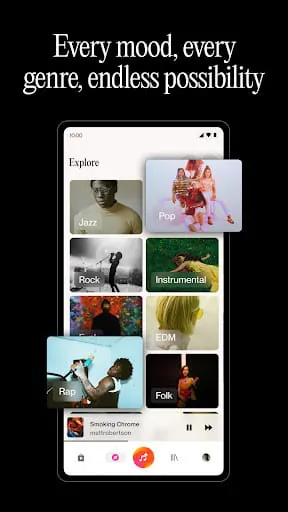
Complete song generation from prompts, intuitive interface, and the ability to generate music in various genres are highly valued. The recent V4 and V4.5 updates have been noted for improvements in audio quality and song structure.
-
Common Complaints:
Some users have reported issues with songs going missing from their library, and a desire for more granular control over musical direction (e.g., key changes, specific musical cues). Customer service has also been mentioned as potentially non-existent by one user. There are also concerns about the AI sometimes ignoring prompt details or repeating lyrics.
Technical Performance
-
App Size and Requirements:
The Android app size is around 39.5 MB to 45.5 MB, with a minimum Android version requirement of 8.1.0+.
-
Battery Consumption:
Specific data on battery consumption is not readily available.
-
Loading Speed:
Users report quick song generation, often in seconds or minutes.
-
Stability:
While generally stable, some users have reported occasional issues like songs disappearing from the library or data loss after crashes, especially in older versions.
-
Offline Capabilities:
The app primarily relies on an internet connection for its AI-driven music generation. Offline capabilities are not explicitly mentioned.
Updates and Maintenance
-
Update Frequency:
The app receives frequent updates, with new versions being released regularly, indicating active development and maintenance.
-
Latest Version Changes:
Recent updates (like V4.5 and V5) have introduced significant improvements, including extended upload limits, enhanced song editors with audio editing tools, advanced sliders for style influence, stem extraction, and improved vocal realism.
-
Bug Fix Response Time:
Specific details on bug fix response times are not publicly detailed, though frequent updates suggest an ongoing effort to address issues.
-
Developer Support Quality:
One user mentioned that customer support seemed non-existent, while others praise the app's continuous improvement through updates.
Security and Privacy
-
Data Collection Practices:
The app may collect location, personal information, financial information, and device IDs. Data is encrypted in transit.
-
Privacy Policy Clarity:
Suno's privacy notices state a commitment to protecting user privacy and complying with applicable laws. They detail what information is collected, how it's used, shared, stored, and secured. Users can request data deletion.
-
Security Measures:
Data is protected using industry-standard encryption and security measures. Security protocols are regularly updated.
-
Permission Requirements:
Standard app permissions for music creation tools would be expected, though specific details are not extensively listed in public reviews.
-
Data Storage Methods:
Data is stored securely on servers with encryption and access controls. Specific details on data storage methods are not extensively provided beyond general security statements.
Monetization Strategy
-
Pricing Model:
Suno operates on a freemium model. A free tier offers limited daily song generation (e.g., 10 songs/50 credits per day) for non-commercial use. Paid plans (Pro, Premier) offer significantly more credits, faster processing, advanced features, and commercial use rights.
-
In-app Purchases:
Credits can be purchased to generate more songs beyond the daily free limit or to access premium features.
-
Subscription Options:
Subscription plans (Pro, Premier) are available, offering monthly credit allowances and commercial rights.
-
Free vs Paid Features:
Free users have access to basic song generation for personal use, while paid plans unlock commercial use rights, higher generation limits, priority queue access, advanced editing tools, stem exports, and early access to new features.
-
Value for Money:
Users generally find the paid plans offer good value, especially for creators who need to monetize their music or require higher generation volumes and commercial rights.
Market Position
-
Competitor Comparison:
Suno is frequently compared to other AI music generators like Udio, Beatoven.ai, AIVA, and Boomy. It is often cited as a leading platform for full song generation with vocals.
-
Market Share:
Specific market share data is not readily available, but Suno has achieved significant popularity and widespread recognition since its launch.
-
Unique Selling Points:
Suno's ability to generate complete songs with vocals and instrumentation from simple text prompts, combined with its user-friendly interface, makes it a strong differentiator. Its continuous updates and expanding feature set (like Suno Studio) also contribute to its appeal.
-
Target Audience Fit:
The app appeals to a broad audience, including hobbyists, aspiring musicians, content creators, educators, and professionals looking for a quick way to sketch out musical ideas or generate royalty-free music.
Category-Specific Analysis (Music & Audio Apps)
Playback Features
-
Audio Quality:
Recent versions (V4, V4.5) are noted for improved audio quality, described as sharper and more expressive. Users report studio-quality sound.
-
Playback Controls:
The app includes standard playback controls within its library and editor for previewing generated tracks.
-
Queue Management:
The app manages song generation in a queue, with paid plans offering priority access.
-
Shuffle/Repeat:
Shuffle and repeat functionalities are implicitly available within playlist creation and song radio features for listening purposes.
-
Crossfade:
Specific crossfade features for playback are not detailed.
-
Volume Normalization:
Not explicitly mentioned as a feature, but users can adjust volume within the app's player.
Library Management
-
Music Organization:
Users can create playlists to organize their generated tracks. Advanced library management guides suggest structured naming conventions and tagging for better organization.
-
Search Function:
The library includes a search bar to find tracks by name, tags, or lyric snippets.
-
Metadata Editing:
Users can edit song titles and cover artwork. The "Remix" and "Edit" features allow for modifying existing songs.
-
Album Art:
Suno can generate song titles and artwork for generated music.
-
Playlist Creation:
Users can curate personal AI music libraries and organize tracks into playlists.
-
Import Options:
Users can upload audio files (up to 1 minute for free, 8 minutes for paid plans) to use as a base or for cover songs.
Audio Tools
-
Sound Effects:
Not a primary feature focus, but users can generate music across various genres, which may include synthesized sounds or effects depending on the prompt.
-
Audio Editor:
Suno Studio offers advanced editing capabilities, including a multitrack timeline, stem generation, layering, and precise control over BPM, volume, and pitch. The "Remix" and "Edit" features also allow for modifying song sections.
-
Recording Features:
Users can record audio directly within the app.
-
Voice Enhancement:
Recent versions feature more human-like vocals and options to adjust vocal styles.
-
Format Conversion:
The API supports converting to WAV format. Export options in Suno Studio include WAV files.
-
Mixer Controls:
Suno Studio provides a multitrack timeline with controls for volume and pitch. Stem separation allows for individual track manipulation.
User Experience
-
Interface Design:
Praised for being intuitive and user-friendly, making music creation accessible. Recent updates have brought interface changes, with mixed initial reception on ease of use.
-
Navigation:
Generally considered straightforward, especially on the mobile app.
-
Queue Management:
Users interact with a generation queue, with paid users receiving priority.
-
Background Play:
Not explicitly detailed as a feature for background playback of generated music while the app is not in focus.
-
Lock Screen Controls:
Not a typical feature for music creation apps, and not highlighted for Suno.
-
Widget Support:
No specific mention of widget support.
Social Features
-
Sharing Options:
Users can share their created tracks via links. The platform encourages sharing and discovering music created by other users.
-
User Profiles:
Accounts are public by default, and users can add their created songs to their profiles.
-
Following System:
Users can follow other artists to stay connected with their music.
-
Comments:
Features for commenting on user-created songs are available, fostering community interaction.
-
Collaborative Playlists:
While users can create personal playlists, direct collaborative playlist features are not prominently mentioned. Real-time collaboration was noted via Discord integration in one review.
-
Activity Feed:
Users can explore trending music and see activity from followed artists.
Technical Features
-
Audio Engine:
Employs advanced AI models for music generation, including text-to-speech and music composition models.
-
Cache Management:
Specific details on cache management are not provided.
-
Battery Usage:
No specific data on battery consumption is available.
-
Storage Options:
Generated music is stored within the app's library, with options to download tracks.
-
Cross-device Sync:
While a mobile app and web application exist, specific cross-device synchronization for library content is not explicitly detailed.
-
Backup System:
Users are advised to back up lyrics externally due to past issues with songs disappearing from the library. The library management guide emphasizes saving and version control.
Professional Review
Moments of Insight
The advent of tools like this application offers a profound shift in creative accessibility. It democratizes the act of music creation, transforming abstract ideas into tangible soundscapes with astonishing speed. This immediate feedback loop between imagination and auditory realization can be deeply empowering, fostering a sense of wonder and possibility for individuals who may have previously felt excluded from the musical arts. It's a digital muse, whispering melodies and rhythms into existence through the simple power of text.
Balanced Perspectives
While the creative output is undeniably impressive, it's important to approach it with a balanced view. The generated music, though often captivating, can sometimes lack the nuanced emotional depth or idiosyncratic flair that comes from human experience and artistic struggle. Furthermore, the ongoing discourse surrounding the ethical sourcing of training data and copyright implications is a crucial consideration for both creators and the platform itself. Responsible engagement means acknowledging these complexities.
Mindful Observations
The user interface is designed with a gentle simplicity, guiding users through the creative process without overwhelming them. This thoughtful design promotes a state of flow, allowing one to focus on the creative act rather than wrestling with complex software. The ability to iterate quickly—to generate, refine, and regenerate—encourages experimentation and learning, fostering a digital wellness through creative exploration rather than demanding perfection.
Thoughtful Reflections
This application serves as a powerful reminder that technology can be a harmonious bridge, connecting human creativity with innovative solutions. It simplifies daily routines for content creators needing soundtracks, or for individuals simply wishing to express themselves musically. By lowering the barrier to entry, it encourages a more mindful engagement with artistic processes, reducing the pressure of technical mastery and emphasizing the joy of expression.
Harmonious Integrations
The integration of AI into music creation is not about replacing human artistry but augmenting it. For the user, it offers a collaborative partner that can flesh out ideas, suggest new directions, and provide a foundational structure. This symbiotic relationship between human intent and algorithmic capability allows for a more fluid and intuitive creative journey, leading to outcomes that might not have been possible through solitary effort alone.
Final Verdict
This AI music application represents a significant step forward in accessible creativity. It offers a serene pathway for users to explore musical ideas, fostering a sense of accomplishment and encouraging a more mindful interaction with technology. While mindful consideration of its ethical dimensions is advised, its potential to enhance daily creative routines and promote digital well-being is substantial.
Common Information Analysis
User Reviews and Experience
-
Overall User Satisfaction:
Generally positive, with many users praising its ease of use and the quality of AI-generated music. Some users consider it the "best of them all".
-
Common User Feedback:
Users appreciate the ability to create complete songs with vocals and instrumentation from text prompts. Many find it intuitive and accessible, even for those without musical experience. The mobile app is often preferred over the desktop website for its user-friendliness.
-
User Rating Distribution:
High ratings are frequently observed, with many users giving it 5 stars.
-
Most Appreciated Features:
Complete song generation from prompts, intuitive interface, and the ability to generate music in various genres are highly valued. The recent V4 and V4.5 updates have been noted for improvements in audio quality and song structure.
-
Common Complaints:
Some users have reported issues with songs going missing from their library, and a desire for more granular control over musical direction (e.g., key changes, specific musical cues). Customer service has also been mentioned as potentially non-existent by one user. There are also concerns about the AI sometimes ignoring prompt details or repeating lyrics.
Technical Performance
-
App Size and Requirements:
The Android app size is around 39.5 MB to 45.5 MB, with a minimum Android version requirement of 8.1.0+.
-
Battery Consumption:
Specific data on battery consumption is not readily available.
-
Loading Speed:
Users report quick song generation, often in seconds or minutes.
-
Stability:
While generally stable, some users have reported occasional issues like songs disappearing from the library or data loss after crashes, especially in older versions.
-
Offline Capabilities:
The app primarily relies on an internet connection for its AI-driven music generation. Offline capabilities are not explicitly mentioned.
Updates and Maintenance
-
Update Frequency:
The app receives frequent updates, with new versions being released regularly, indicating active development and maintenance.
-
Latest Version Changes:
Recent updates (like V4.5 and V5) have introduced significant improvements, including extended upload limits, enhanced song editors with audio editing tools, advanced sliders for style influence, stem extraction, and improved vocal realism.
-
Bug Fix Response Time:
Specific details on bug fix response times are not publicly detailed, though frequent updates suggest an ongoing effort to address issues.
-
Developer Support Quality:
One user mentioned that customer support seemed non-existent, while others praise the app's continuous improvement through updates.
Security and Privacy
-
Data Collection Practices:
The app may collect location, personal information, financial information, and device IDs. Data is encrypted in transit.
-
Privacy Policy Clarity:
Suno's privacy notices state a commitment to protecting user privacy and complying with applicable laws. They detail what information is collected, how it's used, shared, stored, and secured. Users can request data deletion.
-
Security Measures:
Data is protected using industry-standard encryption and security measures. Security protocols are regularly updated.
-
Permission Requirements:
Standard app permissions for music creation tools would be expected, though specific details are not extensively listed in public reviews.
-
Data Storage Methods:
Data is stored securely on servers with encryption and access controls. Specific details on data storage methods are not extensively provided beyond general security statements.
Monetization Strategy
-
Pricing Model:
Suno operates on a freemium model. A free tier offers limited daily song generation (e.g., 10 songs/50 credits per day) for non-commercial use. Paid plans (Pro, Premier) offer significantly more credits, faster processing, advanced features, and commercial use rights.
-
In-app Purchases:
Credits can be purchased to generate more songs beyond the daily free limit or to access premium features.
-
Subscription Options:
Subscription plans (Pro, Premier) are available, offering monthly credit allowances and commercial rights.
-
Free vs Paid Features:
Free users have access to basic song generation for personal use, while paid plans unlock commercial use rights, higher generation limits, priority queue access, advanced editing tools, stem exports, and early access to new features.
-
Value for Money:
Users generally find the paid plans offer good value, especially for creators who need to monetize their music or require higher generation volumes and commercial rights.
Market Position
-
Competitor Comparison:
Suno is frequently compared to other AI music generators like Udio, Beatoven.ai, AIVA, and Boomy. It is often cited as a leading platform for full song generation with vocals.
-
Market Share:
Specific market share data is not readily available, but Suno has achieved significant popularity and widespread recognition since its launch.
-
Unique Selling Points:
Suno's ability to generate complete songs with vocals and instrumentation from simple text prompts, combined with its user-friendly interface, makes it a strong differentiator. Its continuous updates and expanding feature set (like Suno Studio) also contribute to its appeal.
-
Target Audience Fit:
The app appeals to a broad audience, including hobbyists, aspiring musicians, content creators, educators, and professionals looking for a quick way to sketch out musical ideas or generate royalty-free music.
User Reviews and Experience
- Overall User Satisfaction: Generally positive, with many users praising its ease of use and the quality of AI-generated music. Some users consider it the "best of them all".
- Common User Feedback: Users appreciate the ability to create complete songs with vocals and instrumentation from text prompts. Many find it intuitive and accessible, even for those without musical experience. The mobile app is often preferred over the desktop website for its user-friendliness.
- User Rating Distribution: High ratings are frequently observed, with many users giving it 5 stars.
- Most Appreciated Features: Complete song generation from prompts, intuitive interface, and the ability to generate music in various genres are highly valued. The recent V4 and V4.5 updates have been noted for improvements in audio quality and song structure.
- Common Complaints: Some users have reported issues with songs going missing from their library, and a desire for more granular control over musical direction (e.g., key changes, specific musical cues). Customer service has also been mentioned as potentially non-existent by one user. There are also concerns about the AI sometimes ignoring prompt details or repeating lyrics.
Technical Performance
- App Size and Requirements: The Android app size is around 39.5 MB to 45.5 MB, with a minimum Android version requirement of 8.1.0+.
- Battery Consumption: Specific data on battery consumption is not readily available.
- Loading Speed: Users report quick song generation, often in seconds or minutes.
- Stability: While generally stable, some users have reported occasional issues like songs disappearing from the library or data loss after crashes, especially in older versions.
- Offline Capabilities: The app primarily relies on an internet connection for its AI-driven music generation. Offline capabilities are not explicitly mentioned.
Updates and Maintenance
- Update Frequency: The app receives frequent updates, with new versions being released regularly, indicating active development and maintenance.
- Latest Version Changes: Recent updates (like V4.5 and V5) have introduced significant improvements, including extended upload limits, enhanced song editors with audio editing tools, advanced sliders for style influence, stem extraction, and improved vocal realism.
- Bug Fix Response Time: Specific details on bug fix response times are not publicly detailed, though frequent updates suggest an ongoing effort to address issues.
- Developer Support Quality: One user mentioned that customer support seemed non-existent, while others praise the app's continuous improvement through updates.
Security and Privacy
- Data Collection Practices: The app may collect location, personal information, financial information, and device IDs. Data is encrypted in transit.
- Privacy Policy Clarity: Suno's privacy notices state a commitment to protecting user privacy and complying with applicable laws. They detail what information is collected, how it's used, shared, stored, and secured. Users can request data deletion.
- Security Measures: Data is protected using industry-standard encryption and security measures. Security protocols are regularly updated.
- Permission Requirements: Standard app permissions for music creation tools would be expected, though specific details are not extensively listed in public reviews.
- Data Storage Methods: Data is stored securely on servers with encryption and access controls. Specific details on data storage methods are not extensively provided beyond general security statements.
Monetization Strategy
- Pricing Model: Suno operates on a freemium model. A free tier offers limited daily song generation (e.g., 10 songs/50 credits per day) for non-commercial use. Paid plans (Pro, Premier) offer significantly more credits, faster processing, advanced features, and commercial use rights.
- In-app Purchases: Credits can be purchased to generate more songs beyond the daily free limit or to access premium features.
- Subscription Options: Subscription plans (Pro, Premier) are available, offering monthly credit allowances and commercial rights.
- Free vs Paid Features: Free users have access to basic song generation for personal use, while paid plans unlock commercial use rights, higher generation limits, priority queue access, advanced editing tools, stem exports, and early access to new features.
- Value for Money: Users generally find the paid plans offer good value, especially for creators who need to monetize their music or require higher generation volumes and commercial rights.
Market Position
- Competitor Comparison: Suno is frequently compared to other AI music generators like Udio, Beatoven.ai, AIVA, and Boomy. It is often cited as a leading platform for full song generation with vocals.
- Market Share: Specific market share data is not readily available, but Suno has achieved significant popularity and widespread recognition since its launch.
- Unique Selling Points: Suno's ability to generate complete songs with vocals and instrumentation from simple text prompts, combined with its user-friendly interface, makes it a strong differentiator. Its continuous updates and expanding feature set (like Suno Studio) also contribute to its appeal.
- Target Audience Fit: The app appeals to a broad audience, including hobbyists, aspiring musicians, content creators, educators, and professionals looking for a quick way to sketch out musical ideas or generate royalty-free music.
Category-Specific Analysis (Music & Audio Apps)
Playback Features
-
Audio Quality:
Recent versions (V4, V4.5) are noted for improved audio quality, described as sharper and more expressive. Users report studio-quality sound.
-
Playback Controls:
The app includes standard playback controls within its library and editor for previewing generated tracks.
-
Queue Management:
The app manages song generation in a queue, with paid plans offering priority access.
-
Shuffle/Repeat:
Shuffle and repeat functionalities are implicitly available within playlist creation and song radio features for listening purposes.
-
Crossfade:
Specific crossfade features for playback are not detailed.
-
Volume Normalization:
Not explicitly mentioned as a feature, but users can adjust volume within the app's player.
Library Management
-
Music Organization:
Users can create playlists to organize their generated tracks. Advanced library management guides suggest structured naming conventions and tagging for better organization.
-
Search Function:
The library includes a search bar to find tracks by name, tags, or lyric snippets.
-
Metadata Editing:
Users can edit song titles and cover artwork. The "Remix" and "Edit" features allow for modifying existing songs.
-
Album Art:
Suno can generate song titles and artwork for generated music.
-
Playlist Creation:
Users can curate personal AI music libraries and organize tracks into playlists.
-
Import Options:
Users can upload audio files (up to 1 minute for free, 8 minutes for paid plans) to use as a base or for cover songs.
Audio Tools
-
Sound Effects:
Not a primary feature focus, but users can generate music across various genres, which may include synthesized sounds or effects depending on the prompt.
-
Audio Editor:
Suno Studio offers advanced editing capabilities, including a multitrack timeline, stem generation, layering, and precise control over BPM, volume, and pitch. The "Remix" and "Edit" features also allow for modifying song sections.
-
Recording Features:
Users can record audio directly within the app.
-
Voice Enhancement:
Recent versions feature more human-like vocals and options to adjust vocal styles.
-
Format Conversion:
The API supports converting to WAV format. Export options in Suno Studio include WAV files.
-
Mixer Controls:
Suno Studio provides a multitrack timeline with controls for volume and pitch. Stem separation allows for individual track manipulation.
User Experience
-
Interface Design:
Praised for being intuitive and user-friendly, making music creation accessible. Recent updates have brought interface changes, with mixed initial reception on ease of use.
-
Navigation:
Generally considered straightforward, especially on the mobile app.
-
Queue Management:
Users interact with a generation queue, with paid users receiving priority.
-
Background Play:
Not explicitly detailed as a feature for background playback of generated music while the app is not in focus.
-
Lock Screen Controls:
Not a typical feature for music creation apps, and not highlighted for Suno.
-
Widget Support:
No specific mention of widget support.
Social Features
-
Sharing Options:
Users can share their created tracks via links. The platform encourages sharing and discovering music created by other users.
-
User Profiles:
Accounts are public by default, and users can add their created songs to their profiles.
-
Following System:
Users can follow other artists to stay connected with their music.
-
Comments:
Features for commenting on user-created songs are available, fostering community interaction.
-
Collaborative Playlists:
While users can create personal playlists, direct collaborative playlist features are not prominently mentioned. Real-time collaboration was noted via Discord integration in one review.
-
Activity Feed:
Users can explore trending music and see activity from followed artists.
Technical Features
-
Audio Engine:
Employs advanced AI models for music generation, including text-to-speech and music composition models.
-
Cache Management:
Specific details on cache management are not provided.
-
Battery Usage:
No specific data on battery consumption is available.
-
Storage Options:
Generated music is stored within the app's library, with options to download tracks.
-
Cross-device Sync:
While a mobile app and web application exist, specific cross-device synchronization for library content is not explicitly detailed.
-
Backup System:
Users are advised to back up lyrics externally due to past issues with songs disappearing from the library. The library management guide emphasizes saving and version control.
Playback Features
- Audio Quality: Recent versions (V4, V4.5) are noted for improved audio quality, described as sharper and more expressive. Users report studio-quality sound.
- Playback Controls: The app includes standard playback controls within its library and editor for previewing generated tracks.
- Queue Management: The app manages song generation in a queue, with paid plans offering priority access.
- Shuffle/Repeat: Shuffle and repeat functionalities are implicitly available within playlist creation and song radio features for listening purposes.
- Crossfade: Specific crossfade features for playback are not detailed.
- Volume Normalization: Not explicitly mentioned as a feature, but users can adjust volume within the app's player.
Library Management
- Music Organization: Users can create playlists to organize their generated tracks. Advanced library management guides suggest structured naming conventions and tagging for better organization.
- Search Function: The library includes a search bar to find tracks by name, tags, or lyric snippets.
- Metadata Editing: Users can edit song titles and cover artwork. The "Remix" and "Edit" features allow for modifying existing songs.
- Album Art: Suno can generate song titles and artwork for generated music.
- Playlist Creation: Users can curate personal AI music libraries and organize tracks into playlists.
- Import Options: Users can upload audio files (up to 1 minute for free, 8 minutes for paid plans) to use as a base or for cover songs.
Audio Tools
- Sound Effects: Not a primary feature focus, but users can generate music across various genres, which may include synthesized sounds or effects depending on the prompt.
- Audio Editor: Suno Studio offers advanced editing capabilities, including a multitrack timeline, stem generation, layering, and precise control over BPM, volume, and pitch. The "Remix" and "Edit" features also allow for modifying song sections.
- Recording Features: Users can record audio directly within the app.
- Voice Enhancement: Recent versions feature more human-like vocals and options to adjust vocal styles.
- Format Conversion: The API supports converting to WAV format. Export options in Suno Studio include WAV files.
- Mixer Controls: Suno Studio provides a multitrack timeline with controls for volume and pitch. Stem separation allows for individual track manipulation.
User Experience
- Interface Design: Praised for being intuitive and user-friendly, making music creation accessible. Recent updates have brought interface changes, with mixed initial reception on ease of use.
- Navigation: Generally considered straightforward, especially on the mobile app.
- Queue Management: Users interact with a generation queue, with paid users receiving priority.
- Background Play: Not explicitly detailed as a feature for background playback of generated music while the app is not in focus.
- Lock Screen Controls: Not a typical feature for music creation apps, and not highlighted for Suno.
- Widget Support: No specific mention of widget support.
Social Features
- Sharing Options: Users can share their created tracks via links. The platform encourages sharing and discovering music created by other users.
- User Profiles: Accounts are public by default, and users can add their created songs to their profiles.
- Following System: Users can follow other artists to stay connected with their music.
- Comments: Features for commenting on user-created songs are available, fostering community interaction.
- Collaborative Playlists: While users can create personal playlists, direct collaborative playlist features are not prominently mentioned. Real-time collaboration was noted via Discord integration in one review.
- Activity Feed: Users can explore trending music and see activity from followed artists.
Technical Features
- Audio Engine: Employs advanced AI models for music generation, including text-to-speech and music composition models.
- Cache Management: Specific details on cache management are not provided.
- Battery Usage: No specific data on battery consumption is available.
- Storage Options: Generated music is stored within the app's library, with options to download tracks.
- Cross-device Sync: While a mobile app and web application exist, specific cross-device synchronization for library content is not explicitly detailed.
- Backup System: Users are advised to back up lyrics externally due to past issues with songs disappearing from the library. The library management guide emphasizes saving and version control.
Moments of Insight
The advent of tools like this application offers a profound shift in creative accessibility. It democratizes the act of music creation, transforming abstract ideas into tangible soundscapes with astonishing speed. This immediate feedback loop between imagination and auditory realization can be deeply empowering, fostering a sense of wonder and possibility for individuals who may have previously felt excluded from the musical arts. It's a digital muse, whispering melodies and rhythms into existence through the simple power of text.
Balanced Perspectives
While the creative output is undeniably impressive, it's important to approach it with a balanced view. The generated music, though often captivating, can sometimes lack the nuanced emotional depth or idiosyncratic flair that comes from human experience and artistic struggle. Furthermore, the ongoing discourse surrounding the ethical sourcing of training data and copyright implications is a crucial consideration for both creators and the platform itself. Responsible engagement means acknowledging these complexities.
Mindful Observations
The user interface is designed with a gentle simplicity, guiding users through the creative process without overwhelming them. This thoughtful design promotes a state of flow, allowing one to focus on the creative act rather than wrestling with complex software. The ability to iterate quickly—to generate, refine, and regenerate—encourages experimentation and learning, fostering a digital wellness through creative exploration rather than demanding perfection.
Thoughtful Reflections
This application serves as a powerful reminder that technology can be a harmonious bridge, connecting human creativity with innovative solutions. It simplifies daily routines for content creators needing soundtracks, or for individuals simply wishing to express themselves musically. By lowering the barrier to entry, it encourages a more mindful engagement with artistic processes, reducing the pressure of technical mastery and emphasizing the joy of expression.
Harmonious Integrations
The integration of AI into music creation is not about replacing human artistry but augmenting it. For the user, it offers a collaborative partner that can flesh out ideas, suggest new directions, and provide a foundational structure. This symbiotic relationship between human intent and algorithmic capability allows for a more fluid and intuitive creative journey, leading to outcomes that might not have been possible through solitary effort alone.
Final Verdict
This AI music application represents a significant step forward in accessible creativity. It offers a serene pathway for users to explore musical ideas, fostering a sense of accomplishment and encouraging a more mindful interaction with technology. While mindful consideration of its ethical dimensions is advised, its potential to enhance daily creative routines and promote digital well-being is substantial.









