

Part 1 - Information Analysis
Section A - Common Information Analysis
1. User Reviews and Experience
-
Overall User Satisfaction:
Generally favorable, with users appreciating the extensive customization options and variety of themes. The app holds a high rating on Google Play, often around 4.7 to 4.8 stars based on a significant number of reviews.
-
Common User Feedback:
Users frequently praise the app for its ability to transform the look of their Android phones, the sheer volume of themes and icons available, and the ease of applying customizations.
-
User Rating Distribution:
The majority of reviews indicate high satisfaction, contributing to a high overall score.
-
Most Appreciated Features:
The icon changer, the extensive theme library, the availability of color widgets, and the "one-tap" application of themes are consistently highlighted as positive aspects.
-
Common Complaints:
Some users report issues with ads being intrusive or non-functional, and a few express a desire for more options in creating entirely custom icons rather than just selecting pre-made ones. There are also occasional mentions of older phones struggling with more intensive themes.
2. Technical Performance
-
App Size and Requirements:
The app size is approximately 82.6 MB to 91.4 MB, with occasional larger sizes for split APKs. It requires Android 7.0 (Nougat) or higher.
-
Battery Consumption:
Specific data on battery consumption is not readily available, but intensive customization apps can sometimes lead to increased battery usage.
-
Loading Speed:
While not explicitly detailed, the general user feedback suggests themes apply smoothly, implying reasonable loading times for core functions.
-
Stability:
Most reviews indicate good stability, though some users mention issues like non-functional ads or occasional lag on older devices. The developers actively release updates to fix bugs.
-
Offline Capabilities:
The app's offline capabilities depend on the specific features used. Some elements might require an internet connection, while others can likely be used offline after initial download.
3. Updates and Maintenance
-
Update Frequency:
The app receives frequent updates, often with mentions of bug fixes and minor enhancements, occurring at least monthly. For example, version 1.2.1 was posted on September 23, 2025, with bug fixes.
-
Latest Version Changes:
Recent updates focus on fixing bugs and enhancing user experience, with occasional additions like tutorials for theme application.
-
Bug Fix Response Time:
The regular update cycle suggests a responsive approach to addressing reported bugs.
-
Developer Support Quality:
While direct developer support quality isn't extensively documented, the consistent updates imply active maintenance and a commitment to improving the app. Users are sometimes advised to contact the developer through the Play Store page for persistent issues.
4. Security and Privacy
-
Data Collection Practices:
The developer states that data collection is primarily for user-requested features that enhance usability and convenience, and they do not collect or share personal or sensitive user data through specific APIs.
-
Privacy Policy Clarity:
Detailed privacy policy information is available, with mentions of data privacy and security practices varying by use, region, and age.
-
Security Measures:
The app is available on the Google Play Store, indicating it has passed Google's security checks. Some APK download sites also mention signature verification.
-
Permission Requirements:
Permissions requested include access to the internet, network state, Bluetooth, location, wallpaper settings, and shortcut management.
-
Data Storage Methods:
Specific methods for data storage are not detailed in the provided information.
5. Monetization Strategy
-
Pricing Model:
The app is generally free to use.
-
In-app Purchases:
There are options for in-app purchases, primarily for an ad-free experience or potentially for premium features or content. One review mentions an optional "ad-free upgrade."
-
Subscription Options:
For the iOS version (ThemeBox -Widgets,Themes,Icons), subscription options like weekly, monthly, and yearly plans are available. It's possible similar options exist or could be introduced on Android.
-
Free vs Paid Features:
Core customization features like themes, icons, and widgets are largely available for free. The primary paid option seems to be removing advertisements.
-
Value for Money:
Given the extensive free features, users generally find the app offers good value, especially if they opt for the ad-free version.
6. Market Position
-
Competitor Comparison:
Themebox operates in a competitive personalization app market, with alternatives like Nova Launcher, Apex Launcher, and various theme/icon pack apps. It ranks within the top 15 in the free personalization category on Google Play.
-
Market Share:
With over 1 million downloads, it has a significant user base within its niche.
-
Unique Selling Points:
The combination of a vast library of themes, extensive icon customization, functional color widgets, and an integrated "smart control center" positions it as a comprehensive personalization toolkit.
-
Target Audience Fit:
The app strongly appeals to Android users who enjoy deeply customizing their device's aesthetics, from minimalist to vibrant styles, and those looking for a cohesive visual experience.
Section B - Category-Specific Analysis: Personalization Apps
1. Customization Options
-
Theme Selection:
Offers over 1000 unique themes, catering to diverse styles like minimalist, neon, pastel, anime, vintage, and more.
-
Color Schemes:
Users can customize colors for icons and widgets.
-
Layout Options:
While not explicitly detailed as layout manipulation, the app allows for the arrangement of icons and widgets on the home screen through theme application.
-
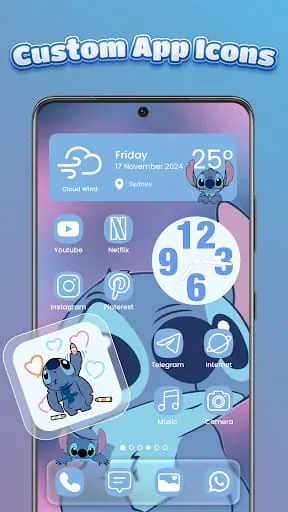
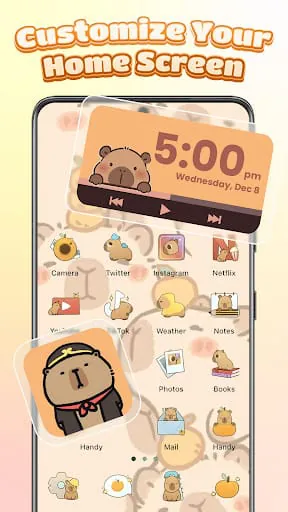
Icon Packs:
Provides a wide variety of icon packs and an icon changer that allows mixing styles, fonts, transparency, and backgrounds. DIY icon packs are also mentioned as a possibility.
-
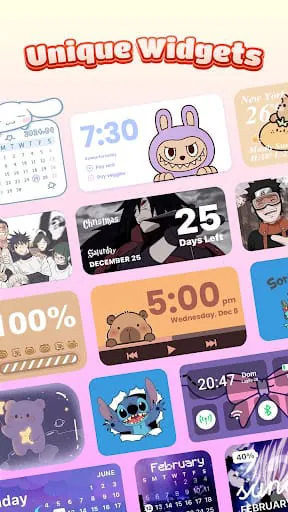
Widget Design:
Offers functional color widgets for battery status, weather, calendar, and image widgets that can be customized with personal galleries.
-
Animation Effects:
Not explicitly mentioned as a feature.
2. System Integration
-
Launcher Features:
Acts as a customization layer or aesthetic launcher, enhancing the default Android experience rather than replacing the core launcher functionality entirely.
-
System Compatibility:
Requires Android 7.0+.
-
Widget Support:
Offers its own set of customizable widgets.
-
Live Wallpapers:
Includes a library of wallpapers to match themes.
-
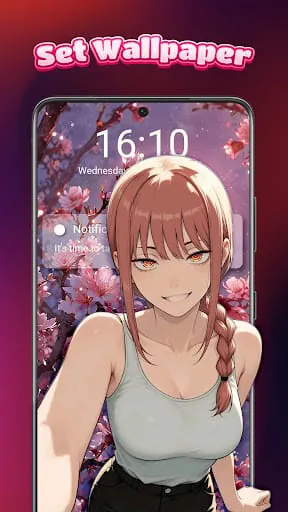
Lock Screen:
Offers customization options for lock screens, including styles, wallpapers, and symbols.
-
Quick Settings:
Features a "smart control center" that provides quick access to essential system settings like Wi-Fi, Bluetooth, brightness, and volume.
3. Content Management
-
Wallpaper Library:
An extensive library of wallpapers is available, updated regularly.
-
Theme Store:
Offers a large collection of themes (over 1000) within the app.
-
Content Updates:
New themes and wallpapers are added regularly, with updates catering to the latest trends.
-
Category Organization:
Themes are organized by style (e.g., anime, vintage, minimalist), making browsing easier.
-
Search Function:
Not explicitly detailed, but implied through browsing options.
-
Favorites System:
Not explicitly detailed.
4. User Experience
-
Easy Application:
Themes and customizations can often be applied with a single tap.
-
Preview Function:
Implied through the selection process before application.
-
Backup Options:
Not explicitly detailed.
-
Reset Features:
Standard Android system settings would likely allow for resets if needed.
-
Profile System:
Not explicitly detailed.
-
Import/Export:
Not explicitly detailed.
5. Performance Impact
-
System Resources:
As with many customization apps, intensive use of themes and widgets might consume more system resources.
-
Battery Usage:
Not specifically detailed, but potentially higher than default settings.
-
Memory Management:
Not specifically detailed.
-
Startup Time:
Not specifically detailed, but likely unaffected unless the theme significantly alters the launcher.
-
Background Process:
Widgets might require background processes to update live information.
-
Stability:
Generally stable, with updates addressing bugs.
6. Additional Features
-
Scheduling:
Not mentioned.
-
Auto-change:
Not mentioned for themes or icons, but widgets display live information.
-
Event Triggers:
Not mentioned.
-
Gesture Controls:
The "smart control center" can be accessed with a swipe gesture.
-
Custom Scripts:
Not mentioned.
-
Sharing Options:
Not explicitly mentioned, though some users may share their customized looks.
1. User Reviews and Experience
- Overall User Satisfaction: Generally favorable, with users appreciating the extensive customization options and variety of themes. The app holds a high rating on Google Play, often around 4.7 to 4.8 stars based on a significant number of reviews.
- Common User Feedback: Users frequently praise the app for its ability to transform the look of their Android phones, the sheer volume of themes and icons available, and the ease of applying customizations.
- User Rating Distribution: The majority of reviews indicate high satisfaction, contributing to a high overall score.
- Most Appreciated Features: The icon changer, the extensive theme library, the availability of color widgets, and the "one-tap" application of themes are consistently highlighted as positive aspects.
- Common Complaints: Some users report issues with ads being intrusive or non-functional, and a few express a desire for more options in creating entirely custom icons rather than just selecting pre-made ones. There are also occasional mentions of older phones struggling with more intensive themes.
2. Technical Performance
- App Size and Requirements: The app size is approximately 82.6 MB to 91.4 MB, with occasional larger sizes for split APKs. It requires Android 7.0 (Nougat) or higher.
- Battery Consumption: Specific data on battery consumption is not readily available, but intensive customization apps can sometimes lead to increased battery usage.
- Loading Speed: While not explicitly detailed, the general user feedback suggests themes apply smoothly, implying reasonable loading times for core functions.
- Stability: Most reviews indicate good stability, though some users mention issues like non-functional ads or occasional lag on older devices. The developers actively release updates to fix bugs.
- Offline Capabilities: The app's offline capabilities depend on the specific features used. Some elements might require an internet connection, while others can likely be used offline after initial download.
3. Updates and Maintenance
- Update Frequency: The app receives frequent updates, often with mentions of bug fixes and minor enhancements, occurring at least monthly. For example, version 1.2.1 was posted on September 23, 2025, with bug fixes.
- Latest Version Changes: Recent updates focus on fixing bugs and enhancing user experience, with occasional additions like tutorials for theme application.
- Bug Fix Response Time: The regular update cycle suggests a responsive approach to addressing reported bugs.
- Developer Support Quality: While direct developer support quality isn't extensively documented, the consistent updates imply active maintenance and a commitment to improving the app. Users are sometimes advised to contact the developer through the Play Store page for persistent issues.
4. Security and Privacy
- Data Collection Practices: The developer states that data collection is primarily for user-requested features that enhance usability and convenience, and they do not collect or share personal or sensitive user data through specific APIs.
- Privacy Policy Clarity: Detailed privacy policy information is available, with mentions of data privacy and security practices varying by use, region, and age.
- Security Measures: The app is available on the Google Play Store, indicating it has passed Google's security checks. Some APK download sites also mention signature verification.
- Permission Requirements: Permissions requested include access to the internet, network state, Bluetooth, location, wallpaper settings, and shortcut management.
- Data Storage Methods: Specific methods for data storage are not detailed in the provided information.
5. Monetization Strategy
- Pricing Model: The app is generally free to use.
- In-app Purchases: There are options for in-app purchases, primarily for an ad-free experience or potentially for premium features or content. One review mentions an optional "ad-free upgrade."
- Subscription Options: For the iOS version (ThemeBox -Widgets,Themes,Icons), subscription options like weekly, monthly, and yearly plans are available. It's possible similar options exist or could be introduced on Android.
- Free vs Paid Features: Core customization features like themes, icons, and widgets are largely available for free. The primary paid option seems to be removing advertisements.
- Value for Money: Given the extensive free features, users generally find the app offers good value, especially if they opt for the ad-free version.
6. Market Position
- Competitor Comparison: Themebox operates in a competitive personalization app market, with alternatives like Nova Launcher, Apex Launcher, and various theme/icon pack apps. It ranks within the top 15 in the free personalization category on Google Play.
- Market Share: With over 1 million downloads, it has a significant user base within its niche.
- Unique Selling Points: The combination of a vast library of themes, extensive icon customization, functional color widgets, and an integrated "smart control center" positions it as a comprehensive personalization toolkit.
- Target Audience Fit: The app strongly appeals to Android users who enjoy deeply customizing their device's aesthetics, from minimalist to vibrant styles, and those looking for a cohesive visual experience.









