
Advertisement
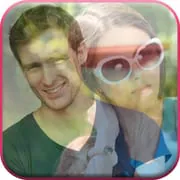
Ultimate Photo Blender / Mixer
4.90
0+ Reviews4.90
0 + Reviews
1
1%
2
1%
3
3%
4
21%
5
74%
User Reviews

Wendy Davis
★★★★★
January 27, 2026Very easy to use. Depends on what you're doing but can easily join several photo's together to set up nice imaging to show all sides of an object & merge to make a single photo to forward to another through messaging. I recommend to others that need to quickly show the full object using different angles or sides.

A Google user
★★★★★
April 2, 2020Amazing results every time. The possibilities are endless. Great in- ap background choices, edits, overlays, and stickers. And you aren't limited to just two pictures. You can use as many as you wish. Not only do the photos turn out great, but it's also relaxing, easy to is, and a good way to just kill some time. Love it!
Barry King
★★★★★
October 20, 2022GREAT APP! It allows me to get so much photo editing done very quickly! It is so simple to use. It never fails. I can lasso an image elsewhere, fix it, then lay it on top of the same spot that needed fixing, and now it looks perfect! Or, I can simply add images to a photo, and I can shrink the new layered photo or enlarge it, so that it's the size I want. I use this app all the time. I can bring my ideas into reality with it! Thanks!
Advertisement
Sky Tech
★★★★★
September 22, 2022Pretty-good... Needs some guides/instructions. The erasing tool needs more than top and bottom for remote selecting. There's no way to purchase the "full" version. There's a limit to the image size for saving - it has downgraded the dimension AND the quality. Enhancements/tunings do not exist for the resized object, but does for the final image. The resizing object doesn't get saved, so, you'd have to RE-CUT for each new image. My biggest issue is the quality and dimension degradation.

Anadelyn
★★★★★
November 15, 2021It works, but with an ugly logo added on top. This is so far the only app I have found that actually allows me to blend 2 of my own photos on top of each other. I was so excited to finally find something that would work for me. Then I saved it and it was ruined by an advertisement for their app being placed over my photos... Unless I redo this after adding a black area below both of my photos so I can crop that off this is useless.
Shae-Bae White
★★★★★
December 2, 2020Best photo editing app I've ever used, even bad pics look amazing. Super fun and easy to use compared to others I've used claiming to be the same as this one. It is absolutely worth the timeand random ads. Only thing i didn't particularly care for,is it seems to drain my battery pretty quickly.otherwise AMAZING!!! Excellent selection of free items without having to pay for a sub unlike so many others.
Paul Strader
★★★★★
December 1, 2022I'm giving 5 star review because, I wasn't bombed with ads like most new apps do. I have only processed 1 photo so this review can and will change as I get a little time in. I'm also an Adobe user when it comes to photo/video editing. I was looking for an app that is quick and easy to use without the ads holding me hostage and forcing me to watch the ads that are full of lies and misleading information on the product they are trying to run down my throat. So far this app hasn't done it.
Terri Riviera
★★★★★
September 13, 2022Just awesome best I have ever come across and I take a lot of pics of whatever big or small things anybody and whoever. I love photography and only use my camera phone. This app is totally it for me. The background selection was easy so was selecting a photo from my gallery and the blending was extremely easy in either thing did I have to go back and try again or delete a photo on the first try. Every blend in app that I have tried I tried only once and deleted. U got me hooked👍🙌🫶💯😍

Mrs. Lisa G Carter
★★★★★
October 24, 2025Would be better if you'd have it set up where what's being blended could be adjusted better for going smaller and being able to place it better, takes so long to try and pinch something small enough and then get it in the right place!!! I use this app everyday thanks!!!
Peter B
★★★★★
January 23, 2026Simple to use interface with a good tutorial to guide you through the first session. Unlike others the double exposure result does not need to have a semi transparent subject
A Google user
★★★★★
September 19, 2019Have used this app for a while to make memes mainly and it's the best I've found. You need to get used to it, but it always does the job for me. Only annoying things are small, like how it puts a grey box outline around any transparent image you import in (tho you can get rid of this with the eraser tool and some patience), not being able to send an item to the top or bottom if they're stacked, and the lack of decent fonts. The frames and overlays are really 00s & cheesy, but I don't use them.
Myca Polentinos
★★★★★
March 16, 2024It's a good app. Blends well. But the reason why I gave it 3 stars is because it don't have 'Save' option like save it for a few minutes then you could edit it again. Edited. minus 1. I did try pressing the check mark then leave the pictures I was doing, but when I got back the work was already gone! Not good!!

MrFixit USA
★★★★★
June 9, 2022This one seems to be working well and as advertised so far. I only problem is that stupid watermark that you can only remove by paying. So I can't even do a few trial images without having a dang water mark all over it. But they actually do let you access most of the features, and they work, so it's a far cry better than EVERY other app of this type I've tried.

Ant F
★★★★★
January 20, 2026I'm surprised I haven't reviewed this LOL. I don't get the chance to use it that often but when I did use it in the past. This is a superior app it's simple to use also I give it 10 Stars😂😂😂
Rose Harrington
★★★★★
September 11, 2025I love this app,I had it for years, but my phone messed up and I lost everything even this app.i am 73 and on a very limited budget. all the while I used it for free even the eracer. but now you want to charge me for it and I can't afford to pay for it. I tried to down load the what was a free app just to begin working on a project and when I needed to erace i learned that I now needed to pay for it. that is pretty low down .I gave it a 1 star but before this happened I would have given it a 5

Tommy Brewer
★★★★★
October 13, 2025this used to be a good app. now it's horrible. the pictures are horrible and you can't even do anything because it's so damn many ads
Daniel
★★★★★
July 25, 2020Yeah sure.... this app is great! Only if you PAY FOR IT!!! You allow me to customize a great portrait, that I can't do nothing with! Becuz you have your stupid water mark, "Ultimate Photo Mixer," sprawled across the bottom, ruining the creation!!! And can't do nothing about it! Therefore....FORCING people to buy the paid version! As IF.... there was a FREE version! Meanwhile.... even if I paid..can't reproduce the exact, unique picture I jus created, with OUT the watermark! Slick. Smh
A Google user
★★★★★
March 23, 2019This is an easy-to-use app packed with useful features. I should have given 5 stars but I opted for 4...sorry. The clear display of the watermark has stopped me from doing so. If you could adjust the opacity of the watermark to make it subtle or faded (only if removing it isn't an option), then I wouldn't think twice about giving a 5-star thumb's up. Thank you for sharing your useful app for free. Keep up the good work in search of excellence.
Shruthi B Mohan
★★★★★
February 5, 2021I recently started using this app, not bad. Nice app👍, I thought it will only accept one photo but I can upload more than one photo 🙂 I have only one suggestion, please can you remove the Ultimate Photo Mixer in a photo. Once I saved the photo, when I see it. It has Ultimate Photo Mixer at the bottom of the photo and I know it is for your ad and for public to show. I hope you change this. Thanks.
JT Irby
★★★★★
January 4, 2025i absolutely love this app! you can do so much more than blend two photos. you can create collages, you can super impose one or more photographs into another, you can line the subject of several photos up using the transparency tool and then crop into the subject matter and create perfectly aligned photos for a motion gif. Love Love Love!
You Might Like

Read With Akili - So Many Diff
100k+
4.90

Scientific calculator plus 991
10M+
4.90

HelloChinese: Learn Chinese
5M+
4.90

Citizen Now: US Citizenship
100k+
4.90

Dhikr & Dua
500k+
4.90

Doh A Tu (Learn With Us)
10k+
4.90

Ethical Hacking University App
500k+
4.90

The Happy Child Parenting App
500k+
4.90

CDL Prep Test 2024
500k+
4.90

Speak English with Loora AI
5M+
4.90