Balance Points: Media Playback Capabilities
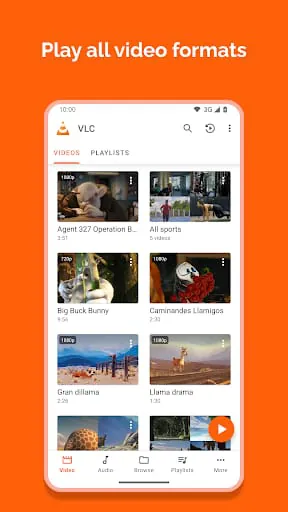
The application demonstrates a strong balance in media playback capabilities, supporting a wide array of formats and codecs. This versatility ensures users can play almost any video or audio file without needing additional software.
Format Support
Supports formats like MP4, MKV, AVI, MOV, FLAC, and many more. Codec compatibility includes H.264, H.265, VP9, etc.
-
Wide format support
-
Excellent codec compatibility
-
Smooth playback
-
Occasional stuttering on very high-resolution videos (4K+) on older devices.
Integration Features: Streaming and Network Playback
Integration with network streams and online sources is seamless. Users can easily access and play media from various network protocols such as HTTP, FTP, and UPnP/DLNA.
Network Streaming
Supports streaming from network shares, online radio streams, and podcasts. Subtitle support extends to online content, enhancing accessibility.
-
Streaming Protocols
-
HTTP, HTTPS, RTP/RTSP, HLS, FTP, SMB, MMS
Harmony Aspects: User Interface and Controls
The user interface strikes a good balance between functionality and ease of use. The gesture controls are intuitive, allowing for easy navigation and adjustments during playback.
Gesture Controls
Volume and brightness can be adjusted with vertical swipes, while seeking is achieved with horizontal swipes.
Customizable Interface
Users can customize the interface with different themes and adjust settings to suit their preferences. This allows for a personalized viewing experience.
Unity Paths: Audio and Subtitle Management
The application provides a unified approach to audio and subtitle management. Users can easily switch between audio tracks, adjust subtitle settings, and even download subtitles from within the app.
|
Feature
|
Description
|
|
Audio Track Switching
|
Seamlessly switch between different audio tracks available in the media file.
|
|
Subtitle Support
|
Supports multiple subtitle formats (SRT, SSA, ASS) with customization options (size, color, encoding).
|
Synergy Moments: Offline Capabilities and Library Management
The combination of offline playback capabilities and effective library management creates a synergistic experience. Users can organize their media files and access them anytime, anywhere, without requiring an internet connection.
Overall Impression
The application is a robust and versatile media player that offers a balanced and harmonious user experience. Its wide format support, intuitive interface, and offline capabilities make it an excellent choice for Android users.
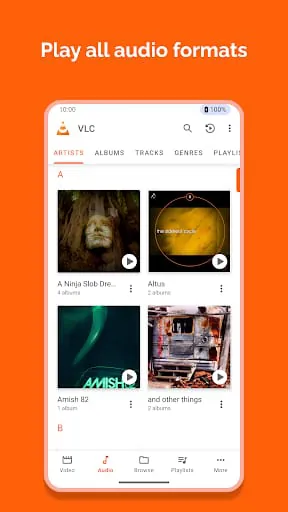
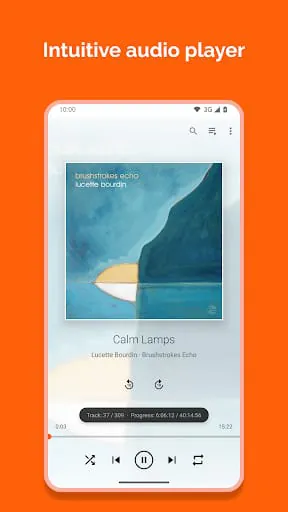
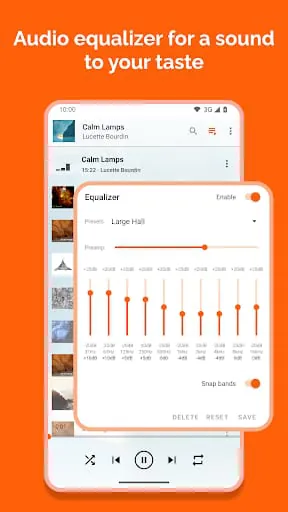
VLC media player is a free and open source multimedia player that can play most multimedia files, including discs, devices, and network streaming protocols. It is available on multiple platforms, including Android. VLC for Android can play any video and audio files, network streams, network shares and drives, and DVD ISOs. It is a full audio player with a complete database, an equalizer, and filters, playing all audio formats. VLC is free, has no ads, no in-app-purchases, no spying, and is developed by passionate volunteers. All the source code is available for free.
VLC for Android supports all formats, including MKV, MP4, AVI, MOV, Ogg, FLAC, TS, M2TS, Wv, and AAC. All codecs are included with no separate downloads. It supports subtitles, Teletext, and Closed Captions. VLC for Android has a media library for audio and video files and allows browsing of folders directly. It also supports multi-track audio and subtitles, auto-rotation, aspect-ratio adjustments, and gestures to control volume, brightness, and seeking. It includes a widget for audio control, supports audio headsets control, cover art, and a complete audio media library.
VLC for Android requires access to "Photos/Media/Files" to read all media files, "Storage" to read all media files on SD cards, and "Other" to check network connections, change the volume, set the ringtone, run on Android TV, and display the popup view. It needs "read the contents of your USB storage" to read media files on it, "modify or delete the contents of your USB storage" to allow deletion of files and store subtitles, "full network access" to open network and internet streams, "prevent phone from sleeping" to prevent the phone from sleeping when watching a video, "change your audio settings" to change audio volume, "modify system settings" to allow changing of audio ringtone, "view network connections" to monitor whether the device is connected or not, "draw over other apps" to start the custom picture-in-picture widget, "control vibration" to give feedback on the controls, "run at startup" to set recommendations on Android TV launcher screen, and "microphone" to provide voice search on Android TV devices.
In summary, VLC for Android is a free and open source multimedia player that supports all formats, including network streams, network shares and drives, and DVD ISOs. It has a media library for audio and video files, supports multi-track audio and subtitles, and includes a widget for audio control. It requires access to various permissions to function properly.