
HomeDuo Mobile
Duo Mobile

Duo Mobile

Everyone
Rating
V4.73.0
Version
10M+
Installs
4.70
5.6k + Reviews
1
4%
2
1%
3
2%
4
8%
5
85%

Review By AppsWm

Duo MobileDuo MobileDuo Mobile

Interaction Patterns

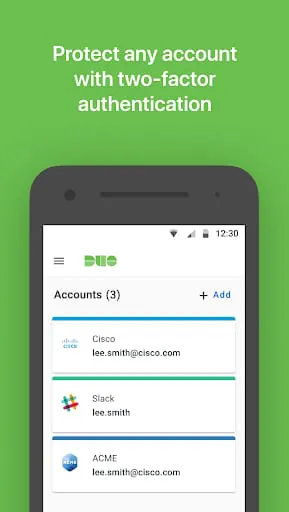
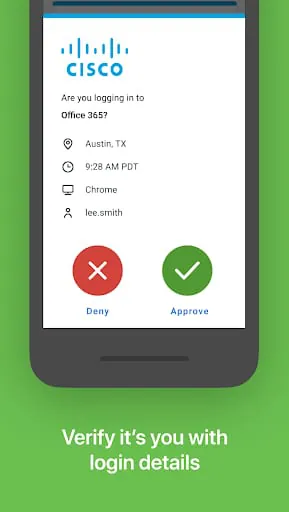
The primary interaction pattern revolves around push notifications and one-tap verification. This offers a seamless and quick authentication process. The design effectively utilizes visual cues to guide users, ensuring clarity and ease of use. However, the consistency of these visual cues could be improved across different operating systems and device types.

Experience Flows

The enrollment process is straightforward, guiding users through account linking and device registration. Subsequent authentication flows are rapid and minimally disruptive. The app leverages contextual awareness to streamline the user experience, adapting to different security requirements based on location or risk level. A potential enhancement would be to provide more proactive guidance and support within the experience flow, particularly for less tech-savvy users.

Design Thoughtfulness

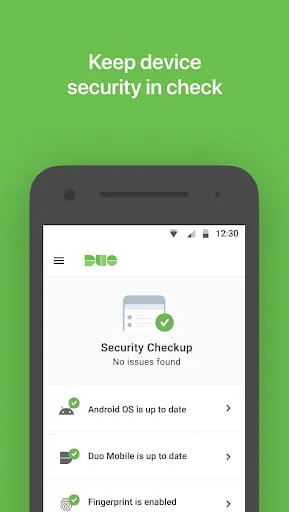
The design prioritizes security without sacrificing usability. The app features a clean and intuitive interface. Security measures, such as biometric authentication, are seamlessly integrated into the user flow. Thoughtful design is also evident in the app's minimal permission requests. A future improvement could focus on greater customization options, allowing users to tailor the app's behavior to their specific needs and preferences.

User Engagement

While primarily a utility application, user engagement is maintained through clear communication and a reliable service. The app proactively notifies users of security events and provides helpful guidance. Engagement could be further enhanced by incorporating personalized tips and insights related to security best practices. The simplicity is key to the app's wide acceptance.

Interface Elegance

The interface is uncluttered and easy to navigate. The use of color and typography is restrained, creating a professional and trustworthy aesthetic. The visual design aligns well with the app's core functionality, emphasizing security and simplicity. Small design touches, such as subtle animations and transitions, contribute to a polished and refined user experience.


Pros
  • Seamless authentication process
  • Intuitive user interface
  • Strong security features
  • Minimal performance impact

Cons
  • Limited customization options
  • Potential for greater proactive support
  • Visual consistency across platforms could be improved

Description

Section 1: Duo Mobile is a two-factor authentication service that helps make logins more secure. It generates passcodes for login and can receive push notifications for easy, one-tap authentication. It can also be used to manage two-factor authentication for other applications and web services that make use of passcodes. Section 2: In order to use Duo Mobile with Duo accounts, it needs to be activated and linked to the account. An activation link is sent as part of Duo's enrollment process. Additionally, access to the camera may be requested in order to scan QR codes when activating accounts. Accounts can be activated by other methods if desired. Section 3: License agreements for third-party Open Source libraries used in Duo Mobile can be found on the Duo Security website. The latest Terms and Conditions can be found on the Duo website.

All Versions

V4.103.0

Updated: 2025-12-25

13.80 MB

V4.84.0

Updated: 2025-3-3

27.32 MB

V4.73.0

Updated: 2024-9-13

26.12 MB

V4.72.0

Updated: 2024-8-30

26.2 MB

V4.66.0

Updated: 2024-5-29

24.3 MB

V4.64.0

Updated: 2024-4-30

22.27 MB

V4.61.0

Updated: 2024-3-15

22.06 MB

Summary Of User Reviews

Jason Galley
Jason Galley
January 15, 2026
Overall it works decently well. A few annoyances, but mainly that if you click the accept button in the notification panel and it doesn't detect a Wi-Fi/cellular signal (even though it's always there) it pops up the app with a failure notification, but accepting the failure notification CLOSES THE APP. When trying to accept a login attempt against a timer this is majorly annoying and serves absolutely no purpose to have it close after that... it does this frequently.
Provoxin
Provoxin
November 19, 2025
This app has been awful as an IT admin. Enrollments very often don't work for no apparent reason, and refuse to give any meaningful error data. Users softlock themselves if the enrollment process gets interrupted at any point, and then their partial setup has to be completely reset from our end before they can try again. We've been getting countless calls about the setup just failing or refusing to proceed for no reason. Once set up, the app occasionally fails to send push notifications.
A Google user
A Google user
November 5, 2019
Very annoying app. The worst part is that the push notifications just don't work. I have to manually open the app to see the request and approve it. Then, a few minutes later, the push for the original request will finally show up in my notifications, by which point it's useless and I don't need it anymore. Also, I emailed the support email for the app store to mention my issue and all they said to me was that the email support was for paying DUO users. Why put that email for the free app?!










