
Part 1 - Information Analysis
Section A - Common Information Analysis
1. User Reviews and Experience
1. User Reviews and Experience
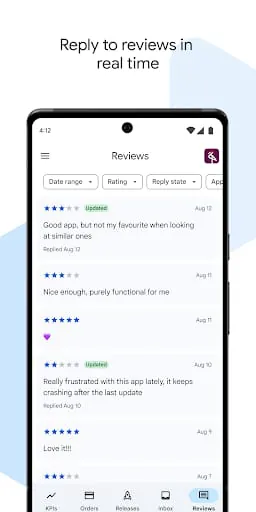
User reviews are a critical component of the Google Play Console, providing direct feedback on app performance and user satisfaction. The platform offers tools to view and respond to individual reviews, fostering a sense of developer-user engagement. Developers can analyze aggregated review data, identify trends in user feedback, and even report reviews that violate Google Play policies. The console also provides benchmarks to see how an app's rating compares to similar applications, helping developers understand their market position relative to user sentiment.
2. Technical Performance
Technical performance is a significant focus within the Google Play Console, particularly through the "Android Vitals" feature. This section monitors critical metrics such as crash rates, Application Not Responding (ANR) rates, and excessive battery usage. The console provides detailed diagnostics, including stack traces and device information, to aid developers in debugging and resolving issues. By staying below "bad behavior thresholds," developers can improve their app's discoverability on Google Play. The platform also offers tools to analyze and optimize app startup time and overall responsiveness, which are crucial for user experience.
3. Updates and Maintenance
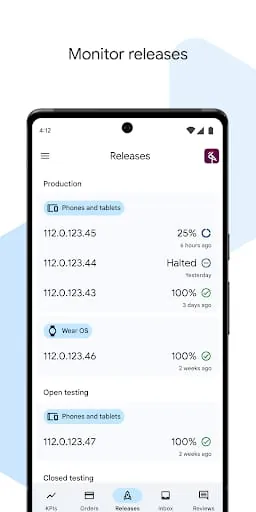
The Google Play Console facilitates robust update and maintenance processes for applications. Developers can manage app releases, including staged rollouts to gradually introduce new versions to users. The "Save for later" feature offers more control over when changes are sent for review, allowing for greater flexibility in managing updates. The console also provides tools to monitor the status of release changes, ensuring developers are aware of when their updates have been reviewed and approved.
4. Security and Privacy
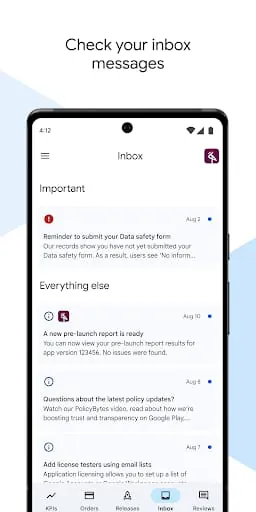
Security and privacy are paramount, with Google Play Console offering a dedicated "Data safety" section. This feature requires developers to declare how their apps collect, share, and protect user data. This information is displayed on the app's store listing, enabling users to make informed decisions before installation. Developers must provide details on data collection, sharing practices, and security measures like encryption. The Play Integrity API also assists in verifying application integrity and protecting against tampering.
5. Monetization Strategy
The Google Play Console provides comprehensive tools for managing monetization strategies. Developers can track revenue from in-app purchases, subscriptions, and ads. The platform supports various monetization options, including in-app ads, in-app purchases, and subscriptions, allowing developers to generate revenue. Advanced features include price experiments and subscription management, enabling developers to optimize their revenue streams.
6. Market Position
The Google Play Console offers insights into an app's market position through various analytics and reporting tools. Developers can compare key growth, engagement, and monetization metrics against peer groups to benchmark performance. User acquisition reports help identify sources of downloads, while conversion rates on store listings can be analyzed to understand market appeal. Store listing experiments allow developers to test different store listing elements to optimize discoverability and appeal.
Section B - Category-Specific Analysis (Tools)
1. Core Functionality
As a tool for developers, the core functionality of the Google Play Console is centered around managing and optimizing applications. Its feature completeness is extensive, covering app release management, performance monitoring, user acquisition analysis, revenue tracking, and app quality assessment. The accuracy of its data is high, being first-party data directly from Google. Processing speed is generally efficient, although review times for submitted changes can vary. Automation capabilities are present through APIs, allowing integration with third-party workflows. Advanced features include A/B testing for store listings and AI-powered tools for drafting store listings and summarizing reviews.
2. User Interface
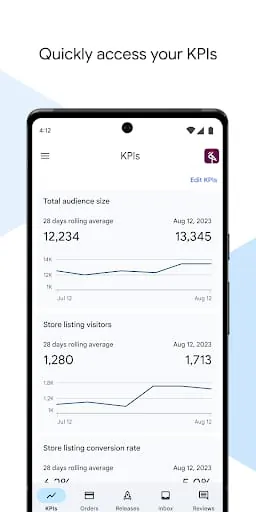
The Google Play Console's user interface is designed to provide a comprehensive overview of an app's performance and management. It features a dashboard with key metrics, detailed statistics pages, and dedicated sections for releases, growth, quality, and monetization. Navigation is generally logical, with a left-hand menu providing access to different functionalities. While customization of the dashboard is possible to pin preferred KPIs, extensive UI customization options for the console itself are not a primary feature, as it's a developer-facing tool. Quick access tools are abundant, with a mobile app available for on-the-go management.
3. Data Management
Data management within the Google Play Console is robust, providing developers with access to a wealth of analytics on app performance, user acquisition, engagement, and monetization. The console allows for data export in CSV format for deeper analysis and integration with internal systems. It supports the management of app versions and release tracks, crucial for iterative development. Cloud integration is inherent, as all data is stored and managed by Google. Data security is a significant focus, with developers required to detail their data handling practices in the "Data safety" section.
4. Integration Capabilities
The Google Play Console offers various integration capabilities, primarily through its Play Console APIs, which allow developers to automate tasks and integrate workflows with third-party services. While direct third-party app integration within the console is limited, it's designed to work with external development and marketing tools. Share options are available for reports and configurations. Cross-platform sync is a given for managing apps across devices through the web console and the mobile app. Plugin and extension system support are more characteristic of apps being managed, rather than the console itself.
5. Professional Features
The Google Play Console is packed with professional features tailored for app developers and marketers. These include advanced settings for release management, granular statistics for performance analysis, and sophisticated monetization tools. Keyboard shortcuts are not a prominent feature of the web-based console, but the structured interface and available APIs support efficient workflows. Batch processing is implicitly supported through API integrations and bulk report downloads. Custom templates are not a direct feature, but the ability to save and share report configurations offers similar flexibility.
6. Performance Optimization
Performance optimization is a core pillar of the Google Play Console. "Android Vitals" provides deep insights into app stability, battery usage, and render times. Developers receive alerts for new issues and can debug technical problems quickly with contextual information. The console helps identify and prevent issues related to large screen layouts and incorrect edge-to-edge rendering. Startup time and resource usage are critical areas for optimization, with the console providing metrics to guide these efforts. Cache management and memory efficiency are indirectly addressed through stability and performance metrics that highlight problems in these areas.
Part 2 - Professional Review
Moments of Insight
The Google Play Console serves as a digital mirror, reflecting the performance and reception of an application. Its strength lies in its ability to distill complex user interactions and technical data into actionable insights. Witnessing a surge in positive reviews after a well-executed update, or identifying a recurring technical glitch through Android Vitals, offers profound moments of understanding. These insights are not just data points; they are gentle nudges, guiding developers toward a more harmonious relationship with their users and their product.
Balanced Perspectives
Approaching the Play Console requires a balanced perspective, acknowledging both its power and its inherent complexities. It provides an unparalleled view into an app's lifecycle, from initial release to ongoing user engagement and monetization. However, navigating its vast array of statistics and tools can sometimes feel overwhelming. The key is to focus on core metrics that truly matter, using the console as a tool for continuous improvement rather than a source of anxiety. It’s a bridge to understanding, not a hurdle to overcome.
Mindful Observations
Observing the user feedback within the Play Console fosters a sense of mindfulness. Each review, whether positive or negative, represents a human experience and a moment of connection. Responding thoughtfully to user concerns, and implementing changes based on their feedback, cultivates digital empathy. The console encourages a mindful user experience by highlighting the importance of stability, performance, and privacy – all crucial elements for digital well-being. It prompts developers to consider the user's journey with care and intention.
Thoughtful Reflections
The Play Console prompts developers to reflect on their creation's role in users' lives. Beyond metrics and performance, it encourages consideration of the app's impact on daily routines and digital wellness. Is the app a source of stress or a tool for seamless efficiency? The thoughtful design of the console itself, with its organized dashboards and clear reporting, supports this reflection. It aims to empower developers to build applications that are not only functional but also contribute positively to the user's digital harmony.
Harmonious Integrations
The ultimate harmony is achieved when the app and its underlying platform, the Play Console, work in concert. The console's integration capabilities, through APIs and data export, allow for a more holistic view of the app's ecosystem. By leveraging these tools, developers can create a more cohesive and responsive experience for their users. This integration fosters a seamless flow of information, enabling proactive problem-solving and continuous refinement, ultimately leading to an app that feels intuitively aligned with user needs.