

User Reviews and Experience
Kling AI generally receives positive feedback for its creative capabilities, with users praising its ability to transform ideas into high-quality videos and images. Many appreciate the realism and detail in the generated content, with some calling it "next level" and a tool that truly brings visions to life. The image-to-video conversion, in particular, is frequently highlighted as a strong point. However, there are also significant criticisms regarding reliability, processing times, and cost. Some users report that the AI ignores prompts, produces low-quality or distorted results, and experiences lengthy waiting times, especially on free plans. This inconsistency leads to frustration and a feeling of gambling with the tool.
User Rating Distribution
While specific distribution data is not readily available, user feedback suggests a polarized experience. Many express strong satisfaction with the output quality, while others are deeply frustrated by technical issues and unreliability. The app store ratings often reflect this, with a mix of high praise and significant complaints.
Most Appreciated Features
-
Realistic and cinematic video generation.
-
High-quality image-to-video conversion.
-
Smooth motion and character movements.
-
Intuitive interface for beginners.
-
Prompt adherence for creating specific scenes and actions.
Common Complaints
-
Unreliable performance and frequent glitches (e.g., getting stuck at 99%).
-
Long processing and generation times, especially for free users.
-
AI occasionally ignoring prompts or producing unusable results.
-
Credit system and pricing perceived as expensive or exploitative by some users.
-
Limited editing flexibility post-generation.
-
Inconsistent customer support.
Technical Performance
- Unreliable performance and frequent glitches (e.g., getting stuck at 99%).
- Long processing and generation times, especially for free users.
- AI occasionally ignoring prompts or producing unusable results.
- Credit system and pricing perceived as expensive or exploitative by some users.
- Limited editing flexibility post-generation.
- Inconsistent customer support.
Technical Performance
Kling AI offers video generation up to 1080p resolution at 30 frames per second. Advanced models aim for high-fidelity output with features like 3D face and body reconstruction for enhanced realism. However, performance can be inconsistent, with users reporting long generation times and server capacity issues impacting the app's responsiveness. Offline capabilities are not a feature of this cloud-based AI generation tool.
Updates and Maintenance
Kling AI receives frequent updates, with mentions of versions like 1.5, 1.6, 2.0, 2.1, and 2.5 Turbo, indicating active development. These updates often introduce new features, model upgrades, and performance improvements. While the frequency suggests developer engagement, some users point to a lack of responsiveness in bug fixing and customer support, particularly for free users.
Security and Privacy
The app's privacy policy outlines data collection practices, including user-generated content, metadata, and device information. Data is collected to provide and improve services, and may be shared with group entities. Users are advised to be cautious about submitting confidential data and are informed that public content is displayed publicly. The policy also details data security measures, retention periods, and international data transfer practices. Permission requirements would typically align with standard app functionalities for media creation and cloud access.
Monetization Strategy
Kling AI operates on a freemium model with a credit system. Free users receive a limited number of credits, while paid subscriptions offer more credits and access to advanced features. Pricing tiers include options for individuals and businesses, with various plans based on credit allocation and feature access. Some users find the pricing expensive, especially given the potential for inconsistent results, while others deem it cost-effective for the creative output achieved.
Market Position
Kling AI is positioned as a leading AI video generation tool, competing with platforms like Runway, Google Veo, and Pika Labs. Its unique selling points include its advanced multimodal capabilities, cinematic output quality, and a focus on realism and motion dynamics. The target audience includes content creators, marketers, designers, and businesses seeking to streamline video production. It holds a significant market share, with reports suggesting it leads competitors in certain segments.
Creative Tools
As an Art & Design app focused on AI video generation, Kling AI's primary creative tools revolve around its AI models. These include:
- Text-to-Video and Image-to-Video Generation: The core functionality allowing users to create videos from text prompts or existing images.
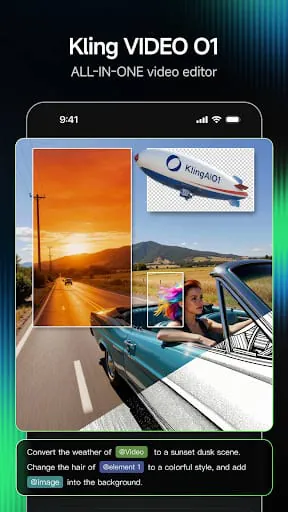
- Elements Feature: Allows uploading multiple images as reference elements to maintain visual consistency for characters, objects, and scenes, enabling dynamic interactions.
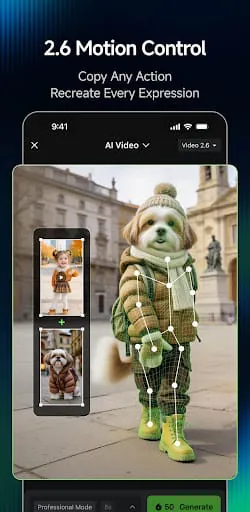
- Motion Brush and Motion Control: Tools for animating specific parts of an image or controlling character movements with precision.
- AI Sound Generation: Integration of sound based on video content.
- AI Effects Library: Includes features like old photo restoration, holiday themes, and dual-character effects.
- Style Transfer and Customization: Ability to deconstruct and apply core styles from reference images, offering diverse artistic outputs (e.g., felt, 3D, vintage).
Design Features
While not a traditional design app, Kling AI offers features that support creative design workflows:
- High-Resolution Output: Generates videos in 1080p resolution at up to 30 frames per second, with 4K in testing.
- Aspect Ratio Support: Suitable for various platforms like TikTok and Instagram.
- Negative Prompts: Helps remove unwanted elements for cleaner visuals.
- Video Extension: Allows extending generated content up to 3 minutes.
- Export Options: While not explicitly detailed, the output is intended for use across various digital platforms.
User Interface
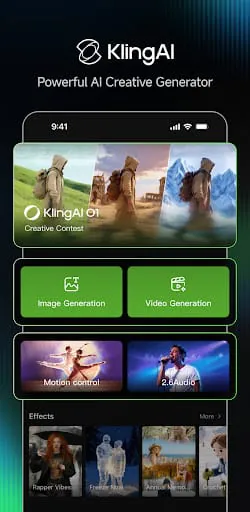
The user interface is generally described as intuitive and beginner-friendly, simplifying the process of AI video generation. Users can input prompts, select styles, and refine scenes. However, detailed customization options for advanced users might be limited compared to professional video editing software. The platform offers tutorials and community support to aid users.
Performance
Canvas Performance: Not applicable as it's not a drawing or painting app. File Handling: Handles image and video inputs and outputs. Memory Management: Cloud-based processing means local device memory is less critical for generation. Undo/Redo System: Implicit in the iterative refinement of prompts and generation. Auto-save: Not explicitly mentioned for ongoing projects, but generated videos are saved. Project Backup: Projects and generated assets are typically stored on the cloud.
Learning Resources
-
Tutorial Content:
Detailed step-by-step tutorials are available to guide users through basic and advanced features.
-
Community Support:
A large community of users offers tips, ideas, and feedback.
-
Prompt Guides:
Resources often include examples and best practices for writing effective prompts.
-
Customer Support:
Available for inquiries and troubleshooting.
Moments of Insight
Kling AI offers a fascinating glimpse into the future of content creation, where the barrier between imagination and visual reality is dramatically lowered. The ability to translate a narrative thought into a dynamic, cinematic scene with mere text prompts is a profound simplification of the creative process. This democratization of video production allows individuals without extensive technical skills to bring their stories to life, fostering a sense of empowerment and possibility.
Balanced Perspectives
While Kling AI excels in generating visually impressive and often realistic videos, its performance can be inconsistent. Users report occasional issues with prompt adherence, leading to results that don't quite match expectations. The processing time, particularly for free users, can also be a significant hurdle, testing the patience of even the most dedicated creator. Balancing the creative output with the practicalities of wait times and potential rework is key to a sustainable workflow.
Mindful Observations
The user interface is designed for accessibility, allowing for rapid ideation and experimentation. This ease of use encourages a more fluid creative process, where users can iterate quickly on ideas without getting bogged down in complex software. The community features also promote a sense of shared exploration, where inspiration can be drawn from others' creations, fostering a collaborative digital space.
Thoughtful Reflections
Kling AI prompts a reflection on the nature of digital well-being in creative pursuits. By simplifying complex tasks, it can reduce the friction often associated with content creation, potentially alleviating stress and burnout. However, the reliance on cloud processing and potential for long wait times can also introduce its own form of digital frustration if not managed mindfully. The tool's value lies in its ability to enhance, rather than consume, the user's time and energy.
Harmonious Integrations
The platform's integration of advanced AI models for both image and video generation creates a cohesive creative studio. This allows for a more seamless workflow, where initial visual concepts can be developed into full-fledged video narratives. The continuous updates and active development suggest a commitment to refining these integrations, aiming for a more powerful and intuitive user experience that harmonizes human creativity with artificial intelligence.
Final Verdict
Kling AI presents a powerful and accessible entry point into AI-driven video creation. Its ability to translate prompts into compelling visuals offers a unique bridge between ideation and execution. While challenges in consistency and processing time exist, the tool's potential for fostering creativity, simplifying routines, and promoting digital engagement is undeniable. For those who approach it with a mindful balance of expectation and exploration, Kling AI can be a valuable ally in the quest for harmonious digital expression.
Moments of Insight
Kling AI offers a fascinating glimpse into the future of content creation, where the barrier between imagination and visual reality is dramatically lowered. The ability to translate a narrative thought into a dynamic, cinematic scene with mere text prompts is a profound simplification of the creative process. This democratization of video production allows individuals without extensive technical skills to bring their stories to life, fostering a sense of empowerment and possibility.
Balanced Perspectives
While Kling AI excels in generating visually impressive and often realistic videos, its performance can be inconsistent. Users report occasional issues with prompt adherence, leading to results that don't quite match expectations. The processing time, particularly for free users, can also be a significant hurdle, testing the patience of even the most dedicated creator. Balancing the creative output with the practicalities of wait times and potential rework is key to a sustainable workflow.
Mindful Observations
The user interface is designed for accessibility, allowing for rapid ideation and experimentation. This ease of use encourages a more fluid creative process, where users can iterate quickly on ideas without getting bogged down in complex software. The community features also promote a sense of shared exploration, where inspiration can be drawn from others' creations, fostering a collaborative digital space.
Thoughtful Reflections
Kling AI prompts a reflection on the nature of digital well-being in creative pursuits. By simplifying complex tasks, it can reduce the friction often associated with content creation, potentially alleviating stress and burnout. However, the reliance on cloud processing and potential for long wait times can also introduce its own form of digital frustration if not managed mindfully. The tool's value lies in its ability to enhance, rather than consume, the user's time and energy.
Harmonious Integrations
The platform's integration of advanced AI models for both image and video generation creates a cohesive creative studio. This allows for a more seamless workflow, where initial visual concepts can be developed into full-fledged video narratives. The continuous updates and active development suggest a commitment to refining these integrations, aiming for a more powerful and intuitive user experience that harmonizes human creativity with artificial intelligence.
Final Verdict
Kling AI presents a powerful and accessible entry point into AI-driven video creation. Its ability to translate prompts into compelling visuals offers a unique bridge between ideation and execution. While challenges in consistency and processing time exist, the tool's potential for fostering creativity, simplifying routines, and promoting digital engagement is undeniable. For those who approach it with a mindful balance of expectation and exploration, Kling AI can be a valuable ally in the quest for harmonious digital expression.