

HomeOrbot: Tor for Android
Orbot: Tor for Android

Orbot: Tor for Android

Everyone
Rating
V17.0.0-RC-1-tor.0.4.7.11
Version
10M+
Installs
4.10
8.4k + Reviews
1
15%
2
3%
3
7%
4
9%
5
66%

Review By AppsWm

Orbot: Tor for AndroidOrbot: Tor for AndroidOrbot: Tor for AndroidOrbot: Tor for Android

Refined Privacy Provision

This application distinguishes itself through its commitment to user privacy, routing internet traffic through the Tor network. This layered encryption process offers a sophisticated approach to anonymity, shielding users from surveillance and tracking. The core function is to provide a private connection, acting as a sophisticated proxy, creating a secure tunnel.

Privacy Shield Assessment

The elegance of this privacy lies in its ability to seamlessly integrate with other applications. While it is not a communication app itself, it secures communications of other apps. The degree of shielding provided is very elegant.

Sophisticated Security Setup

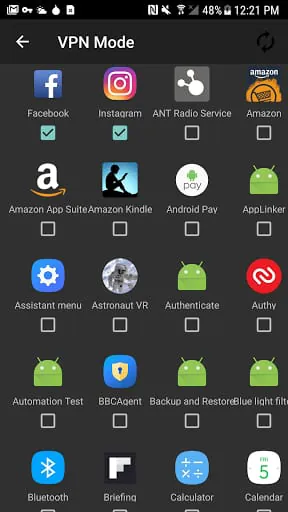
Setting up the application involves a series of well-defined steps, ensuring that users understand the process of enabling Tor for their device. The initial configuration might appear technical, but it reflects a deliberate design choice to provide maximum control to the user. Fine-grained control exists over which apps traffic is routed through Tor, and which bypass the system.

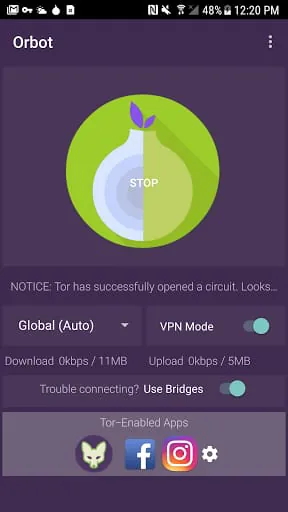
Orbot VPN Mode

A key sophisticated feature is the VPN mode, which allows all apps on the device to route their traffic through the Tor network.

Graceful Anonymity Handling

The application gracefully handles the complexities of Tor, presenting a simplified interface that abstracts away much of the underlying technical detail. Despite being a tool for advanced users, there is a clear attempt at user friendliness. Elegantly manages bridges and relays.

  • Strong anonymization
  • Free and open source
  • Customizable settings
  • Can significantly slow down connection speed
  • May require technical knowledge for optimal configuration
  • Not suitable for all types of internet activity

Polished Configuration Options

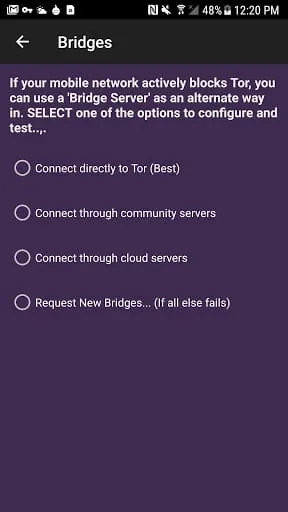
The application provides a range of configuration options that allow users to tailor the Tor experience to their specific needs. These options include the ability to select specific countries for exit nodes, configure bridges for circumventing censorship, and adjust various other settings.

Bridge Configuration
Provides options to configure Tor bridges, enabling users to bypass censorship and access blocked content.
Node Selection
Allows users to choose specific countries for entry and exit nodes, further enhancing control over their anonymity.

Elegant Network Integration

The application seamlessly integrates with the Android operating system, allowing users to easily enable or disable Tor connectivity. The app also provides detailed statistics on Tor traffic, allowing users to monitor their connection and ensure that it is functioning correctly.

Integration Assessment

The degree of integration is very elegant.

Description

Orbot is a free VPN and proxy app that uses Tor to encrypt your internet traffic and hide it by bouncing through a series of computers around the world. This process provides the highest standard of security and privacy, preventing network surveillance that threatens personal freedom and privacy, confidential business activities and relationships, and state security known as traffic analysis. Orbot is the only app that creates a truly private internet connection, and it prevents anyone from knowing what apps you are using or websites you visit. Orbot is the Tor VPN for Android, and any installed app can use Tor via the Orbot VPN feature or proxy feature. Orbot prevents someone watching your connection from knowing what apps you are using or websites you visit. All anyone monitoring your network traffic can see is that you're using Tor. Guardian Project is a group of developers that make secure mobile apps and open-source code for a better tomorrow. Orbot is free software, and users can take a look at the source code or join the community to make it better. Users can send feedback to [email protected] . While Orbot is constantly upgrading its software to combat the latest threats and eliminate bugs, no technology is 100% foolproof, and users must utilize best practices to keep themselves safe. Overall, Orbot is a reliable and secure VPN and proxy app that provides the highest standard of security and privacy for internet users.

All Versions

V17.0.0-RC-1-tor.0.4.7.11

Updated: 2023-8-6

22.5 MB

V17.0.0-BETA-5-tor.0.4.7.11

Updated: 2023-3-22

17.9 MB

V16.6.0-RC-4-tor.0.4.6.9

Updated: 2022-3-14

17.2 MB

V16.4.1-RC-2-tor.0.4.4.6

Updated: 2021-4-30

17.9 MB

V16.4.0-RC-2a-tor-0.4.4.6

Updated: 2021-2-2

18.9 MB

Summary Of User Reviews

A Google user
A Google user
December 14, 2019
To be honest its all on the processing speed of the user's phone and internet connection. The moment I purchased a good phone with reliable service I've never had an issue. You should always delete it when your done, including anything you downloaded while using it. It's a great experience if you know what your doing. Most people dont even use all the setting properly. I love this and love how it doesn't even have to be a third party app. Gooood orbot!!!!
Armin M
Armin M
July 16, 2025
In countries with severe internet censorship, Tor is the best solution, and having an Android Tor VPN client app is extremely useful. however, Orbot is very rarely updated and there are issues that have been around for a long time. for example the "turn tor off" option never works properly and causes the app to crash several times when you try to reconnect after using it. this crashing issue also sometimes happens randomly. fixing this can save us a lot of time.
Bob Smith
Bob Smith
October 10, 2020
Update, goes dormant a few minutes after you start it. Can I just have an older version that works properly. It'll start, but once you close the app it just doesn't work. This is what happens when devs continually tweak apps. Why can't we leave well enough alone. And have working apps Works once, then it needs to be Uninstalled then reinstalled. Works great when you use it once, rather bothersome if you want to use it more. Developer's really need to fix what they broke.