HomePaperColor
PaperColor

PaperColor

Everyone
Rating
V2.9.11
Version
10M+
Installs
4.40
12.9k + Reviews
1
1%
2
1%
3
3%
4
21%
5
74%

Review By AppsWm

PaperColorPaperColorPaperColorPaperColor

Refined Drawing Experience

The application offers a streamlined drawing experience, focusing on core features that cater to both beginners and experienced artists. The brush system, in particular, stands out for its responsiveness and variety.

Brush Customization

The depth of brush customization, including size, opacity, and texture, contributes significantly to the tool's elegance. This allows for a nuanced approach to digital painting, mimicking traditional media with surprising accuracy.

Sophistication value: High. The level of control provided enhances creative possibilities.

Grace factors: The fluid response of the brushes mimics natural media.

Polish elements: Clean interface for brush adjustments.

Elegance aspects: The feel of traditional drawing with digital precision.

Refinement points: Pressure sensitivity support for varying line weights.

Overall elegant value: 9/10.

Sophisticated Color Palette

The color palette is intuitive and allows for easy selection and mixing of colors. The inclusion of a color picker tool further enhances the user experience, enabling artists to precisely match colors from imported images or existing artworks.

Color Management

The app's approach to color management is elegant, providing users with the necessary tools to achieve their desired results without being overwhelming. The ability to save custom color palettes is a welcome addition.

  • Easy color selection
  • Custom palette creation
  • Color picker tool

Sophistication value: 7/10. It's functional and user-friendly.

Grace factors: Simple to use, but capable of precise color adjustments.

Polish elements: Seamless integration with the drawing tools.

Elegance aspects: Fluid and responsive color adjustments.

Refinement points: History and Favorites palette.

Overall elegant value: 8/10.

Graceful User Interface

The user interface is clean and uncluttered, allowing artists to focus on their work without distractions. The placement of tools and options is logical and intuitive, making the app easy to learn and use.

  • Intuitive layout
  • Minimalist design
  • Customizable workspace
  • Limited advanced features compared to professional software
  • Occasional lag on older devices

Sophistication value: 8/10. The intuitive interface reduces the learning curve.

Grace factors: Fluid transitions between tools and functions.

Polish elements: Well-placed toolbars and menus.

Elegance aspects: Simple design allows focuses on creation.

Refinement points: Customizable layout for personal workflow.

Overall elegant value: 8/10.

Polished Export Options

The application offers a range of export options, allowing artists to easily share their work in various formats. The ability to export images at different resolutions ensures that artworks look their best on any device.

Export Format Description Use Case
PNG Lossless image format High-quality images, transparent backgrounds
JPG Compressed image format Smaller file sizes, suitable for web

Sophistication value: 6/10. Covers basic needs but lack advanced control.

Grace factors: Simple process to export your creations.

Polish elements: Easy navigation in the export menu.

Elegance aspects: Preserves the artwork quality.

Refinement points: Possibility to change resolution.

Overall elegant value: 7/10.

Overall Impression

The application provides a refined and graceful digital painting experience. Its elegant interface, coupled with a sophisticated brush system and a polished color palette, makes it a joy to use. While it may lack some of the advanced features of professional software, its simplicity and ease of use make it an excellent choice for both beginners and experienced artists alike.

Overall Elegant Value: 8/10

Description

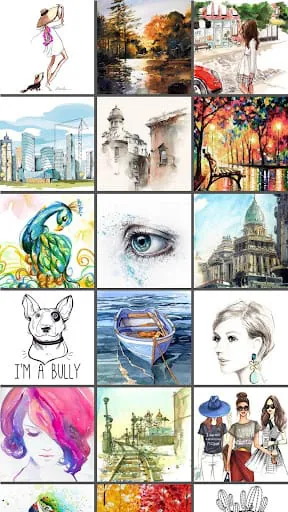
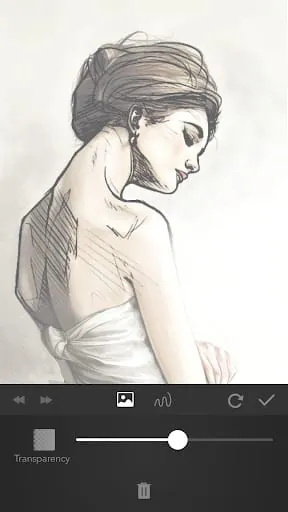
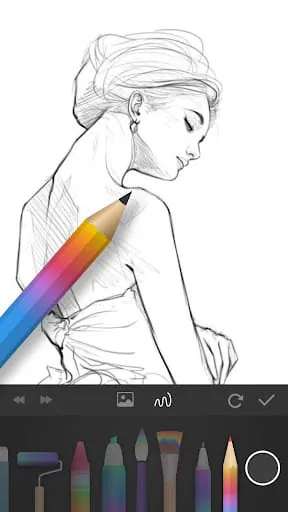
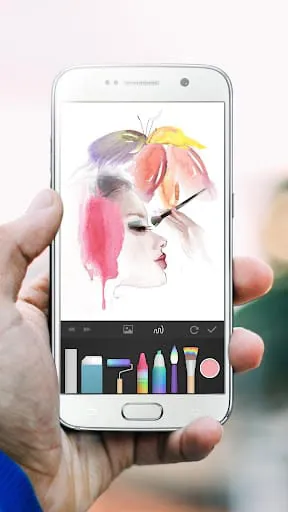
PaperColor is a painting application that allows users to draw, doodle, and graffiti on their phone or tablet. The app imitates the paintbrush and offers a variety of styles and colors to choose from. It is easy to use and perfect for those who want to learn how to paint or simply waste time while traveling or at a party. With PaperColor, users can create perfect artworks and express themselves through their drawings. One of the best features of PaperColor is its exquisite drawing tools. Users can add a handwriting signature with a pen after finishing their work, and there are many tools available that imitate the paintbrush, ruler, and eraser. Additionally, users can mark on their photos or draw on pictures to create unique and personalized artworks. With these tools, users can enjoy the painting time and show off their creativity. Another great feature of PaperColor is its base map, which helps users learn how to draw in a straight way. Users can choose a photo as the base map and set it to translucent, allowing them to easily trace the image and create a beautiful artwork. The app also offers dexterous scaling under the fingertip, making it easy to adjust the size and shape of the drawing. Once the artwork is finished, users can share it on the internet and show it off to the world. In conclusion, PaperColor is an excellent painting application that offers a variety of tools and features to help users create beautiful artworks. It is easy to use and perfect for those who want to learn how to paint or simply enjoy drawing on their phone or tablet. With its exquisite drawing tools and base map feature, PaperColor is a must-have app for anyone who loves to draw and express themselves through their art.

All Versions

V2.9.11

Updated: 2024-8-22

53.99 MB

V2.9.10

Updated: 2024-5-7

51.63 MB

V2.8.4

Updated: 2023-10-20

46.1 MB

V2.8.1

Updated: 2023-7-17

42.75 MB

V2.7.1

Updated: 2023-6-21

42.48 MB

V2.6.2

Updated: 2023-5-30

41.63 MB

V2.5.5

Updated: 2023-3-8

20.6 MB

V2.4.1

Updated: 2020-6-11

16.5 MB

V2.3.7

Updated: 2020-6-3

16.5 MB

V2.3.6

Updated: 2018-12-7

15.9 MB

V2.3.5

Updated: 2018-9-27

15.8 MB

V2.3.4

Updated: 2018-8-2

15.8 MB

Summary Of User Reviews

Ivy g
Ivy g
October 27, 2022
Easy to learn, pretty good function. This app is not powerful enough to do super sophisticated fine art. It's good for basic sketching, coloring book pages, tracing over photos, and simple drawing. I use it for tracing over photos to create cartoon-like drawings. It's very easy to learn. Not too many tools. The pro version adds layers, a color wheel, and a few more brushes. For the price, it's a good value.
Jake
Jake
November 7, 2020
It was an AMAZING app to use when drawing, but there were some negatives and positives. Positives were that it had many tools and barely any ads! Negatives were that you couldn't rotate the screen, and you needed premium in order to use more than one layer. Because of the layer problem, I ended up uninstalling it. If that could be moved to 3 please and I could be notified of the update then I'd reinstall it and bump it up to 4 stars, but until then, I'm gonna stick to ibis Paint X.
Kessy Vann
Kessy Vann
June 8, 2024
I absolutely love this app! I get very few ads. most of the ads I get are when I am have paused a drawing ( left uncompleted). My wich is impressive to me because I am usually drawing for 45 or more minutes before pausing the drawing. it also lets you save uncompleted drawings and continue them later. another plus on this app is it comes with several drawing tools and if those tools aren't enough you can watch ads to get more.