
HomeSpotify Kids
Spotify Kids

Spotify Kids

Everyone
Rating
V1.38.0.2
Version
1M+
Installs
2.50
667 + Reviews
1
45%
2
9%
3
9%
4
9%
5
28%

Review By AppsWm

Spotify KidsSpotify KidsSpotify KidsSpotify Kids

Peace Points

The app's curated content aims to create a safe and age-appropriate listening environment, fostering peace of mind for parents. The focus on child-friendly music and stories contributes to a calmer auditory experience compared to mainstream streaming services.

  • Parental controls for content management
  • Ad-free experience
  • Specifically designed for younger listeners
  • Limited music selection compared to the main app
  • May require a premium subscription for full access

Calm Features

The interface is designed with simplicity in mind, featuring large icons and easy navigation to promote a calming and intuitive user experience for children. The absence of complex menus reduces potential frustration and encourages independent exploration.

Simplified Navigation

The app's interface minimizes distractions, allowing children to focus on the content. This fosters a sense of calm and encourages independent use.

Transform Paths

By offering a dedicated space for children's audio entertainment, the app transforms screen time into a more enriching and educational experience. It encourages creativity and imagination through storytelling and musical discovery.

  1. Curated content libraries promote discovery.
  2. Parental control over what is played.
  3. Offline playback provides flexibility and distraction-free enjoyment.

Quiet Moments

The offline playback capability allows children to enjoy their favorite songs and stories during travel or in situations where internet access is limited, creating opportunities for quiet and focused listening. This promotes relaxation and reduces reliance on potentially disruptive alternatives.

Offline Playback

The ability to download content for offline listening is a key feature that provides a quiet and distraction-free experience. This is especially valuable during travel or in areas with limited internet connectivity.

Change Aspects

The app facilitates a shift from passive entertainment to active engagement with music and stories. Parental controls allow for customization, aligning content with a child's developmental stage and interests.

Feature Description
Parental Controls Enables parents to monitor and control content.
Age-Appropriate Content Offers a selection of songs and stories suitable for children.

Overall Peaceful Value

The app offers a valuable service by providing a safe and engaging audio experience for children. Its focus on simplicity, parental controls, and offline playback contribute to a peaceful and enriching environment. While the music selection is limited compared to the main app, the benefits of a dedicated and curated platform outweigh this drawback for many parents.


Description

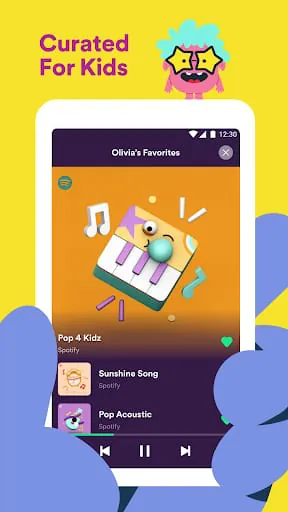
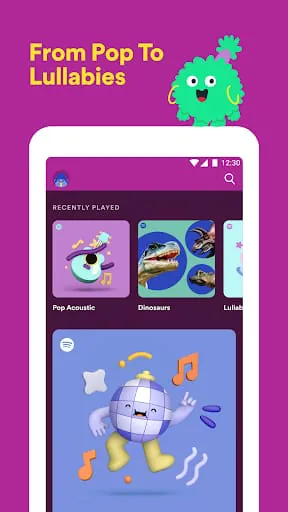
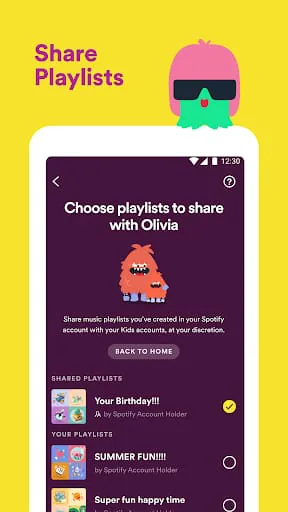
Spotify Kids is a music app designed for children of all ages to explore and discover music in a fun and safe environment. With singalongs, soundtracks, and playlists made specifically for young listeners, the app is packed with audio content that kids will love. The app is included with a Spotify Premium Family subscription, and users can try it for free for one month with a Premium Family trial. Parents can cancel anytime, and terms apply. The app allows children to listen to audio they love with their own account, explore their tastes without hearing explicit content, and discover music handpicked for kids by experts. They can also hear playlists made just for young listeners and play their favorite tracks offline. To use the app, parents need to subscribe to Spotify Premium Family first. A Kids profile counts as one account in the Premium Family plan, and parents can create up to five Kids accounts for their Family plan and download the app to as many devices as they want. The app uses the device's internal storage to store downloaded music for offline play and streams content over WiFi and mobile networks. Parents should check their data package and allowance with their mobile network provider. The app asks for the child's name and age, which is used to showcase the most relevant content for the child and personalize their experience using the app. Children may see different content depending on their age, and all information is fully encrypted.

All Versions

V1.38.0.2

Updated: 2023-10-17

45.15 MB

V1.38.0.1

Updated: 2023-6-20

45.15 MB

V1.37.0.0

Updated: 2023-6-4

42.6 MB

V1.36.0.1

Updated: 2023-4-14

42.47 MB

V1.35.0.2

Updated: 2022-10-10

40.76 MB

Summary Of User Reviews

Anna Henry
Anna Henry
September 26, 2025
Ok, so the biggest problem is that I can't even make an account, and when I add my Spotify info to transfer it, the Spotify kids. It's said not available even though I used it a moment ago, and now it's telling me to pay. It is the worst. The app is always telling me to pay more, but why am I paying more even though I don't have a account , and I recommend getting a different kid friendly app or just using the regular Spotify app because this is just ridiculous. DEFINITELY A ZERO IF I COULD!!!!!
Pais Byington
Pais Byington
February 3, 2026
Ok listen, this was a good idea, but it failed. Why? Here are my reasons 1. You can't shuffle music. Unless you want to play the same songs, its really annoying. 2. You can only make 1 playlist on the app yourself. And that goes back to one, you listen to it over and over 3. Finally, there is limited selection. Example: They only have 5 HTTYD songs, and the songs, except for 2 or 3 of them in the WHOLE saga, have words, which may I point out they are appropriate. Unlike some songs they have...
Lolli Pop
Lolli Pop
September 30, 2025
Terrible. Songs are extremely limited, no customization options (like your kids building themselves a playlist), no looping, no shuffling, frequent bugs... you get the point. The app itself is clunky and inconvenient. The songs are grouped into playlists, and the search results are weird and random. It doesn't even have the new songs in Disney movies. Just go to the OG and monitor your kid's accounts instead of dealing with Spotify Kids.